
A user at Northwind Traders clicked a URL in an email and was redirected to a malicious website. The admin suspects Safe Links should have blocked the URL. The admin needs to determine why Safe Links did not block the URL and check whether other users in the organization also clicked the same link. What should the admin do?
Select an answer to reveal the explanation.
Short Explanation and Infographic
Threat Explorer's URL click data is your forensic trail for Safe Links incidents — it shows every user who clicked the URL, the click verdict, and whether Safe Links blocked or allowed it. If the URL slipped through, the first place to look is the Safe Links policy itself: was this user covered? Is the URL on the 'do not rewrite' list? Those allow lists are the usual culprit when Safe Links fails to block.
Full explanation below image
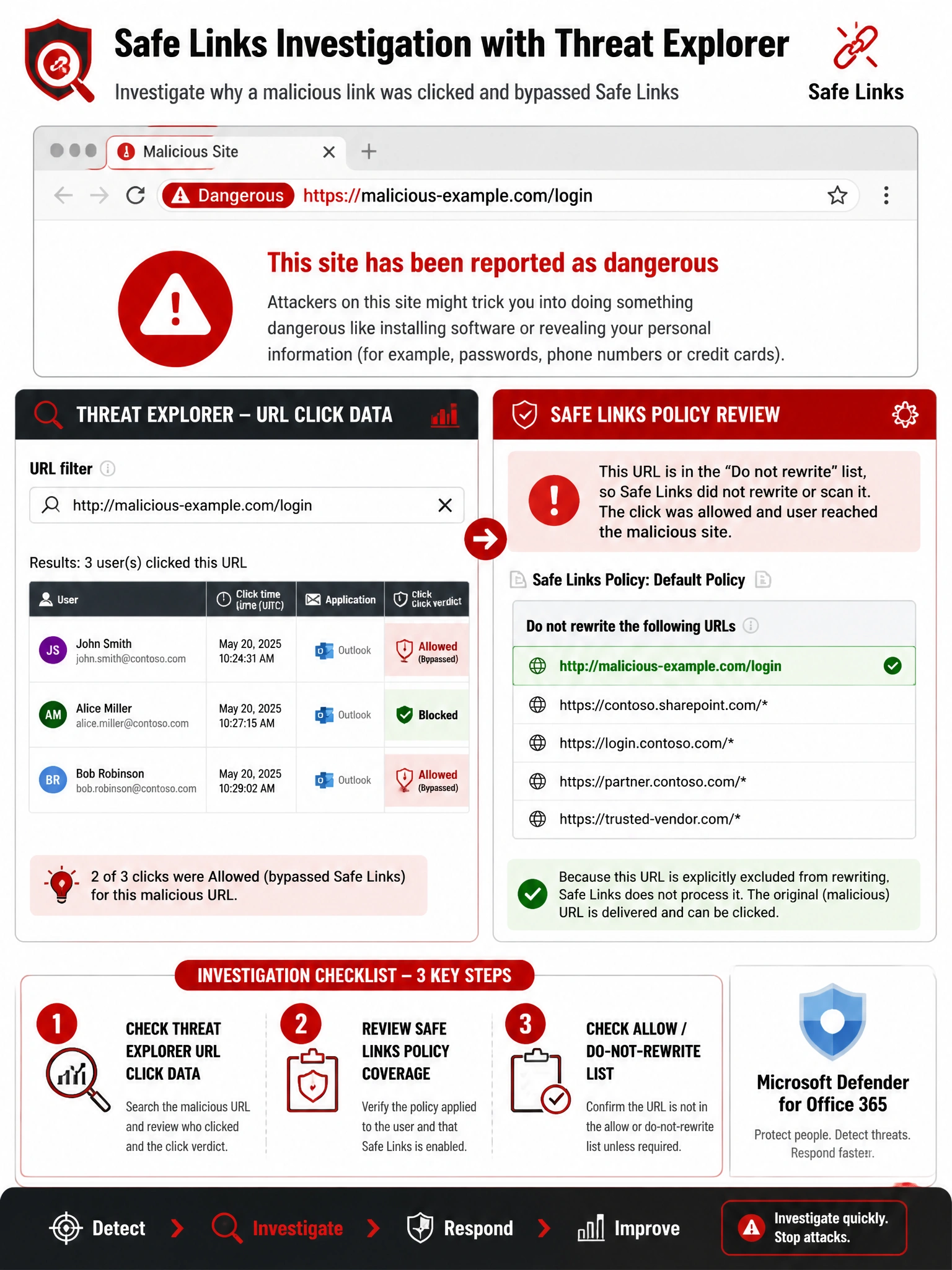
Full Explanation
When investigating a Safe Links bypass or failure, the admin needs two things: who else clicked the URL, and why wasn't it blocked? Threat Explorer (Microsoft 365 Defender > Email & Collaboration > Explorer) with the URL view allows filtering by specific URLs to see all users who clicked them and the click verdict (Blocked, Allowed, Allowed override, Pending verdict). This simultaneously answers both questions about scope of exposure. The second investigative step is reviewing the Safe Links policy applied to the affected user — specifically: (1) Is the user covered by a Safe Links policy? (2) Is the URL included in the 'Do not rewrite the following URLs' list (an allowlist that bypasses Safe Links analysis)? (3) Was the policy set to track clicks but not block? A URL on the allowlist is the most common reason Safe Links does not block a known malicious URL.
Option A (anti-malware reports) covers file-based malware detections in email, not URL-based threats. URL protection is handled by Safe Links, not the anti-malware engine. Anti-malware reports would not contain URL click data or Safe Links block/allow decisions.
Option B (message trace in EAC) shows email routing and delivery events but does not show URL click activity. Message trace can confirm who received the email, but it cannot tell you who clicked the embedded link or what Safe Links did with it. For URL click investigation, Threat Explorer is the authoritative source.
Option D (Entra ID sign-in logs) would be useful for investigating whether the user's credentials were compromised AFTER clicking the link (e.g., if they were phished and then an attacker used those credentials to sign in). However, this comes after investigating the Safe Links failure itself. Entra sign-in logs do not contain Safe Links click data or URL policy evaluation results.
Exam tip: The Safe Links 'Do not rewrite the following URLs' list (also called the allow list) is a common source of Safe Links bypass in real environments and on exams. When a URL on this list is later found to be malicious, Safe Links will not protect users from it. Also remember that Safe Links can be configured to track but not block URL clicks, which is useful for auditing but leaves users unprotected. Know where to find URL protection reports in both Threat Explorer and the Defender for Office 365 Reports section.