
Contoso's security team requires that all Global Administrators use phishing-resistant authentication methods only. The company has decided to deploy FIDO2 hardware security keys for these accounts. What must the admin configure to enable FIDO2 authentication in Microsoft Entra ID?
Select an answer to reveal the explanation.
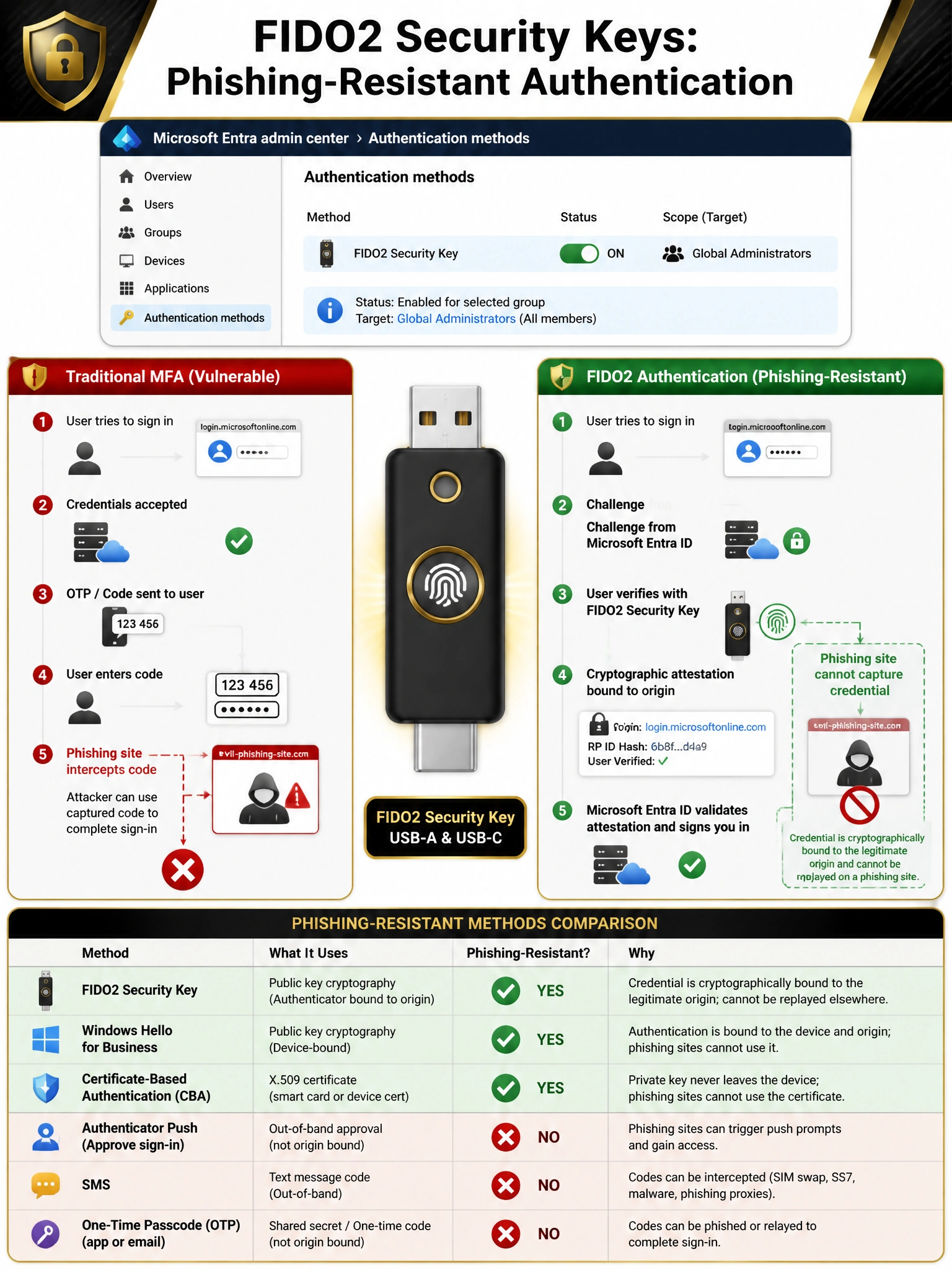
Short Explanation and Infographic
FIDO2 keys are the gold standard of phishing-resistant MFA — they use cryptographic attestation tied to the specific website's origin, so a fake sign-in page literally can't intercept them. To enable FIDO2 in Entra ID, head to Authentication Methods > FIDO2 Security Key, flip it on, and scope it to your Global Admins group. Simple config, maximum security.
Full explanation below image
Full Explanation
Microsoft Entra ID supports FIDO2 security keys (such as YubiKeys and Google Titan keys) as a passwordless, phishing-resistant authentication method. To enable it, the admin navigates to Microsoft Entra ID > Security > Authentication methods > Authentication methods policies > FIDO2 Security Key, enables the method, and can scope it to specific users or groups (e.g., the Global Administrators group). FIDO2 is phishing-resistant because the private key never leaves the device and the authentication is cryptographically bound to the legitimate origin URL — a phishing site cannot replay or intercept the credential.
Option A (Windows Hello for Business) is also a phishing-resistant method and a valid control, but the scenario specifically asks about FIDO2 security key deployment. Windows Hello for Business is a device-bound credential that requires the user to authenticate to a specific enrolled Windows device — it is not portable the way a security key is. For Global Administrators who may use multiple devices, a FIDO2 hardware key is more flexible.
Option C (certificate-based authentication with smart cards) is another phishing-resistant option and is enterprise-grade. However, the scenario explicitly states FIDO2 security keys have been decided upon — the admin's task is to enable FIDO2, not to evaluate alternatives. CBA also requires Public Key Infrastructure (PKI) setup which is a more complex deployment.
Option D (Microsoft Authenticator with number matching) improves resistance to MFA fatigue attacks (push bombing) but is NOT phishing-resistant. A sophisticated phishing site can still intercept the OTP or capture the session token during a real-time phishing attack. Number matching and additional context make Authenticator more secure than simple push approval, but it does not meet the bar for 'phishing-resistant' that FIDO2 and Windows Hello for Business provide.
Exam tip: The three Microsoft-recognized phishing-resistant authentication methods for Entra ID are: FIDO2 security keys, Windows Hello for Business, and Microsoft Entra certificate-based authentication (CBA). The Microsoft Authenticator app, SMS, and phone call are NOT phishing-resistant. Conditional Access can enforce phishing-resistant MFA by using the 'Authentication strength' grant control set to 'Phishing-resistant MFA'.