
Contoso wants all users whose Department attribute is set to 'Sales' in Microsoft Entra ID to be automatically added to a group called 'Sales Team'. The group should include a shared mailbox and a Microsoft Teams workspace, and membership should update automatically when the Department attribute changes. What should the admin create?
Select an answer to reveal the explanation.
Short Explanation and Infographic
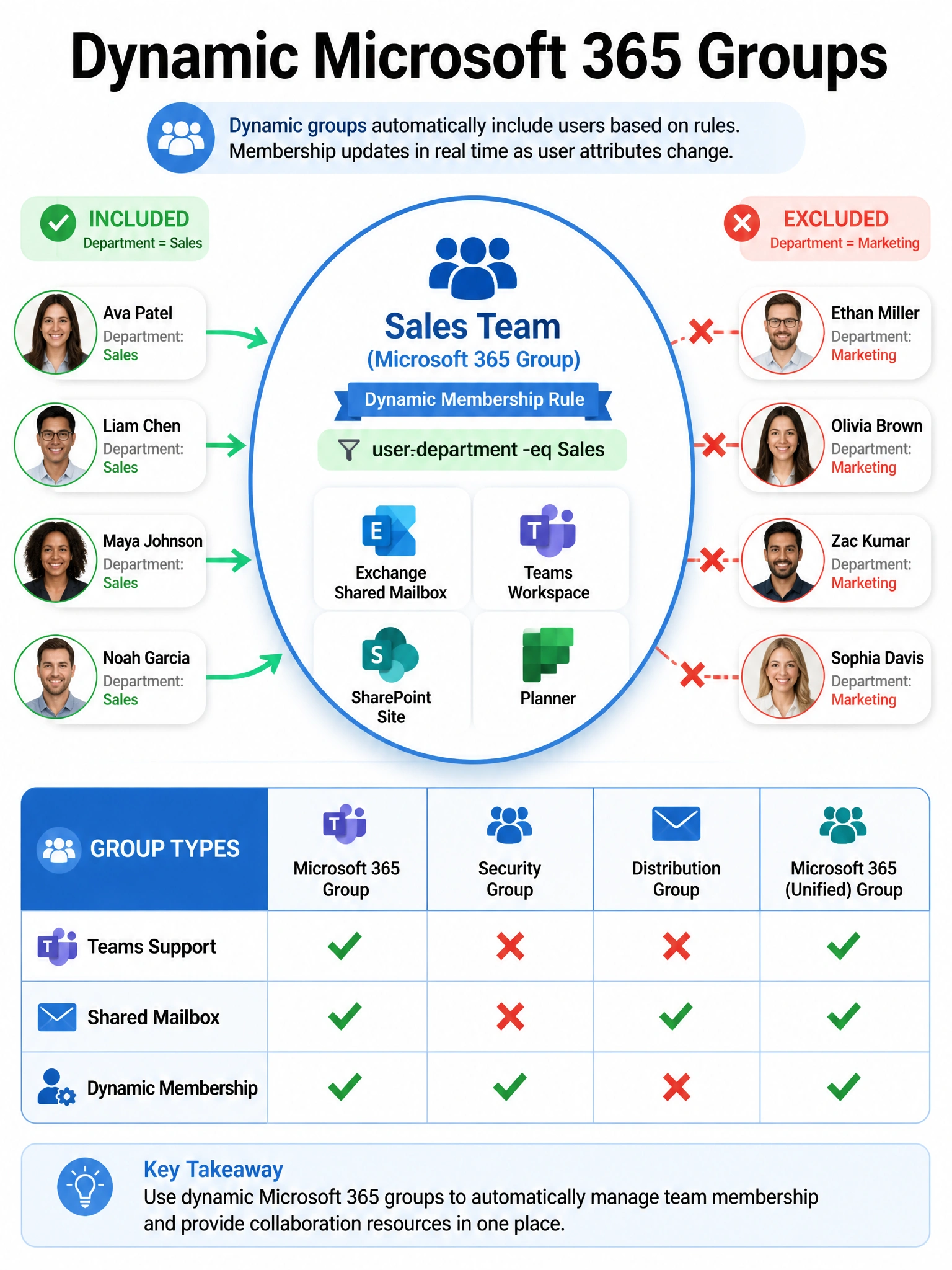
Only Microsoft 365 groups (not security groups) can be 'Teams-ified' — you need an M365 group to get the shared mailbox AND the Teams workspace under one roof. Dynamic membership on an M365 group means the department attribute does all the heavy lifting: user joins Sales, they're in the group; they transfer to Marketing, they're out. Zero manual work.
Full explanation below image
Full Explanation
Microsoft 365 groups are the only group type that supports both a shared mailbox (Exchange) and a Teams team simultaneously. When you enable dynamic membership on a Microsoft 365 group with the rule (user.department -eq 'Sales'), Microsoft Entra ID continuously evaluates the rule and adds or removes members as their Department attribute changes. A Teams team can then be created on top of the Microsoft 365 group, inheriting the same membership. This fully satisfies all requirements: shared mailbox, Teams workspace, and automatic dynamic membership.
Option A (dynamic security group) is incorrect because security groups — even dynamic ones — cannot back a Teams team or provide a shared mailbox. A Teams team requires a Microsoft 365 group as its backing store. You cannot add a Teams team to a security group.
Option C (PowerShell nightly script) is a manual, error-prone approach with a delay of up to 24 hours before membership reflects reality. Dynamic membership rules in Entra ID evaluate changes within minutes of the attribute changing. A scripted approach is never preferable when a native dynamic membership feature exists.
Option D (mail-enabled security group) is a legacy group type from Exchange that supports distribution list functionality but cannot back a Microsoft Teams team. Mail-enabled security groups do not support Teams workspace creation or the full Microsoft 365 group feature set (Planner, SharePoint site, shared mailbox).
Exam tip: Know the four group types in Microsoft 365: Security Group, Microsoft 365 Group, Distribution Group, and Mail-Enabled Security Group. Only Microsoft 365 Groups support Teams teams, SharePoint sites, and shared mailboxes. Dynamic membership is available for Security Groups and Microsoft 365 Groups (requires Microsoft Entra ID P1 or P2 licensing).