
Adventure Works has purchased a new domain 'adventureworks.com' and wants to add it to their Microsoft 365 tenant so employees can use it for email. After adding the domain in the Microsoft 365 admin center, the admin needs to verify ownership of the domain. What is the MOST common method used to verify domain ownership in Microsoft 365?
Select an answer to reveal the explanation.
Short Explanation and Infographic
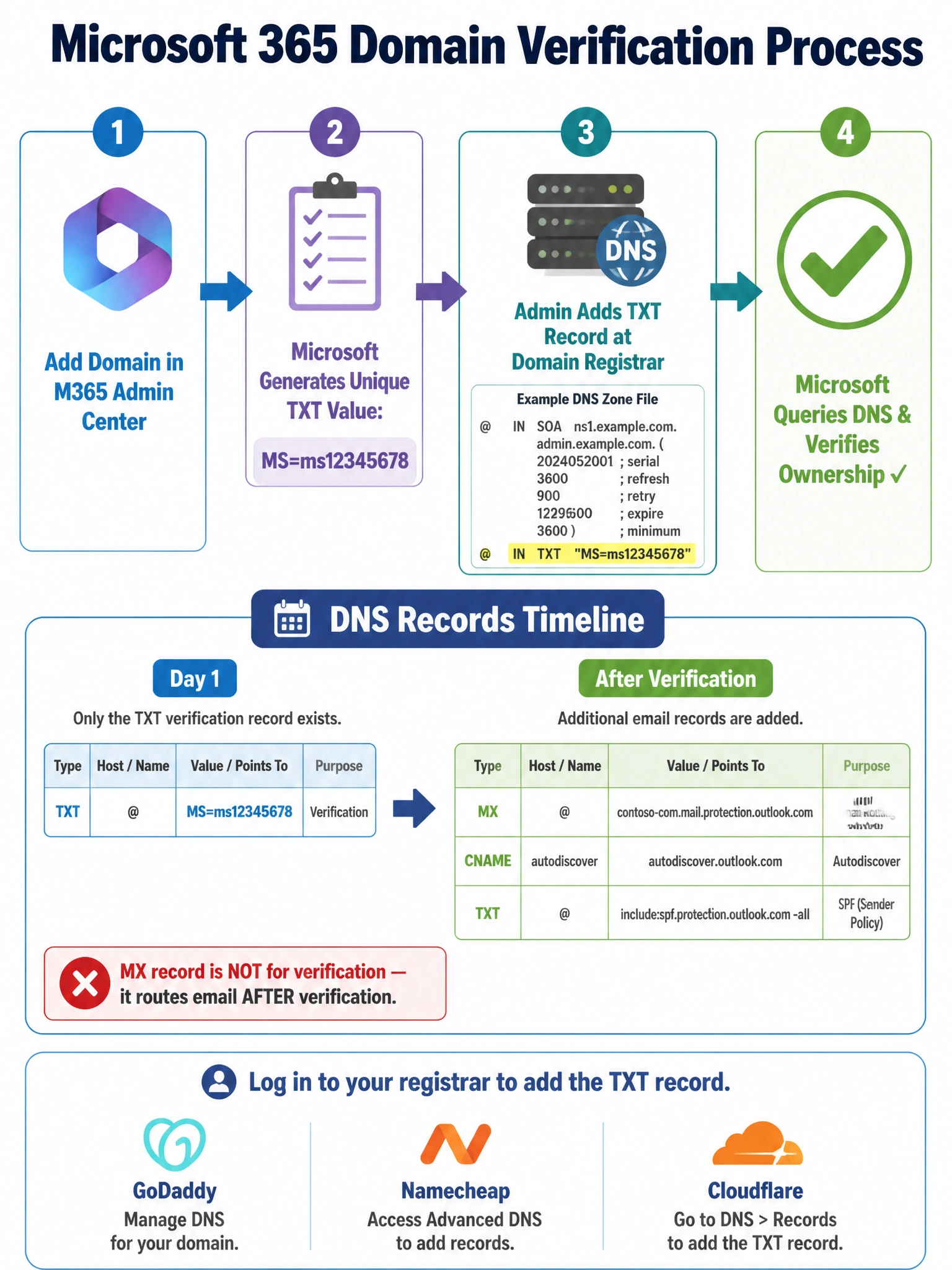
Think of a DNS TXT record like sticking a sticky note on your mailbox that only the true owner could have placed — Microsoft gives you a unique code, you add it to your DNS at your registrar, and Microsoft reads it back to confirm you own the domain. MX records come later for email routing, but the TXT record is how you prove ownership first.
Full explanation below image
Full Explanation
Correct Answer — B: Add a TXT record with a Microsoft-provided verification value to the domain's DNS settings at the domain registrar
When you add a custom domain to Microsoft 365, the system generates a unique TXT record value (for example: MS=ms12345678). You log in to your domain registrar (GoDaddy, Namecheap, Cloudflare, etc.) and add this value as a TXT record in your DNS zone. Microsoft then queries your DNS to confirm the record exists — proving that you control the domain's DNS settings and therefore own the domain. This is a self-service, fully automated process that typically completes within minutes, though DNS propagation can take up to 48 hours in rare cases. Microsoft 365 also supports verification via a CNAME record as an alternative, but the TXT record is the primary and most common method.
Why A is wrong — Create an MX record pointing to Microsoft's mail servers: An MX (Mail Exchanger) record is what routes incoming email to Microsoft's mail servers (for example, adventureworks-com.mail.protection.outlook.com). This is indeed a DNS record you will add — but AFTER domain ownership has already been verified. The MX record enables email flow; it does not prove ownership. Swapping in an MX record before verification would also risk disrupting any existing mail flow on the domain.
Why C is wrong — Upload an HTML verification file to the root web server: This method is used by Google Search Console and Google Workspace domain verification, not by Microsoft 365. Microsoft 365 relies entirely on DNS-based verification (TXT or CNAME). An admin who tries to upload an HTML file to prove Microsoft 365 domain ownership will find no such option in the Microsoft 365 admin center wizard.
Why D is wrong — Contact Microsoft support with a purchase receipt: Microsoft cannot and does not verify domain ownership through support tickets or purchase receipts. Domain ownership verification is a cryptographic/DNS proof-of-control mechanism — if you can update the domain's DNS records, you own it. Microsoft support has no authority to bypass this process, and doing so would be a significant security risk.
Exam Tip: The domain addition wizard in Microsoft 365 admin center walks through three steps: (1) Add the domain, (2) Verify ownership via TXT/CNAME record, (3) Configure DNS records for services (MX, CNAME for Autodiscover, TXT for SPF, etc.). The AB-650 exam may present questions about any of these three phases — be sure to distinguish the verification step (TXT record) from the post-verification DNS configuration step (MX, CNAME, SPF).