
Graphic Design Institute uses an internal employee ID format: the prefix 'GDI-' followed by exactly 6 digits (for example, 'GDI-482931'). The compliance team wants DLP policies to be able to detect these employee IDs when they appear in documents or emails. What is the FIRST step the administrator must complete before the DLP policies can detect this pattern?
Select an answer to reveal the explanation.
Short Explanation
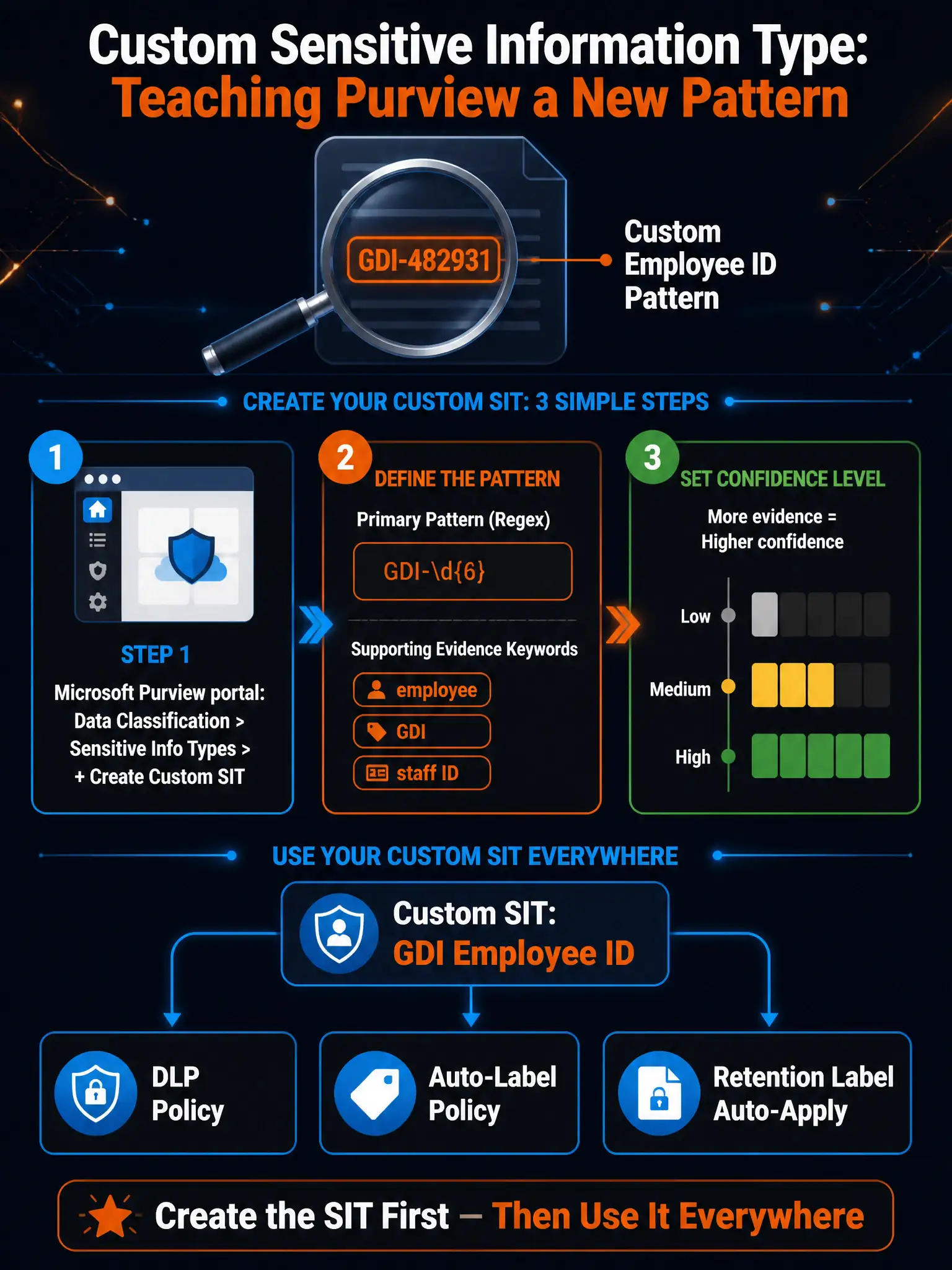
Microsoft Purview can't detect your company's custom ID format out of the box — there's no built-in sensitive information type for 'GDI-' employee IDs. You have to teach Purview what to look for by building a custom sensitive information type using a regex pattern first, and then you can reference that type inside DLP policies. The sensitive information type is the building block; the DLP rule is where you use it.
Full Explanation
The correct approach is to create a Custom Sensitive Information Type in Microsoft Purview using a regular expression pattern (GDI-\d{6}) to match the employee ID format, optionally including supporting evidence keywords and confidence levels, before referencing it in DLP policy rules. Microsoft Purview requires that patterns used to detect sensitive data be defined as sensitive information types before they can be referenced in DLP policies, retention policies, or auto-labeling policies. For a custom pattern like 'GDI-' followed by 6 digits, you create a Custom Sensitive Information Type in Microsoft Purview > Data classification > Sensitive info types > Create. You define a primary pattern using a regular expression such as GDI-\d{6}, optionally add supporting evidence keyword lists like 'employee', 'ID', 'Graphic Design Institute' to increase detection confidence, and set confidence levels (Low, Medium, High). Once the Custom Sensitive Information Type is created, it becomes available in DLP policy rules under the 'Content contains sensitive info type' condition.
The keyword-dictionary approach is incorrect. The keyword dictionary is used to match a large list of specific, known string values — for example, a list of banned product names or specific known account numbers. The keyword dictionary is not appropriate for a pattern-based format like 'GDI-' + 6 digits, where the specific values are unknown and could be any combination of 6 digits. Regular expressions are the correct mechanism for pattern matching. Additionally, the keyword dictionary is a separate object that would still need to be incorporated into a Custom Sensitive Information Type or DLP policy — it is not a standalone detection mechanism for this use case.
The built-in 'Employee ID' library approach is incorrect. Microsoft Purview does include hundreds of built-in sensitive information types covering common patterns like Social Security Numbers, credit card numbers, passport numbers, and more — but there is NO built-in sensitive information type for 'Employee ID' in a generic or custom format. Built-in sensitive information types target regulated, standardized data formats. An organization-specific internal ID format like 'GDI-######' does not exist in the built-in library and must be created as a custom type.
The direct-regex-in-DLP-rule approach is incorrect. This describes a capability that does not exist in Microsoft Purview. DLP policy rules do not have a field where you can directly enter a raw regular expression. The only ways to use pattern matching in DLP are through built-in sensitive information types that are already defined in the Purview library, or custom sensitive information types that you create and then reference in DLP rules. The regex must be encapsulated in a named sensitive information type object first.
Exam tip: The exam tests the Custom Sensitive Information Type creation workflow. Know the path: Microsoft Purview > Data classification > Sensitive info types > + Create sensitive info type. The three confidence levels (Low/Medium/High) are defined by how much supporting evidence (keywords, other patterns) accompanies the primary regex match. Also know that Custom Sensitive Information Types can be shared across DLP policies, retention label auto-apply policies, and sensitivity label auto-labeling policies — create once, reuse everywhere.