
A DLP alert fires in Microsoft Purview indicating that a Finance department user shared a SharePoint document containing Social Security Numbers with an external email address. Before taking action, the security admin needs to review the matched content, understand which DLP policy was triggered, and determine whether the sharing was potentially authorized. What is the correct first action?
Select an answer to reveal the explanation.
Short Explanation
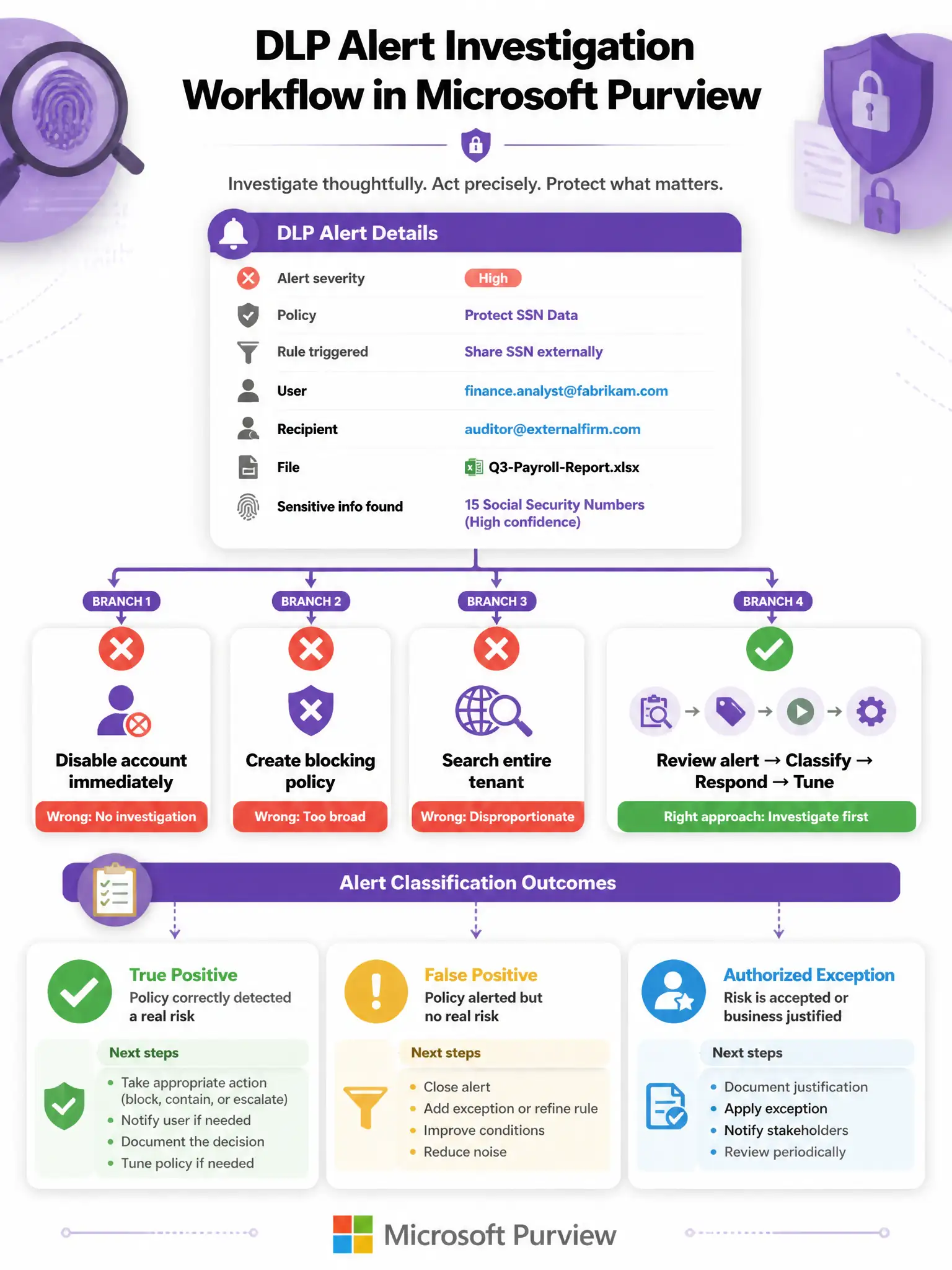
Investigate before you incinerate. DLP alerts contain a gold mine of context: the matched sensitive content snippet, exactly which rule fired, the user who triggered it, the recipient, the file name, and the confidence level. Finance analysts might have legitimately shared Social Security Numbers with an external auditor, so review the DLP alert details in the Microsoft Purview compliance portal first, understand the context, then decide.
Full Explanation
Microsoft Purview DLP alerts appear in the Microsoft Purview compliance portal under Data loss prevention > Alerts. Each alert contains: the policy name and specific rule that triggered, the user who took the action, the specific content that matched with the sensitive information type and confidence level, the recipient or sharing destination, and a timeline of events. This investigation workflow is essential because DLP alerts can be true positives, false positives, or authorized exceptions. The correct first action is to review the DLP alert details in the Microsoft Purview compliance portal, examine the matched content, the policy rule that triggered, the user involved, and the recipient before determining the appropriate response. Disabling the user's Microsoft Entra account immediately violates the principle of investigating before acting. Finance department employees sharing Social Security Numbers with an external party could be entirely authorized, such as payroll processing, external auditors, or authorized third-party services. Disabling the account without investigation causes operational disruption and, if the sharing was authorized, constitutes an unjustified action against an employee. DLP alert investigation should always precede disruptive remediation. Running a full Content Search across the entire tenant to find all SharePoint files containing Social Security Numbers is a disproportionate initial response to a single DLP alert. While a broader audit may eventually be warranted as a follow-up, the immediate action should be to understand the specific alert that fired, what happened, who did it, and whether it was a violation. Tenant-wide content search is time-consuming and does not address the specific incident at hand. Creating a new DLP policy that blocks all external SharePoint sharing is both reactive and disproportionate. Blocking all external SharePoint sharing across the entire organization would destroy legitimate collaboration capabilities, such as partner file sharing, client deliverables, and vendor access. Policy changes of this magnitude require analysis, stakeholder approval, and careful scoping, not an immediate response to a single alert. Exam tip: The DLP alert investigation workflow in Microsoft Purview follows a pattern similar to security incident response: triage by reviewing the alert details and context; classify as a true positive, false positive, or authorized exception; respond with appropriate action based on classification; and tune the DLP policy if needed to reduce false positives or improve coverage. Know that DLP alerts in Purview can be reviewed alongside Activity Explorer, which provides a unified audit trail of data sensitivity events across Microsoft 365.