
Trey Research wants high-risk user accounts (flagged by Microsoft Entra ID Protection due to leaked credentials or anomalous sign-in behavior) to be automatically remediated by forcing an immediate password change. The security team should not need to manually intervene for each incident. What should the admin configure?
Select an answer to reveal the explanation.
Short Explanation
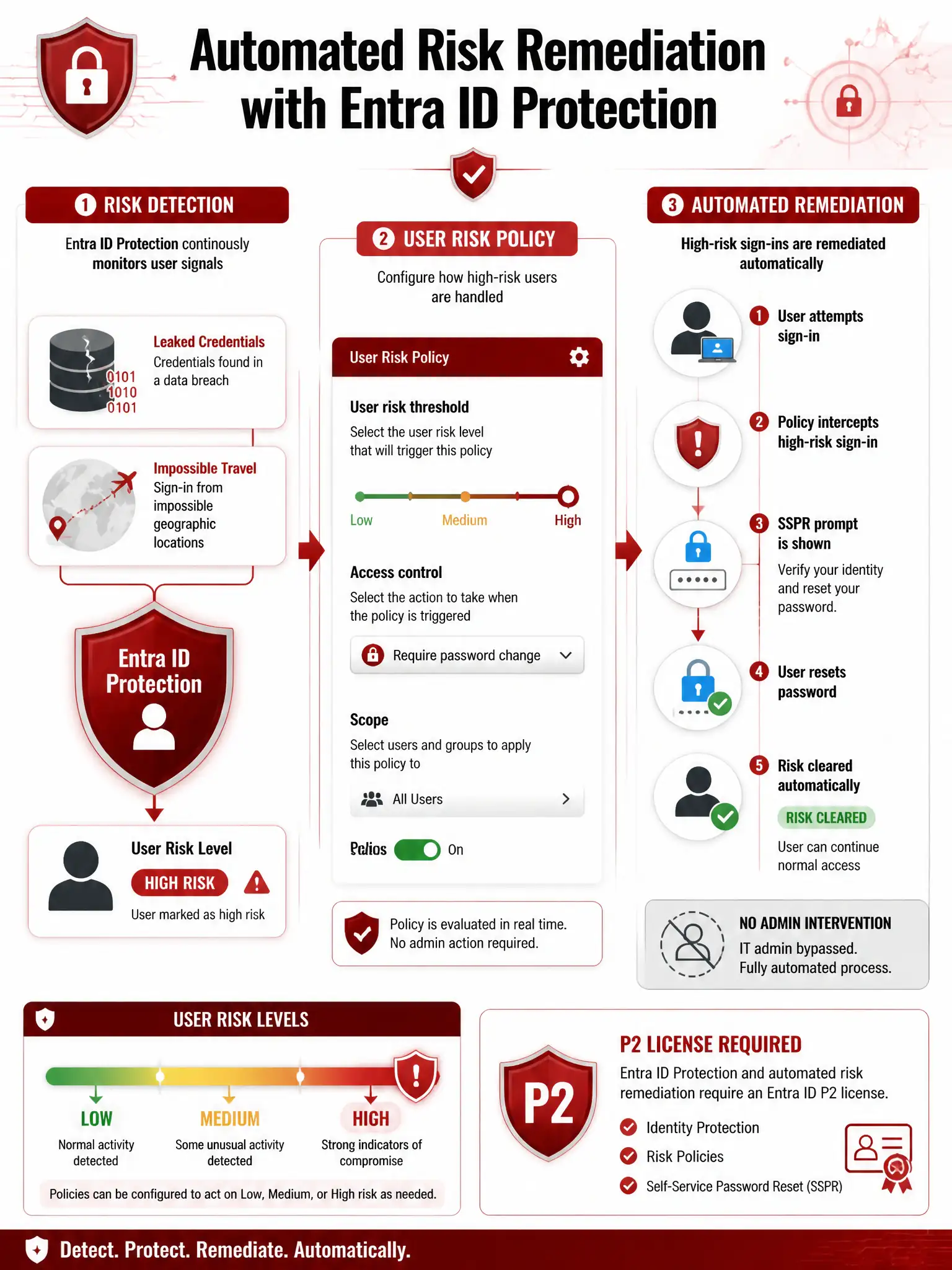
Think of the user risk policy as your automatic immune response. When Microsoft Entra ID Protection spots leaked credentials or impossible-travel behavior and flags an account as High risk, it can force a password reset at next sign-in. You get clean credentials and risk cleared without manual admin work.
Full Explanation
Microsoft Entra ID Protection continuously evaluates user accounts for risk signals including leaked credentials found in breach databases, unfamiliar sign-in properties, atypical travel, and malware-linked IP addresses. The correct configuration is to enable the Microsoft Entra ID Protection user risk policy, set the risk threshold to High, and configure the access control to Require password change. The User Risk Policy, configured under Microsoft Entra ID > Security > Identity Protection > User risk policy, lets admins set a risk level threshold (Low and above, Medium and above, or High) and then define an access control, either Block Access or Allow access and require password change. Setting it to High with Require password change means the system automatically remediates high-risk accounts by forcing a SSPR-based password reset at next sign-in, with no admin intervention required. Once the user successfully resets their password, the user risk is automatically dismissed. The Conditional Access policy that blocks all sign-ins for any user flagged as high risk by Defender for Office 365 is wrong because blocking is overly aggressive; it denies all access and can prevent the user from even accessing the SSPR portal to remediate. Conditional Access can include a user risk condition when Microsoft Entra ID P2 is licensed, and an allow plus require password change grant can be proportionate, but the question's blocking approach is not the right automated remediation. Defender for Office 365 flags email threats, not user risk, so that option conflates two different security products. The Microsoft Sentinel alert rule that triggers a Logic App to disable accounts flagged as high risk is a valid advanced SOAR approach but introduces unnecessary complexity for a scenario where a native automated policy already exists. Sentinel integration is valuable for complex multi-signal investigations and broader incident correlation, but the ID Protection user risk policy provides direct, low-latency automated response without additional tooling. The Microsoft Entra PIM configuration that revokes all eligible role assignments for users flagged as high risk addresses privileged access but does nothing about the compromised account's ability to access regular resources like email, Teams, and SharePoint. The core risk from leaked credentials is unauthorized access to all resources, not just privileged ones. Exam tip: Microsoft Entra ID Protection requires Microsoft Entra ID P2 licensing. Know the two risk types: User Risk, which covers account compromise indicators such as leaked credentials and anomalous activity patterns, and Sign-in Risk, which covers specific sign-in anomalies such as atypical travel, anonymous IP, and unfamiliar location. Each has its own configurable policy.