
Your organization uses a three-environment ALM pipeline (Development → UAT → Production) for a Copilot Studio agent. A developer exports the solution from Development as an unmanaged solution and imports it directly into Production to apply an urgent hotfix. Three days later, the scheduled managed solution deployment from UAT fails with a conflict error, and several generative answers topics that were working in UAT are now missing in Production. What is the root cause of this failure?
Select an answer to reveal the explanation.
Short Explanation and Infographic
Importing an unmanaged solution into a production environment is like writing in pencil on top of ink — it creates an active customization layer that the managed solution import can't see through and won't overwrite cleanly. Managed solutions are designed to sit on top of a clean base; inject an unmanaged layer underneath and you get exactly this kind of silent component loss.
Full explanation below image
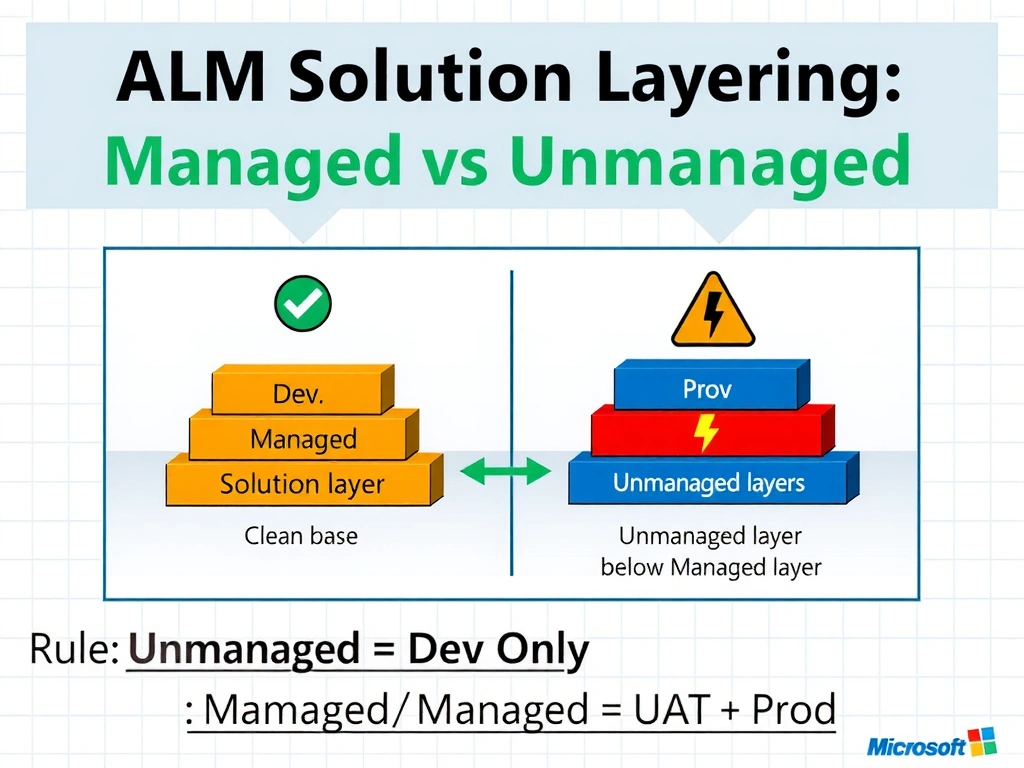
Full Explanation
Power Platform uses a layered solution architecture where managed solutions form the structured, controlled base and unmanaged customizations sit on top as the active layer. When you import an unmanaged solution into an environment, every component it contains is stamped as an 'active' customization. When a managed solution is subsequently imported, Power Platform attempts to reconcile the component ownership — but the active unmanaged layer takes precedence for owned components, causing the managed solution's version of those components to be silently ignored or partially applied.
In this scenario, the developer's unmanaged import in Production created active-layer versions of topics and generative answers components. When the UAT managed solution was imported, Power Platform found these active-layer components already present and did not fully overwrite them. The UAT topics that had been correctly built in the pipeline were either skipped or merged incorrectly, resulting in missing components.
The proper procedure for hotfixes in a managed-solution ALM pipeline is: apply the fix in Development, export as managed, promote through UAT, and import as managed into Production. If a true emergency hotfix is needed, it should still be done as a managed solution patch — never as an unmanaged import into a non-development environment.
Option A (connection reference failure) is a common and real issue, but it would produce an authentication error, not missing topics after a successful-appearing import. Connection reference failures are surfaced during import validation, not as missing components after import completes.
Option C (version number rejection) is plausible but incorrect for this scenario. Solution version conflicts produce a specific version mismatch warning, and the symptom would be an import error message — not a successful import followed by missing components.
Option D (DLP blocking managed import) is incorrect because DLP policies govern connector usage at runtime, not solution import operations. DLP does not block the import of solution packages.
Exam tip: The rule is absolute — unmanaged solutions belong only in Development environments. Any managed-environment import must use managed solutions. When you see 'unmanaged solution in Production' in a question, that is the root cause almost by definition.