
An enterprise is building a Copilot Studio agent that allows purchasing managers to query SAP for current purchase order status, vendor details, and open GR/IR (Goods Receipt/Invoice Receipt) items. SAP ECC is hosted on-premises. The organization has already deployed an on-premises data gateway. A developer needs to design the integration approach to expose relevant SAP data to the agent. Which integration architecture is most appropriate for this scenario?
Select an answer to reveal the explanation.
Short Explanation and Infographic
SAP Gateway publishes its business objects as OData services — think of it as SAP's REST API facade. A custom connector bridges Power Platform to those OData endpoints, and the on-premises data gateway securely tunnels the traffic from Azure to the on-premises SAP Gateway without punching holes in the firewall. That's the architecture designed for exactly this scenario.
Full explanation below image
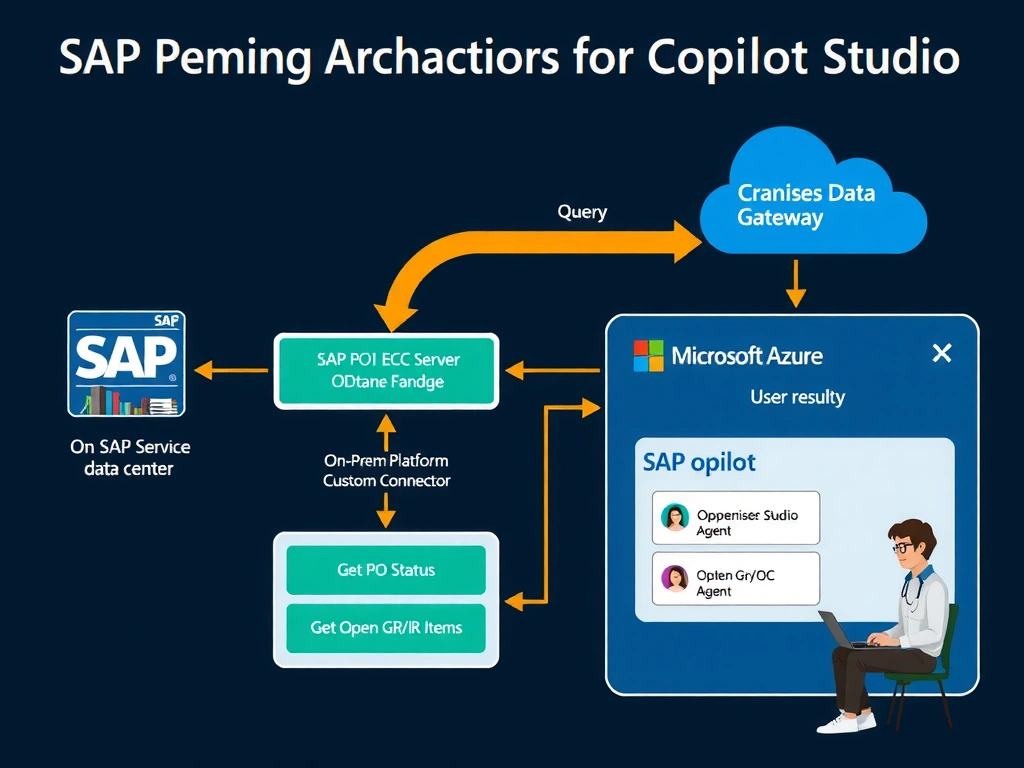
Full Explanation
SAP ECC on-premises does not have a native cloud API. However, SAP Gateway (an ABAP middleware layer) exposes SAP business objects (purchase orders, vendors, GR/IR items) as OData services. These OData endpoints can be consumed by Power Platform custom connectors.
Option A is correct because it uses the architecturally appropriate components for on-premises SAP integration with Power Platform. SAP Gateway's OData services provide a standards-based REST interface over SAP business data. The custom connector defines the API actions (with input parameters like purchase order number and vendor ID) that the Copilot Studio agent can call as agent actions. The on-premises data gateway acts as a secure relay, allowing Power Platform services in Azure to reach the on-premises SAP Gateway without requiring inbound internet connectivity to the on-premises network. This is exactly the integration pattern Microsoft and SAP recommend for Power Platform–SAP connectivity.
Option B is incorrect. RFC/BAPI calls require a native SAP client library (such as the SAP .NET Connector or SAP NWRFC SDK) and network-level access to the SAP application server. Azure-hosted Copilot Studio agents cannot directly install SAP client libraries or make RFC connections to on-premises SAP application servers without an intermediary. Even if this were technically possible, it would bypass the on-premises data gateway security model and expose the SAP system to direct cloud connectivity risks.
Option C is incorrect for the use case. Power BI is a data visualization tool, not a data query API for agent actions. Rendering Power BI visuals in chat responses is not a supported Copilot Studio integration pattern for retrieving structured SAP data. A purchasing manager asking for a specific PO status needs a text or card response, not an embedded chart that requires user interaction.
Option D would work for reporting but fails the freshness requirement implied by the scenario. Purchase order status changes throughout the business day as vendors ship goods, GR/IR items are cleared, and invoices are posted. A 24-hour ETL lag means the agent would regularly provide outdated status information for active transactions. This approach is appropriate for historical analytics but not for operational purchase order queries.
Exam tip: For SAP integration questions on AB-620, the on-premises data gateway + SAP Gateway OData + custom connector is the canonical architecture. Know that SAP Gateway exposes OData v2 and v4 services, that the on-premises data gateway handles the network traversal for on-premises systems, and that custom connectors defined with OpenAPI specifications can wrap these OData endpoints for Copilot Studio consumption.