
A healthcare organization is deploying a Copilot Studio agent that accesses patient records stored in Dataverse. The agent must read patient demographic data but must not be able to create, update, or delete any records. Different departments will use the same agent, but clinical staff should see full demographic records while administrative staff should see only name and contact information. Which Dataverse configuration approach correctly enforces both requirements?
Select an answer to reveal the explanation.
Short Explanation and Infographic
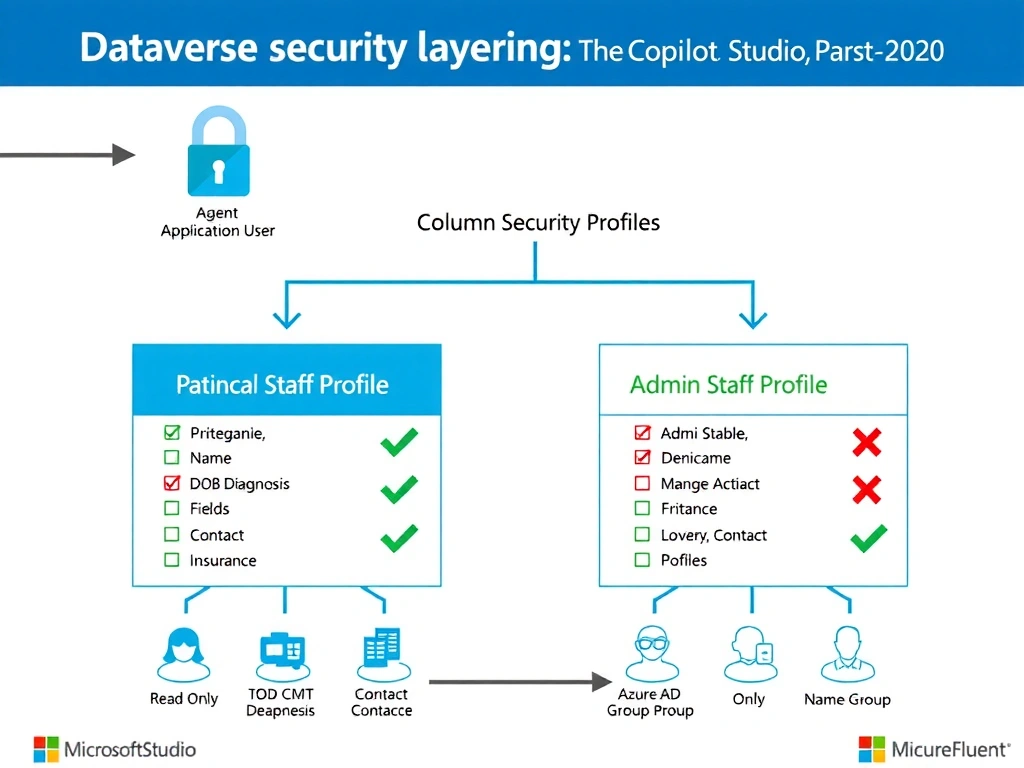
Think of Dataverse security like a hotel key card system — the master key (security role) determines which floors you can enter, and the room restrictions (column security profiles) control which individual rooms you can access on that floor. The agent's application user needs a Read-only master key, and then two different column key sets are handed to clinical and admin staff separately. Layering security roles with column-level security profiles is the only way to enforce both table-level and column-level access simultaneously.
Full explanation below image
Full Explanation
Dataverse security in Copilot Studio deployments involves two distinct layers: table-level access controlled by security roles, and column-level access controlled by column security profiles. Both layers must be configured to meet the requirements in this scenario.
Option D is correct because it addresses both security requirements explicitly. The agent's application user is assigned a custom security role with only Read privilege on the Patient table — this prevents the agent from creating, updating, or deleting records at the table level. Column-level security profiles are then used to implement field-level access differences between clinical and administrative staff. Clinical staff are assigned a profile that grants access to all demographic columns, while administrative staff receive a profile that restricts access to only Name and ContactInfo. Assigning these profiles to Azure AD groups makes the access determination automatic based on group membership.
Option A is incorrect because using topic-level conditions in the agent to hide fields is a UI-layer control, not a data-layer security control. This approach means administrative staff could still retrieve full records through other means (API calls, Power Apps, etc.), and it does not enforce data security at the Dataverse level. Security requirements must always be enforced at the data layer, not the presentation layer.
Option B is incorrect because it describes column-level security profiles restricting the columns for administrative staff but does not specify the creation of separate profiles for clinical staff with full access. It also implies a single configuration rather than two separate profiles — which is insufficient to give clinical staff full access while restricting administrative staff.
Option C is incorrect because it describes restricting the columns for administrative staff but frames the configuration backward. Restricting specific columns in a profile only makes sense when paired with a complementary unrestricted profile for clinical staff explicitly granting all demographic columns. The wording in C also incorrectly conflates the Dataverse security group with the column security profile assignment, which are separate constructs.
Exam tip: Remember the two layers of Dataverse security for agents — security roles control table-level CRUD privileges, and column security profiles control field-level read/write access. An agent's application user is always the identity that the security role is assigned to. End-user field visibility is controlled by column security profiles assigned to Azure AD groups or Dataverse teams, not by the agent's role.