
Celeste is building a Copilot Studio agent for Horizon Benefits that checks a member's remaining dental benefit balance. She has a Power Automate flow that calls the benefits API and returns a 'RemainingBalance' output parameter (Number type). After the 'Call an action' node runs in the topic, Celeste needs to display the balance in a message. How does she correctly access the flow's output value in the topic?
Select an answer to reveal the explanation.
Short Explanation and Infographic
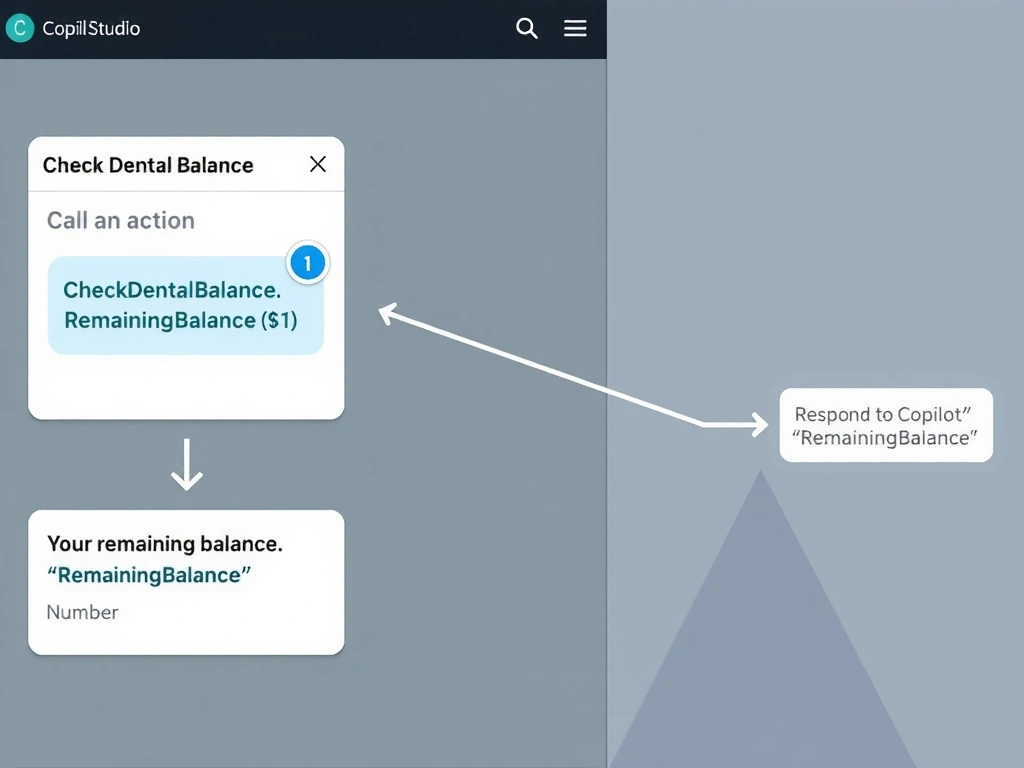
The 'Call an action' node is a two-way pipeline — it sends inputs in and receives named output variables back. Those outputs are immediately available as topic variables like {ActionName.RemainingBalance}, ready to drop into any downstream message node. No JSON parsing, no global variables needed. Answer: C.
Full explanation below image
Full Explanation
When a Power Automate cloud flow returns output parameters via the 'Respond to Copilot' action (previously 'Return value(s) to Power Virtual Agents'), Copilot Studio automatically surfaces those outputs as named variables attached to the 'Call an action' node. The developer does not need to parse JSON or route data through Dataverse.
Option C is correct. After the 'Call an action' node runs, Copilot Studio creates scoped output variables for each output parameter defined in the flow. The variable naming convention follows the pattern [ActionNodeName].[OutputParameterName]. In Celeste's case, if the 'Call an action' node is named 'CheckDentalBalance', the output variable becomes 'CheckDentalBalance.RemainingBalance'. This variable can be inserted directly into any downstream message node using the variable picker, producing output like 'Your remaining dental balance is ${CheckDentalBalance.RemainingBalance}.'
Option A is incorrect because there is no 'Global.LastFlowOutput' system variable in Copilot Studio. Global variables must be explicitly declared by the developer. Flow outputs are topic-scoped output variables of the calling action node, not automatically stored global variables.
Option B is incorrect because Copilot Studio's integration with Power Automate handles the deserialization of flow outputs automatically. The flow's 'Respond to Copilot' action returns typed parameters that Copilot Studio maps directly to variables — no 'Parse JSON' node is needed in the topic (though Parse JSON exists in Power Automate flows themselves for other purposes).
Option D is incorrect. Writing to Dataverse and re-reading it is an absurd roundabout for a simple data handoff. Flow outputs are designed to pass data directly back to the calling topic in memory — no persistent storage is involved or required.
Exam tip: Copilot Studio's data flow follows this pattern: topic variable → flow input parameter → (flow executes) → flow output parameter → topic output variable. All mapping is handled in the 'Call an action' node. The output variable naming convention [NodeName].[OutputParamName] is testable.