
A retailer must write alt text for product photos and must block photos that contain unsafe imagery. Which design fits?
Select an answer to reveal the explanation.
Short Explanation
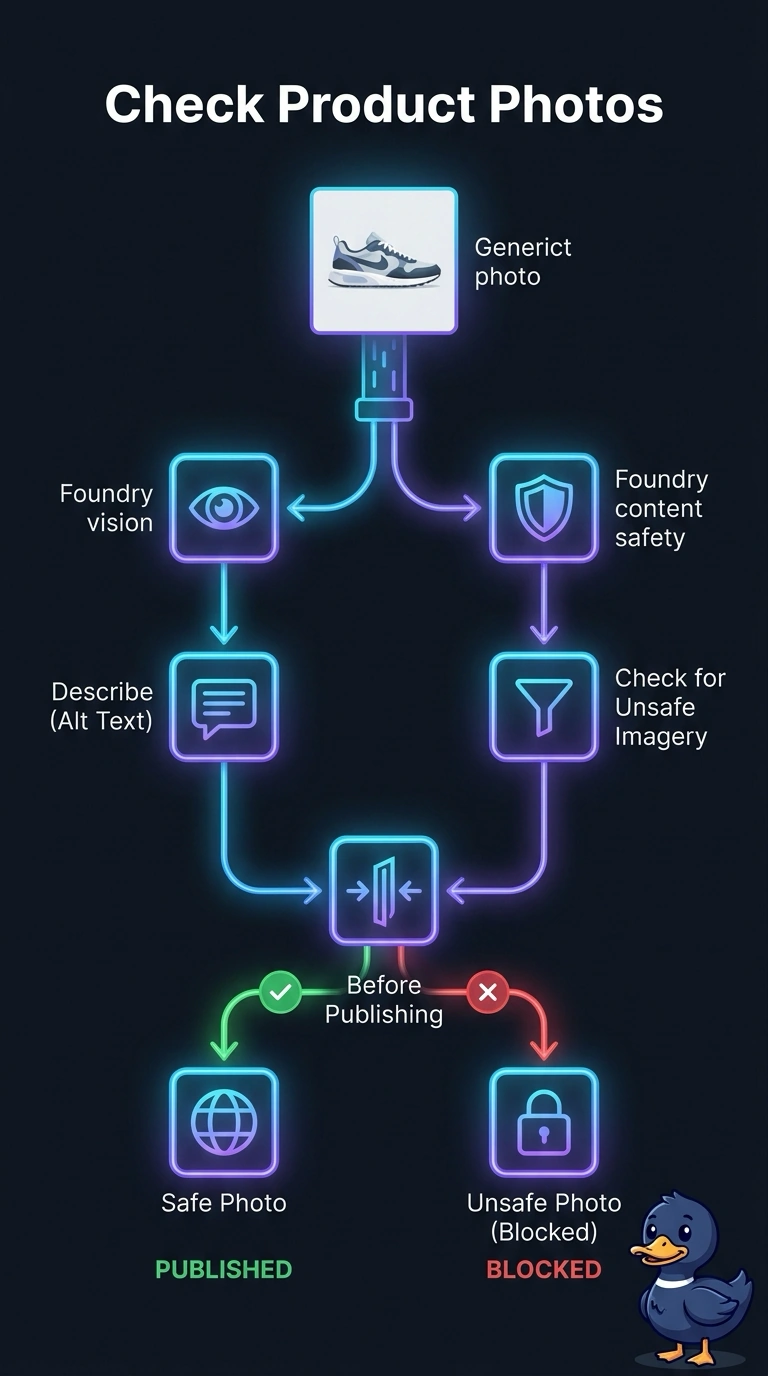
Someone has to look at the picture, write what it shows, and pull the ones that should not be on the shelf. You use Foundry vision and content safety tools for the alt text and the unsafe-image check. A topic of trigger phrases does not open the file.
Full Explanation
Alt text and an unsafe-image check are perception tasks on the photo itself. Foundry vision can describe the image for the alt text, and content safety can screen it for unsafe imagery, so those tools belong in front of publish. Trigger phrases match typed words, and a photo has no words until a vision tool describes it. A topic whose trigger phrases are the words alt text and unsafe waits for a typed phrase and has no step that opens the product photo, so the image is not examined. A chat greeting that asks the shopper to type a description and judge safety pushes both jobs onto the customer and still does not run a tool on the file. A spreadsheet of file names reviewed while the image stays unopened can list what was uploaded and cannot say what the photo depicts or whether it is unsafe. Exam caveat: the two tools do different work, and dropping either one leaves half the requirement unmet. Operational check: submit one ordinary product photo and one known unsafe image, and confirm the ordinary photo receives alt text and the unsafe image is blocked before publish.