
An agent that works correctly in local development is failing when run in a GitHub Actions CI workflow. The run log shows: 'Failed to resolve MCP server from registry: connection refused (registry.internal.company.com:443).' The MCP registry is hosted on the company's internal network. What is the most appropriate fix?
Select an answer to reveal the explanation.
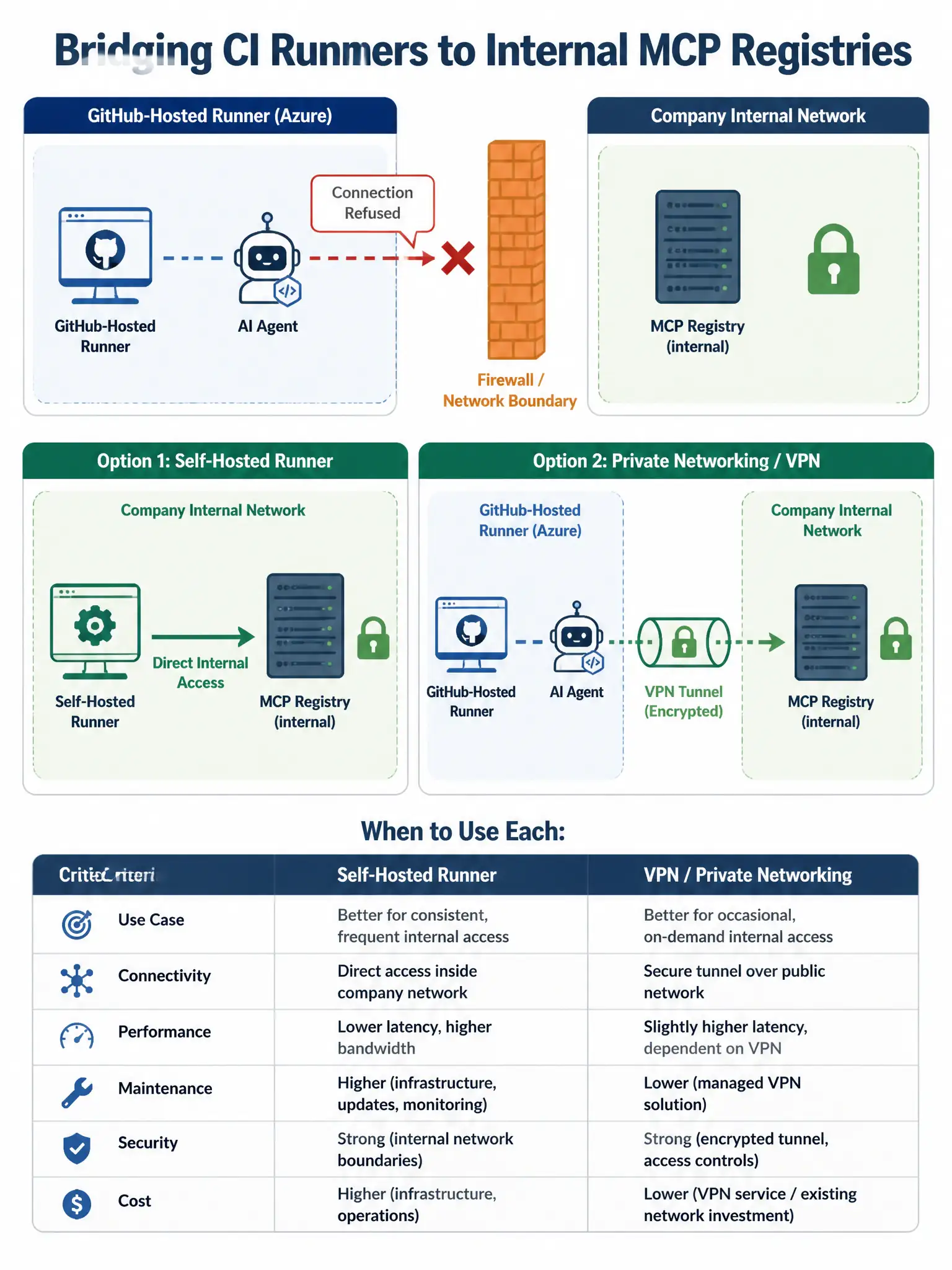
Short Explanation
GitHub-hosted runners live in Microsoft Azure and can’t see your company’s internal network. If an internal MCP registry is refusing connections, you need to bridge the network gap: run CI on a self-hosted runner inside the network, or use a VPN/private network connection so the runner can reach registry.internal.company.com:443.
Full Explanation
GitHub-hosted Actions runners operate in ephemeral virtual machines on GitHub's infrastructure (Microsoft Azure). By design, these runners have access to the public internet but cannot reach hosts on a company's private internal network unless an explicit network bridge is configured. An internal MCP registry hosted at 'registry.internal.company.com' is not routable from GitHub-hosted runners — hence 'connection refused.'
The correct architectural fix is to bridge the network gap between the CI runner and the internal MCP registry. This can be done by deploying GitHub Actions runner agents on infrastructure inside the company network, because self-hosted runners have the same network access as any internal machine and can reach the internal MCP registry natively. Alternatively, use GitHub's private networking features (such as Azure Virtual Network integration for GitHub-hosted runners) or a VPN tunnel to extend the runner's network reach to the internal segment where the registry lives.
Why the other options are wrong:
The local configuration file approach — Moving MCP server definitions from the registry to a local configuration file in the repository avoids the registry lookup but is a workaround rather than a fix. It creates configuration drift (local dev uses registry, CI uses file), may expose server metadata in the repository, and doesn't scale well as server definitions change. More importantly, if the MCP servers themselves (not just their definitions) are only reachable on the internal network, local config files don't help — the server endpoints are still unreachable.
The allow list approach — The MCP allow list is a security configuration that controls which MCP servers the agent is permitted to invoke; it is not a network routing control. Adding a hostname to the allow list does not create a network path from the runner to that host. These are two entirely separate systems.
The pre-download binaries/cache approach — Caching MCP server binaries would only help if the MCP server runs locally on the runner (a local MCP server pattern). If the MCP server is a remote service running inside the company network, downloading its binary to the runner doesn't help — the binary runs on the internal server, not on the runner. This option also conflates the registry (the discovery mechanism) with the MCP server itself (the execution environment).