
An organization wants developers to start new repositories with a ready-made CI workflow. Where must organization workflow templates live so the GitHub UI offers them when creating a new workflow?
Select an answer to reveal the explanation.
Short Explanation and Infographic
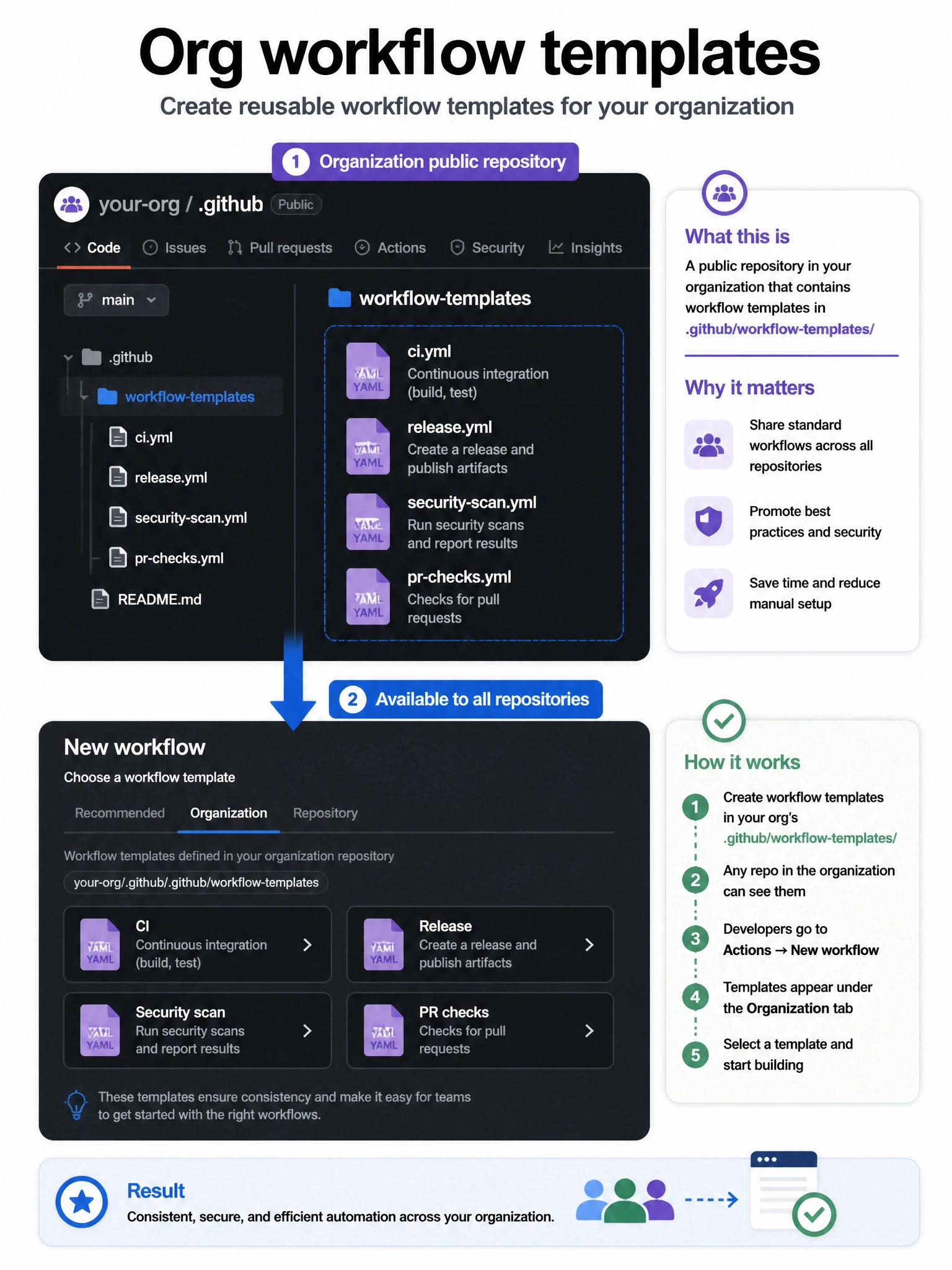
Organization workflow templates sit in the special public .github repo under workflow-templates—not in random repos, personal folders, or Secrets. That is how the “new workflow” picker discovers them for every org repository.
Full explanation below image
Full Explanation
GitHub organization workflow templates are discovered from a public repository named .github that belongs to the organization. Inside that repository, YAML templates (and optional metadata files) live under the workflow-templates directory. When a developer opens Actions → New workflow for any repository in the org, GitHub surfaces those templates alongside starter workflows. Placing workflows only in ordinary application repos does not publish them as org-wide templates. Personal .github/workflows folders apply only to that user's or that repo's workflows. Organization Secrets store credentials; they are not a packaging mechanism for workflow YAML. Teams usually also add a .properties.json sibling for each template to control name and description in the UI. After updating templates, changes appear for new workflow creation—they do not automatically rewrite workflows already committed to product repositories.