
What is the GitHub Actions 'concurrency' setting and what problem does it solve?
Select an answer to reveal the explanation.
Short Explanation and Infographic
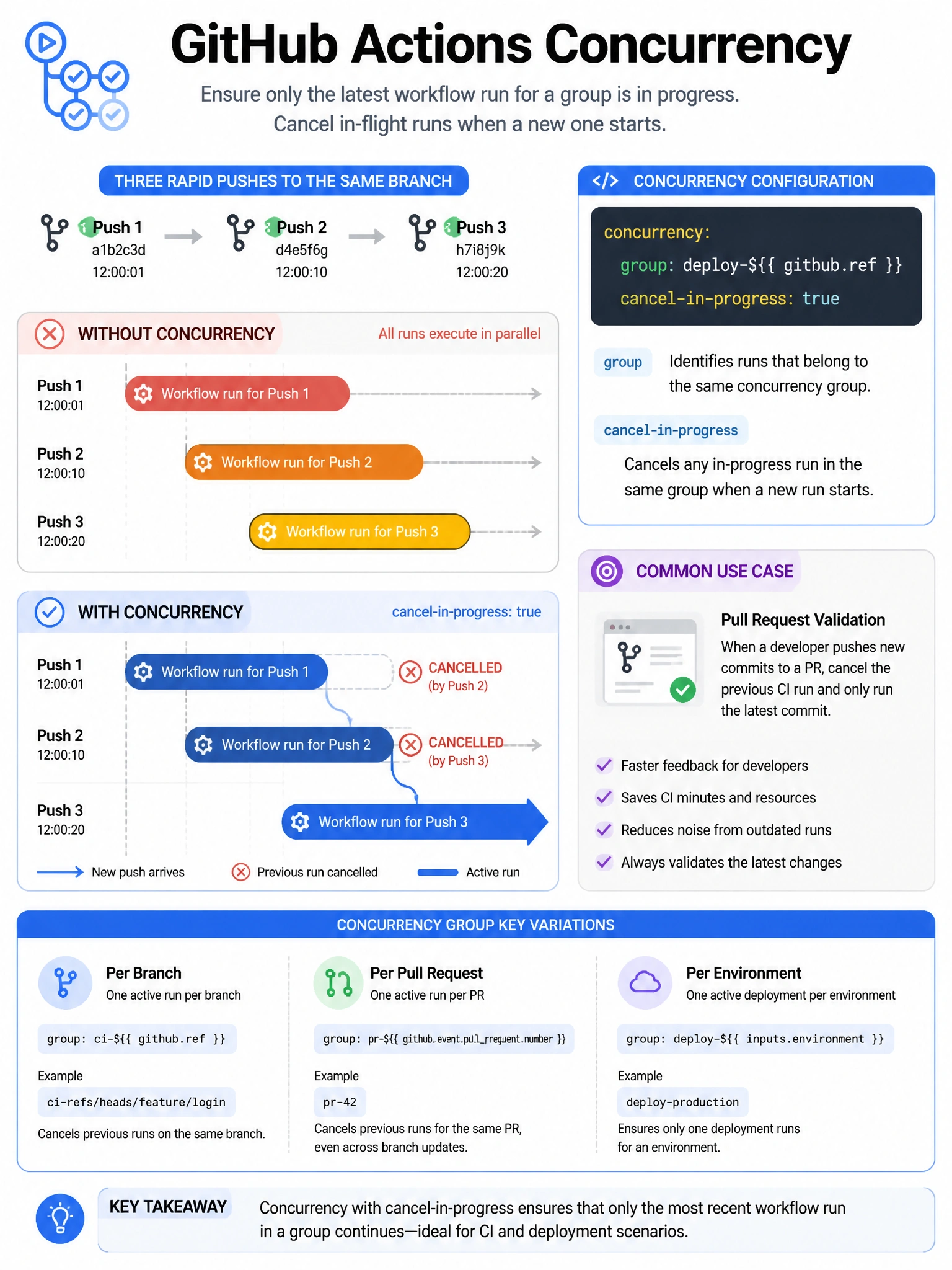
Concurrency groups solve the 'stale deployment' problem. Without it, if you push twice quickly, both deployments run and you might end up with the first (older) deployment winning the race. Set a concurrency group and the second push cancels the first — only the latest matters.
Full explanation below image
Full Explanation
The 'concurrency' setting in GitHub Actions workflow YAML controls simultaneous execution of workflows that share the same concurrency group key. Configuration: (1) Group key — typically a combination of branch, workflow name, and/or event type that identifies concurrent runs. (2) cancel-in-progress — if true, any currently running workflow in the same group is cancelled when a new one starts. Example: 'concurrency: { group: "deploy-${{ github.ref }}", cancel-in-progress: true }'. Use cases: (a) CD pipelines — ensure only the latest push deploys to an environment. (b) PR validation — cancel running checks for a PR when new commits are pushed (run only against latest commit). Without concurrency control, multiple rapid pushes can create a queue of deployments that all run, potentially causing race conditions or unnecessary resource usage.