
What are 'deploy keys' in GitHub repositories and when should they be used?
Select an answer to reveal the explanation.
Short Explanation and Infographic
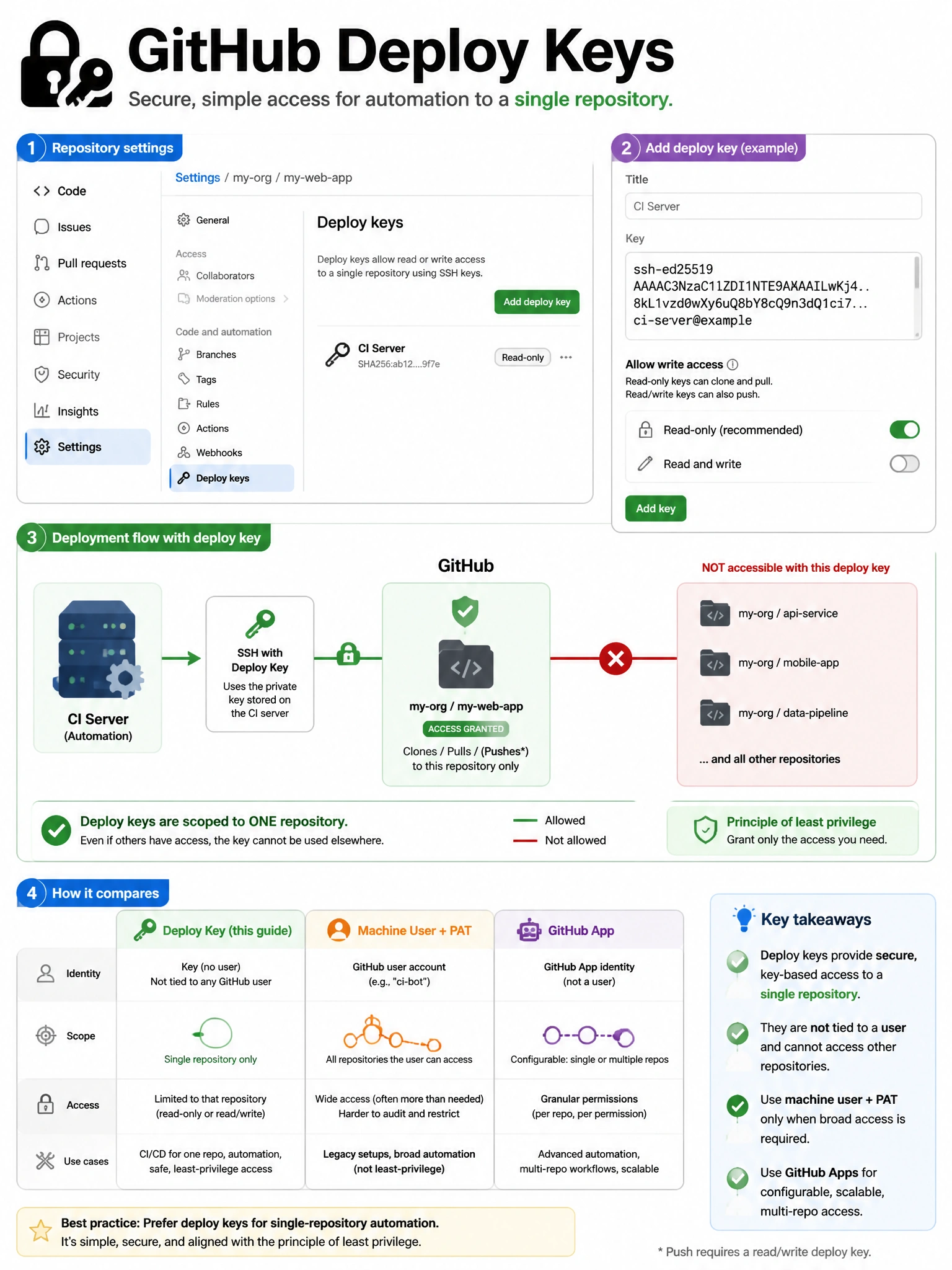
Deploy keys are per-repo SSH keys for automation. Give your CI server's SSH public key to a specific repo as a deploy key, and it can clone (or push) just that repo without needing user credentials. Minimal surface area — one key, one repo.
Full explanation below image
Full Explanation
GitHub deploy keys are SSH public keys registered to a specific repository that grant access to that repository only. Characteristics: (1) Repository-scoped — the key provides access to the single repository it's registered with, not all user repositories. (2) Read or read/write — configured at registration time. (3) No user account required — the key itself provides access, suitable for CI/CD systems, deployment servers, or any system that needs repository access without human credentials. (4) Not transferable — a deploy key cannot be used to access other repositories. When to use: simple CI/CD pipelines that need to clone a specific repository. When NOT to use: when accessing multiple repositories (use GitHub App installation tokens or a machine user instead). Deploy keys appear in the repository's Settings > Deploy keys and can be revoked individually.