
What is 'IP allow listing' at the GitHub Enterprise Cloud level and what does it restrict?
Select an answer to reveal the explanation.
Short Explanation and Infographic
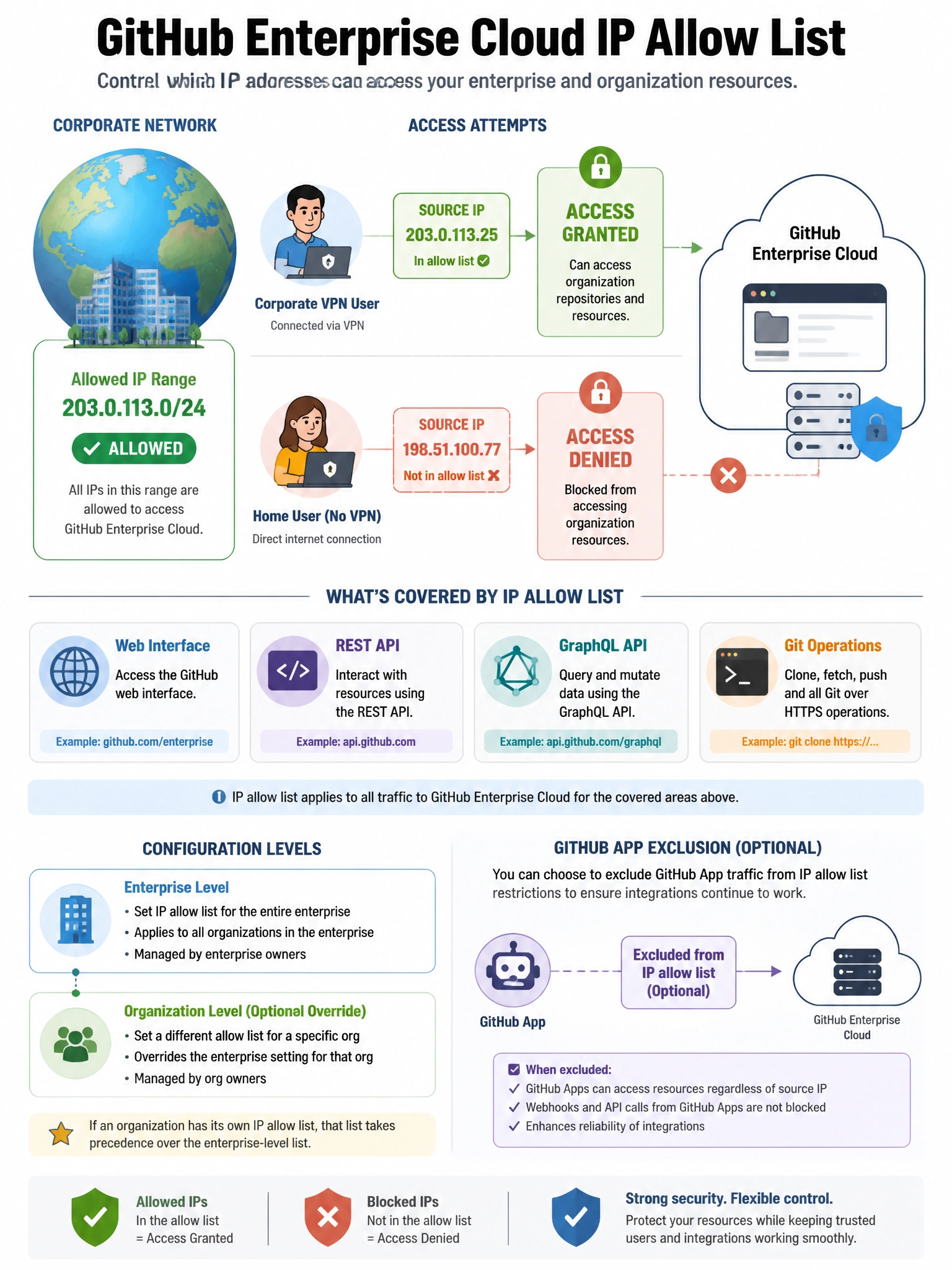
Enterprise IP allow lists are your network fence for GHEC. Once you configure allowed IPs or CIDRs, only users connecting from those addresses can access your organization's resources. Great for ensuring employees can only access org repos from corporate networks or VPN.
Full explanation below image
Full Explanation
GitHub Enterprise Cloud IP allow lists restrict access to organization or enterprise resources based on the connecting IP address. When configured: (1) Web interface access — only allowed IPs can view the org's repositories and settings via browser. (2) API access — REST and GraphQL API calls from unlisted IPs are rejected. (3) Git operations — clone, push, and fetch operations from unlisted IPs are blocked. (4) GitHub Apps — can be excluded from IP allow list checks so installed apps can still function. IP allow lists can be configured at both the organization level and the enterprise level. Enterprise-level lists apply to all organizations. Entries can be individual IPs or CIDR ranges. This is particularly useful for regulated industries requiring that corporate data only be accessible from known corporate network addresses.