
What is the 'Verified & Approved' designation for GitHub Actions in an enterprise?
Select an answer to reveal the explanation.
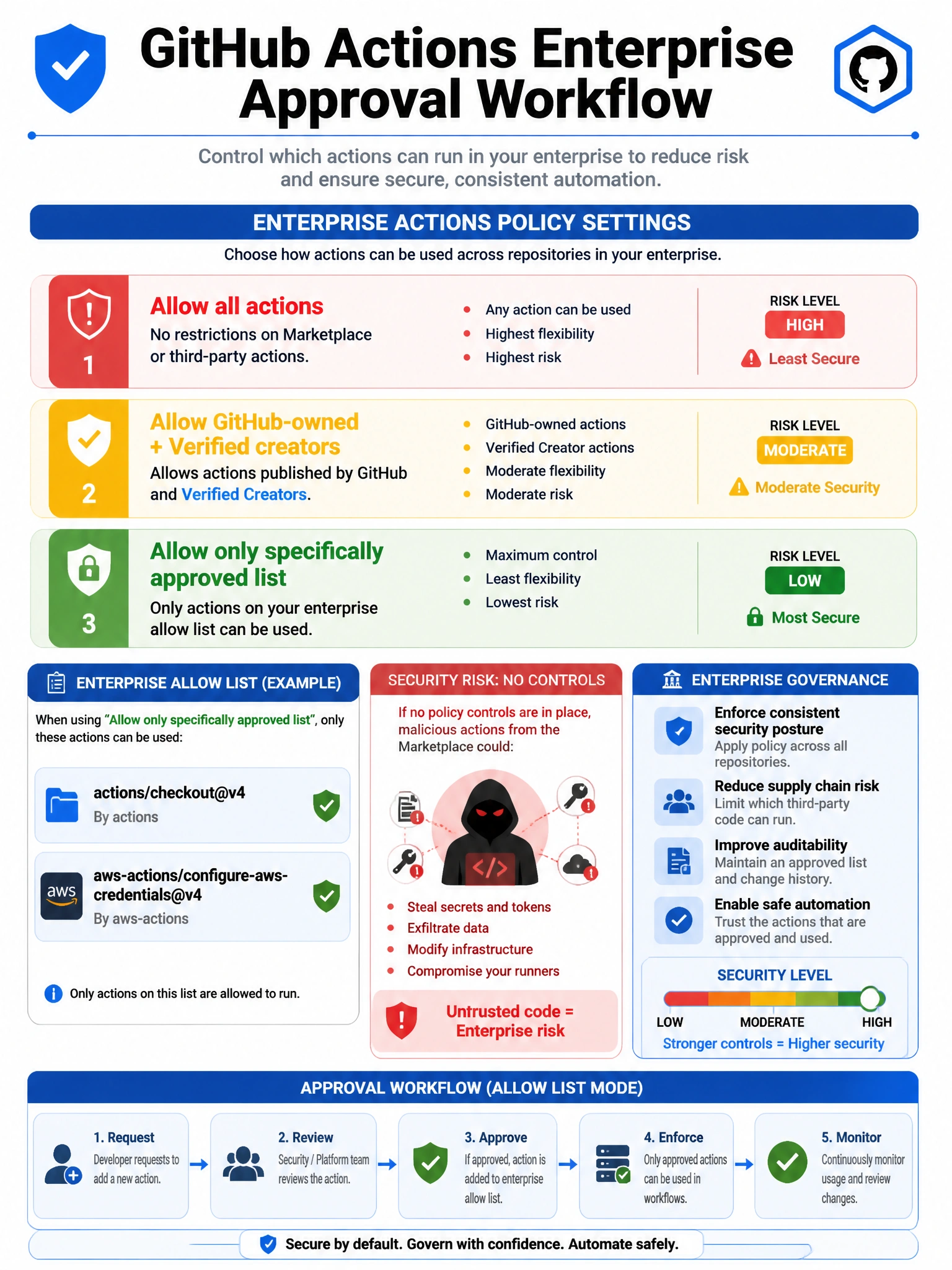
Short Explanation and Infographic
In enterprises, administrators can configure which Actions are allowed. 'Verified creators' have been vetted by GitHub. 'Approved' means your org/enterprise explicitly allowed that Action. Together they form the allow list strategy for controlling which third-party Actions can run in your workflows.
Full explanation below image
Full Explanation
In GitHub Enterprise environments, controlling which Actions can be used in workflows is a security concern. The 'Verified & Approved' concept involves two layers: (1) Verified creator badge — GitHub awards this to Actions publishers who have completed identity verification with GitHub. It doesn't guarantee security but confirms the publisher is who they claim. (2) Organization/enterprise approval — admins can configure Actions policies to: allow all actions, allow only GitHub-owned actions, allow actions by verified creators, or only allow specific approved actions (by name/version). The strictest enterprises maintain an explicit allow list of approved Actions that can be used. This prevents supply chain attacks where a compromised or malicious Action from the marketplace could run in enterprise workflows.