
What is GitHub's 'secret scanning alert' lifecycle and what statuses can an alert have?
Select an answer to reveal the explanation.
Short Explanation and Infographic
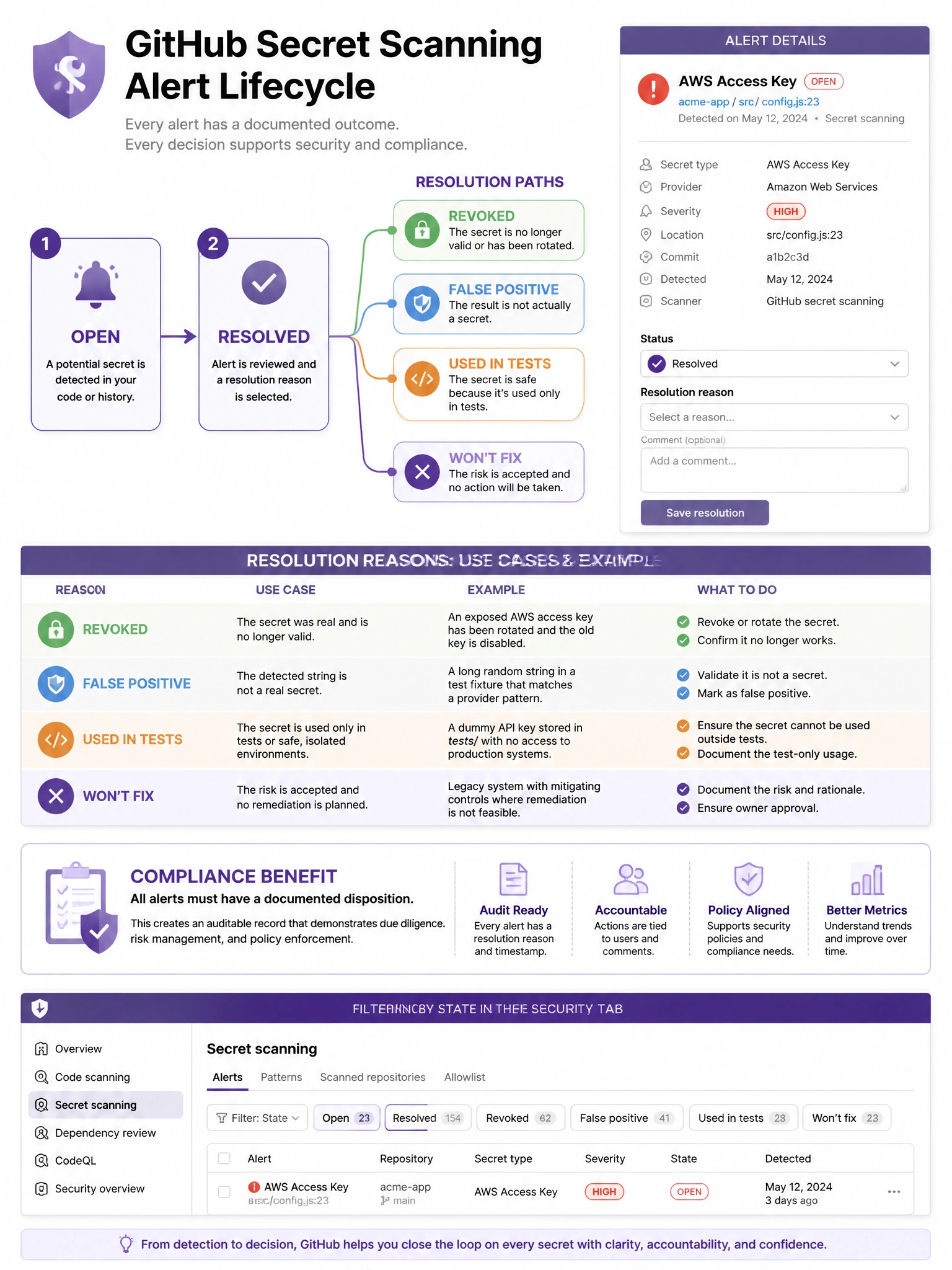
Secret scanning alerts are either open (unaddressed) or resolved. Resolution isn't just 'closed' — you specify why: the secret was revoked, it's a false positive, it was a test credential, or you're choosing not to fix it. The reason matters for compliance tracking.
Full explanation below image
Full Explanation
GitHub secret scanning alerts have two primary states with resolution sub-states: (1) Open — the alert has been generated and requires attention. (2) Resolved — the alert has been addressed, with a required reason: 'Revoked' (the credential was invalidated), 'False positive' (the detected string is not actually a secret), 'Used in tests' (the credential is intentionally present for testing and has no real access), 'Won't fix' (acknowledging the issue but choosing not to remediate). Resolution reasons are important for: compliance documentation (demonstrating that all alerts were triaged), metrics tracking (understanding false positive rates), and audit purposes. Organizations can also configure push protection bypass reasons which are tracked separately. Filtering by status and reason helps teams manage alert backlogs.