
What does it mean to 'verify' a commit signature in GitHub?
Select an answer to reveal the explanation.
Short Explanation and Infographic
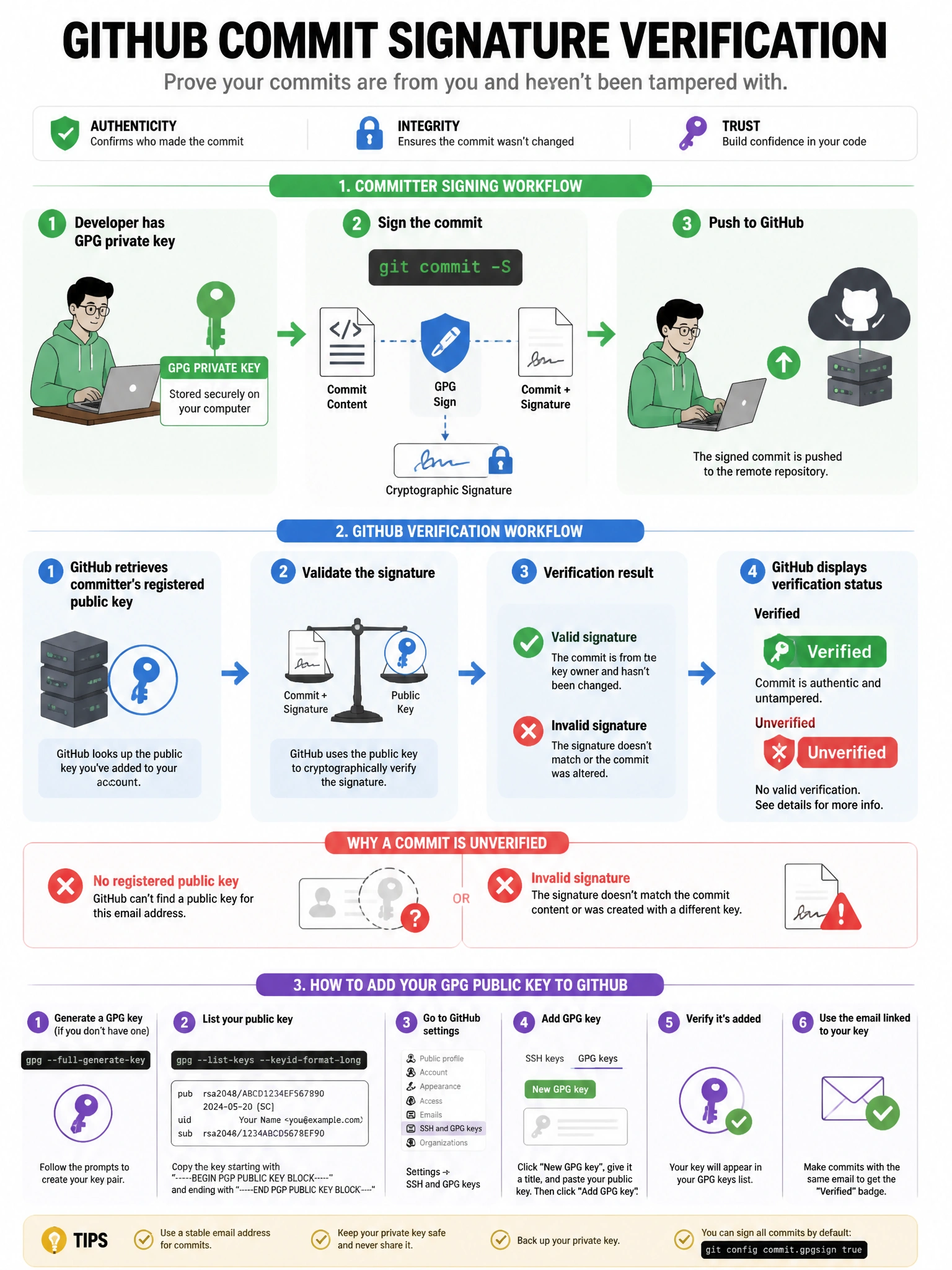
A verified commit in GitHub means GitHub checked the GPG, SSH, or S/MIME signature and it matches a key registered to the committer's account. The 'Verified' green badge appears on commits that pass this check, giving you confidence about who actually made the change.
Full explanation below image
Full Explanation
GitHub's commit signature verification displays a 'Verified' badge on commits that have been cryptographically signed with a key registered to the committer's GitHub account. The verification process: (1) The committer signs the commit using their local GPG key, SSH key, or S/MIME certificate. (2) The public key must be added to the committer's GitHub account settings. (3) When GitHub renders the commit, it verifies the signature against the registered public keys. (4) If valid and the email matches the account: 'Verified' badge appears. (5) If signature is missing or invalid: 'Unverified' or no badge. Verified commits prevent commit author spoofing (someone claiming to be you in a commit). The branch protection 'Require signed commits' uses this same verification mechanism.