
A CKAD-style application chart’s values.yaml exposes replicaCount and image.tag. How do those common keys typically map when the chart templates a Deployment?
Select an answer to reveal the explanation.
Short Explanation
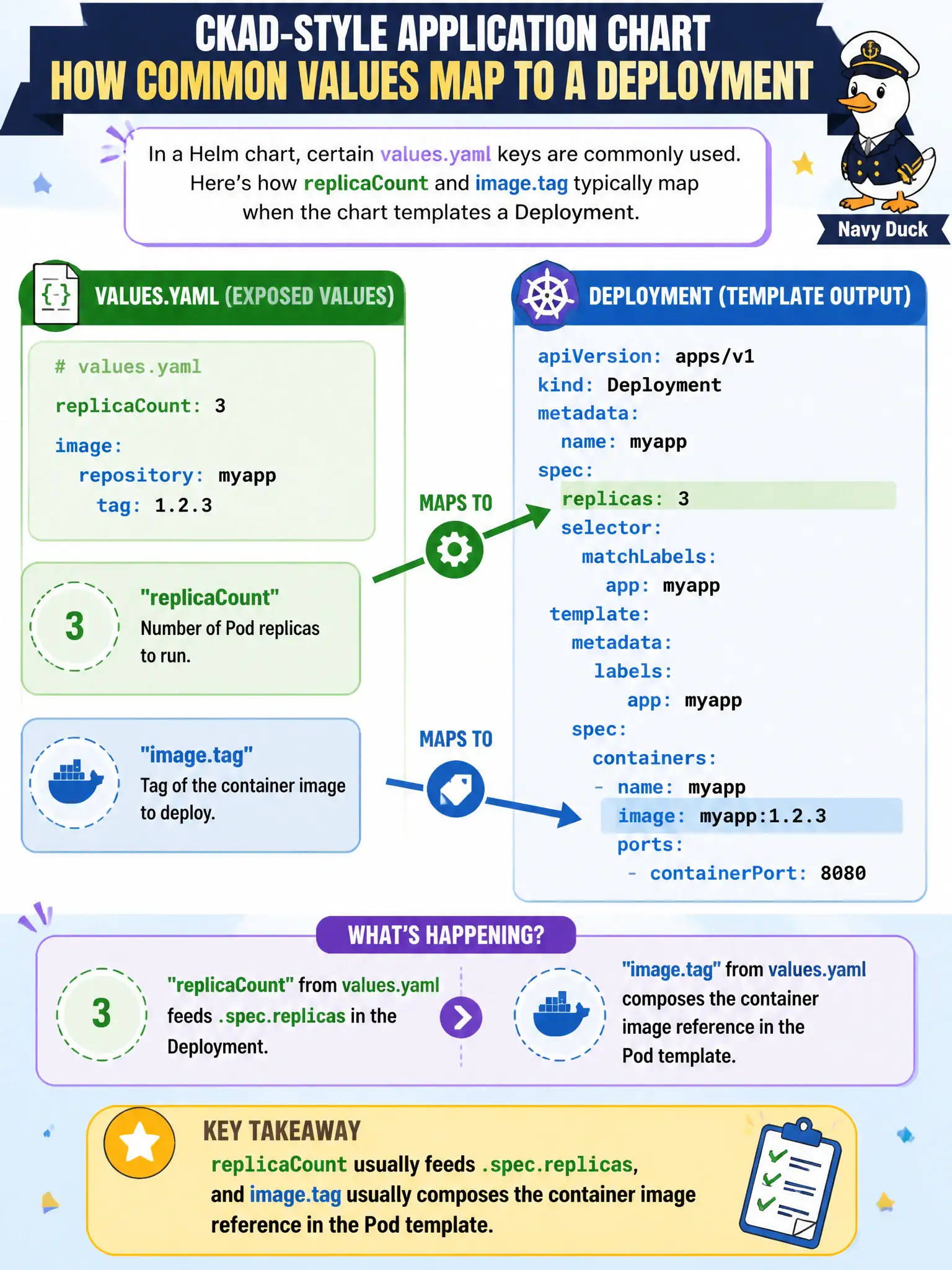
Charts speak a common dialect: replicaCount turns the replica dial, image.tag picks which build stamp goes on the container. That’s how values usually wire into a Deployment template.
Full Explanation
In a typical CKAD-style application chart, values.yaml keys such as replicaCount and image.tag are referenced from Deployment templates so replicaCount feeds .spec.replicas and image.tag composes the container image reference (commonly with image.repository) inside the Pod template. That convention lets municipal developers scale capacity and pin versions through values overrides without rewriting templates for every change—exactly the parameterization Helm is meant to provide for city application charts.
Why the other options fail by concept: replicaCount does not set a Service ClusterIP, and image.tag does not set Ingress hosts. Those keys do not configure NetworkPolicy ingress ports or node taints. They are not ignored until the chart is converted to a DaemonSet; Deployments are the usual wiring target for replicaCount and image.tag.
Exam caveat: Chart conventions vary—always read the chart’s values.yaml and templates rather than assuming identical key names (replicaCount versus replicas, nested image.tag versus a single image string). image.pullPolicy and image.repository often accompany image.tag. --set paths must match the values schema nesting exactly or overrides silently fail to apply.
Operational check: helm show values <chart>, then helm template with --set replicaCount=3 --set image.tag=1.2.3 and grep the rendered Deployment for replicas: 3 and an image line containing 1.2.3 before installing into the city namespace. After install, kubectl get deploy -o wide to confirm live replicas and images match the values you intended.