
A clinic sees a healthy Unified CM cluster in Cloud-Connected UC, skips any import, and then cannot find the clinic auto attendants in Webex Calling. What still has to run before those attendants exist there?
Select an answer to reveal the explanation.
Short Explanation
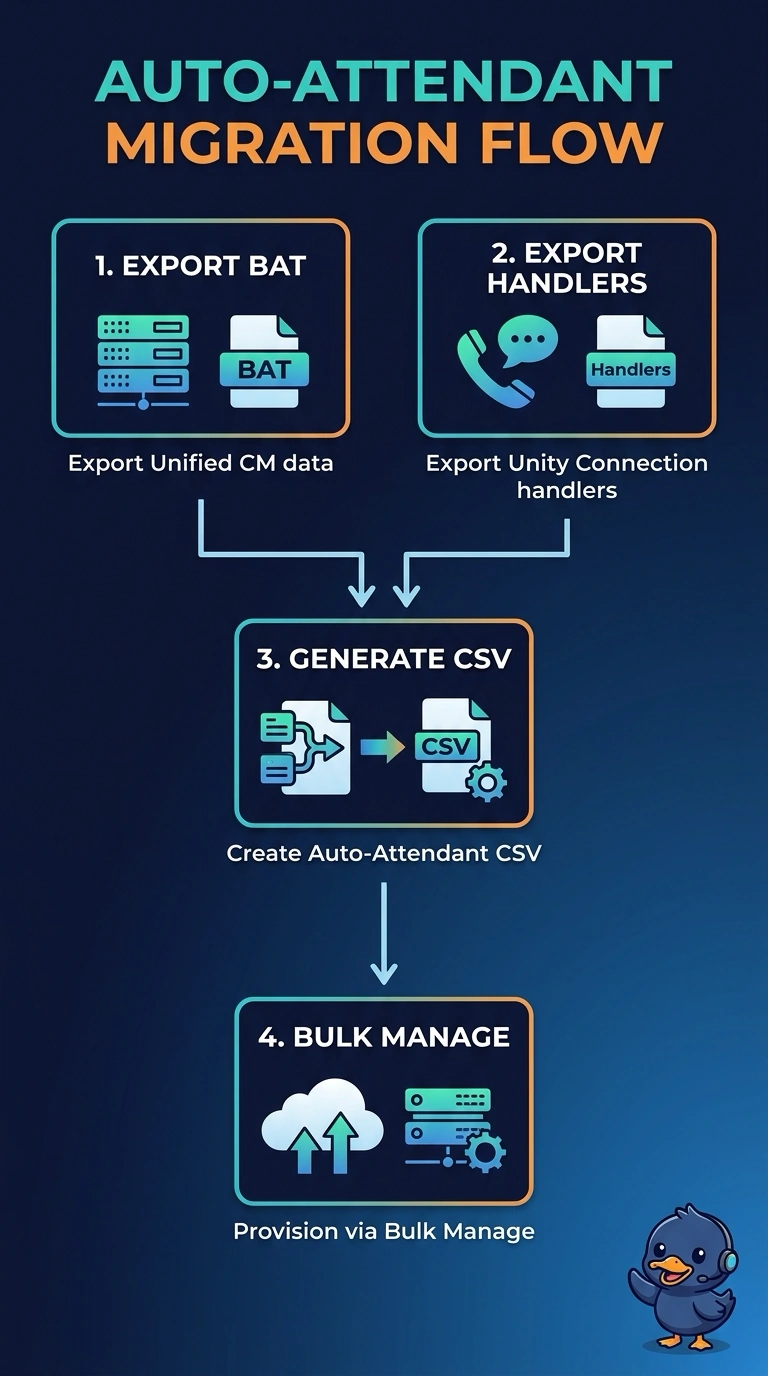
You are seeing health, not migration yet. You upload the Unified CM BAT export and the applicable Unity Connection call-handler export, generate the Auto-Attendant CSV, then provision it through Auto-Attendant Bulk Manage. Once you do that import, you will find your clinic attendants in Webex Calling.
Full Explanation
Auto attendants do not appear in Webex Calling from Cloud-Connected UC health alone. You must complete the feature migration workflow: Upload the Unified CM BAT export and the applicable Unity Connection call-handler export, generate the Auto-Attendant CSV, then provision it through Auto-Attendant Bulk Manage. The BAT export supplies the Unified CM configuration and the Unity Connection export supplies the call-handler details the migration needs to build an accurate CSV for Webex Calling. Provisioning that file with Auto-Attendant Bulk Manage is what actually creates the attendants in the cloud. Treating the healthy Cloud-Connected UC cluster view as proof of movement confuses monitoring with migration; it reports on-premises health and can inform planning, but it never imports objects. Deleting the Unified CM cluster and retyping every clinic attendant by hand discards the authoritative exports and introduces error, rather than using the supported migration path. Reconnecting hybrid calendar surfaces mailbox meetings as join buttons on room devices, but calendar integration does not create calling routing objects or generate attendant configuration.