
A hotel group's front desk receives mail with no attachment and a link that imitates the payroll site. The link must be tested when someone clicks it. Which email control fits?
Select an answer to reveal the explanation.
Short Explanation
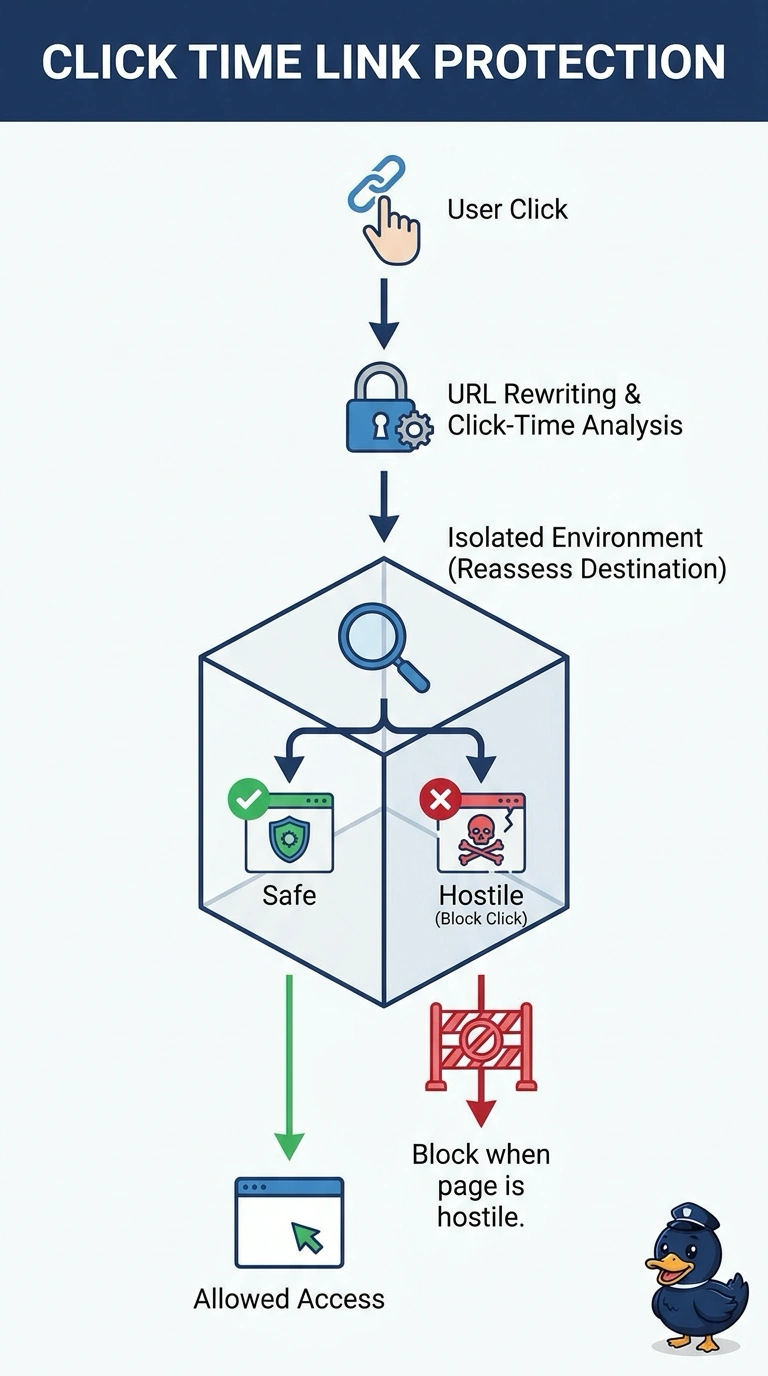
A link is a door you test with your hand on the knob, not a parcel you already shook. You use URL rewriting and click-time analysis to reassess the destination and block the click when it is classified as malicious. An attachment sandbox, a reject rule for the hotel's own domain, or a vendor payment callback does not inspect this link.
Full Explanation
The dangerous object is the link, not a file, so protection must run when the click happens. Use URL rewriting and click-time analysis to reassess the destination and block the click when it is classified as malicious. The URL service reevaluates a rewritten link at click time; coverage depends on what it can inspect and classify. That refresh matters because the payroll lookalike can change after delivery, and only a click-time verdict can still stop the browser before the hostile page loads. An attachment sandbox that detonates office files before those files reach the inbox is the wrong fit because this message has no file, so there is nothing to detonate and the link itself is never exercised. A reject policy for messages that spoof the hotel group's own authenticated domain is the wrong fit because the lure is a lookalike site, not a forged message that fails authentication of the hotel's own domain. A callback to a vendor on a known number before any payment account number is changed is the wrong fit because nobody asks to change a payment account, so a payment callback never inspects the payroll link. Exam caveat: Click-time analysis can still miss a site that stays quiet until after login, so the verdict covers only what was inspected. Operational check: Send a lab message with a rewritten link to a known test page and confirm the click is blocked, then confirm a normal payroll link still opens.