
A hotel's guest Wi-Fi relies on central web authentication: the controller returns a redirect URL in the first access-accept, and the guest posts credentials at the central portal. Which message completes the central web authentication flow so internet access starts immediately?
Select an answer to reveal the explanation.
Short Explanation
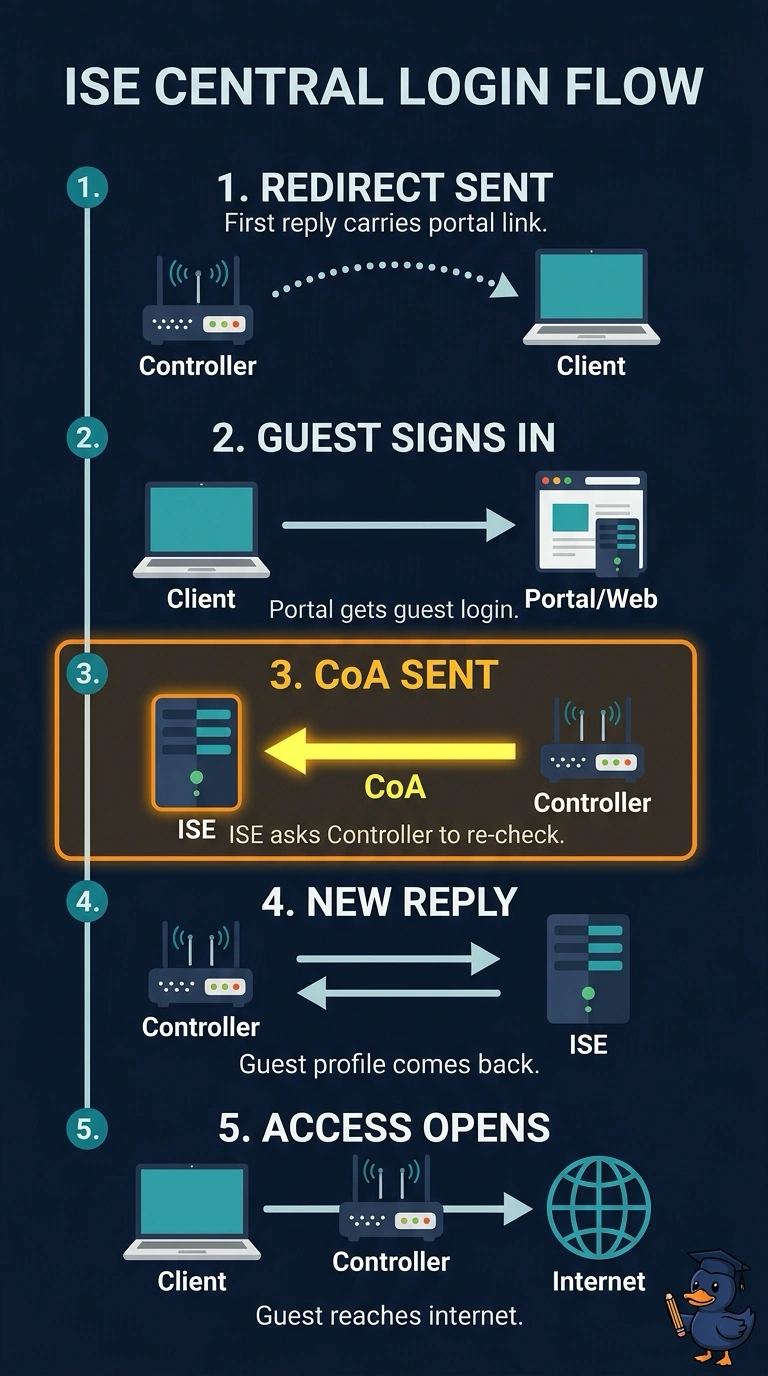
After you sign in at the portal, ISE sends a Change of Authorization (CoA) to the controller so your active session picks up the guest role. It’s like flipping a switch: you get internet access without waiting for a timer or reconnecting.
Full Explanation
Central web authentication runs in two phases: the first RADIUS access-accept carries an authorization profile that redirects the browser to the portal, and once the guest posts credentials ISE has to change the policy on the session that is already running. ISE does that with a RADIUS Change of Authorization sent to the network access device, which triggers an immediate re-authentication request back to ISE; ISE then answers with the guest authorization profile carrying its ACL or VLAN, so internet access appears the moment the login completes. Waiting for the controller's reauthentication timer is a real AAA technique, but it leaves the guest staring at a blank page until the timer expires, which fails the immediacy requirement. Forcing a reconnect assumes a fresh authentication exchange, and the endpoint has no reason to start one because its credentials and session key are unchanged. Pushing the role through the controller's management API may alter device-side settings, but it never updates the RADIUS session state that ISE is authorizing. Caveat: both the redirect profile and the guest profile must be permitted by the authorization policy, or the CoA re-evaluation lands in the wrong rule. Verify with RADIUS live logs, where you should see the CoA request followed by a new access-accept.