
A 600-person manufacturer runs ISE on a single headquarters node that does authentication, profiling, posture and TACACS+. Two new plants need wired 802.1X, endpoint count will roughly double, and the team must keep one configuration console while each site's logins are answered locally. Which deployment design meets those requirements?
Select an answer to reveal the explanation.
Short Explanation
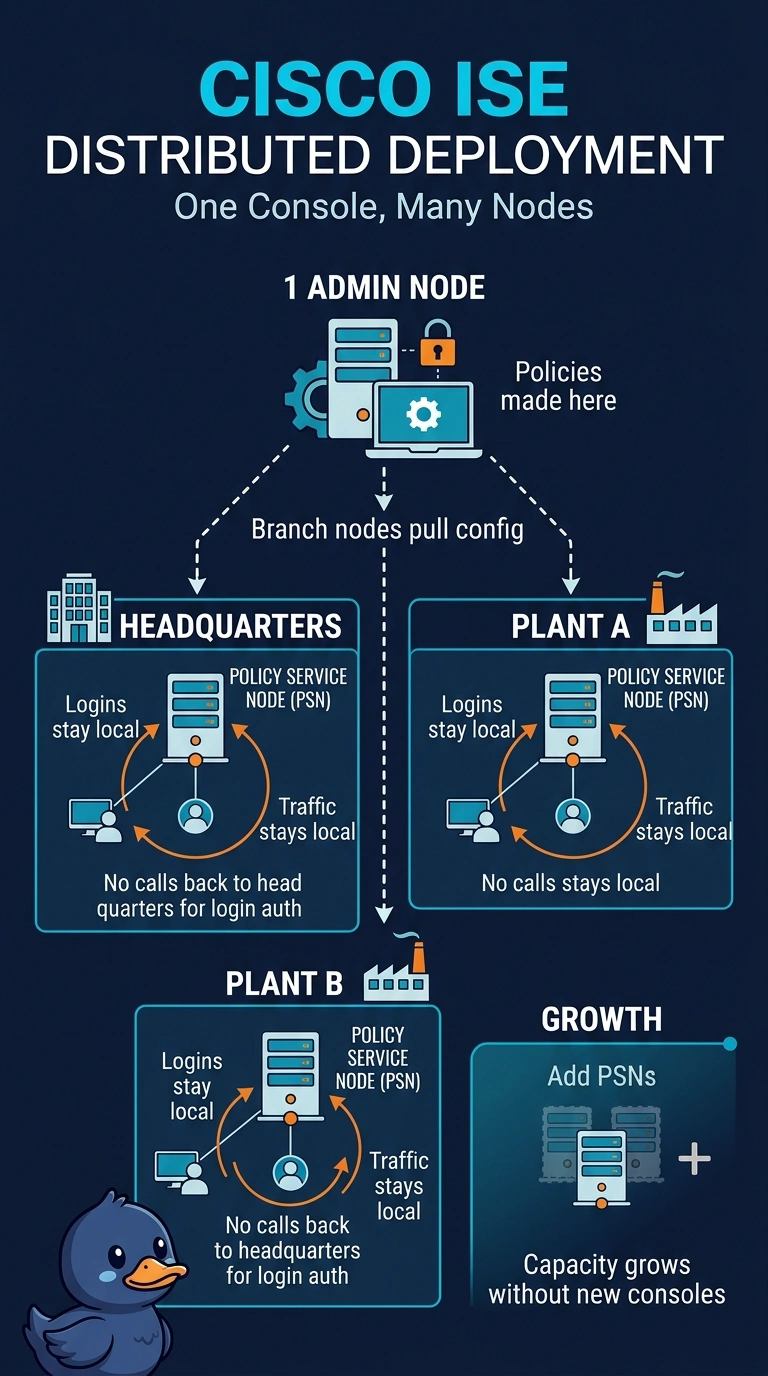
Your single ISE node is a standalone deployment: it handles the admin console and every login, so plant traffic would travel to headquarters. Going distributed keeps your existing node as the admin node and lets policy service nodes at each site answer logins locally.
Full Explanation
A distributed ISE deployment with one administration node and policy service nodes at headquarters and both plants provides the required single configuration console while placing authentication services at every site. Adding policy service nodes also distributes processing as the endpoint population grows, and the existing node can remain the admin node. Retaining the headquarters node as both admin and policy service node while adding policy service nodes only at headquarters and the first plant leaves the second plant without a local ISE node to answer its logins. Creating separate deployments at headquarters and both plants can support local authentication, but gives each site its own administration console, failing the single-console requirement. Making the headquarters node admin-only while adding policy service nodes at both plants keeps one console, but headquarters logins would be handled remotely rather than locally. An exam caveat: administration and policy service are distinct logical roles, even when one appliance runs both; a distributed deployment does not require an administration node at every site. In practice, verify the intended roles and locations in the deployment design, then confirm that each site’s network devices use a reachable local policy service node and that endpoint capacity is adequate.