
A production team must tune inspection for their application. They must start from the built-in base intrusion policy, add a custom rule for their home-grown software, and have blocking take effect on live traffic. Which intrusion policy setup meets all three requirements?
Select an answer to reveal the explanation.
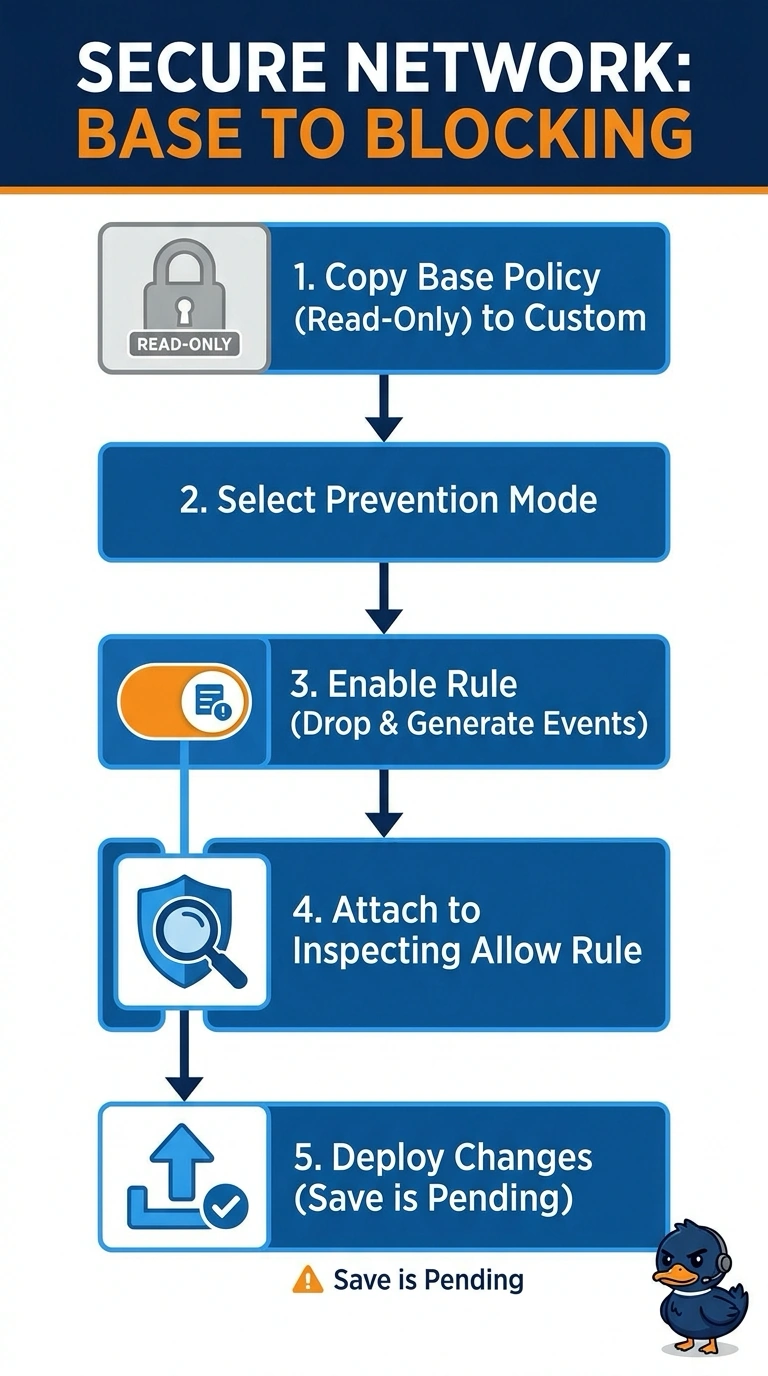
Short Explanation
Your built-in base policy is like a starter recipe: you can’t edit it directly, so create a custom policy based on it. Set it to Prevention, enable your custom rule with Drop and Generate Events, and attach the policy to an inspecting Allow rule so blocking takes effect on live traffic.
Full Explanation
System-provided intrusion policies cannot be edited, so create a custom policy based on the built-in policy. Select Prevention mode, enable the custom rule with Drop and Generate Events, and attach the custom policy to an Allow access-control rule. Deploy the changes so the device receives them. Editing the built-in policy in place fails because it is read-only. A copy left in Detection mode does not drop traffic: Detection mode generates events without enforcing the rule's drop action. Leaving the custom rule in the rule library without enabling it in the attached policy means it will not be enforced. Inspection mode is stored separately for each Snort engine, so after an engine switch, check the mode for the engine in use. After deploying, filter intrusion events by the custom rule's signature ID and verify that the event reports a drop.