
You review a teammate's automation changes before merging. Running git diff main -- playbook.yml in the repo prints one hunk: @@ -40,6 +40,8 @@ followed by three - lines, five + lines, and three unchanged context lines. What does that hunk header report about how the file changed?
Select an answer to reveal the explanation.
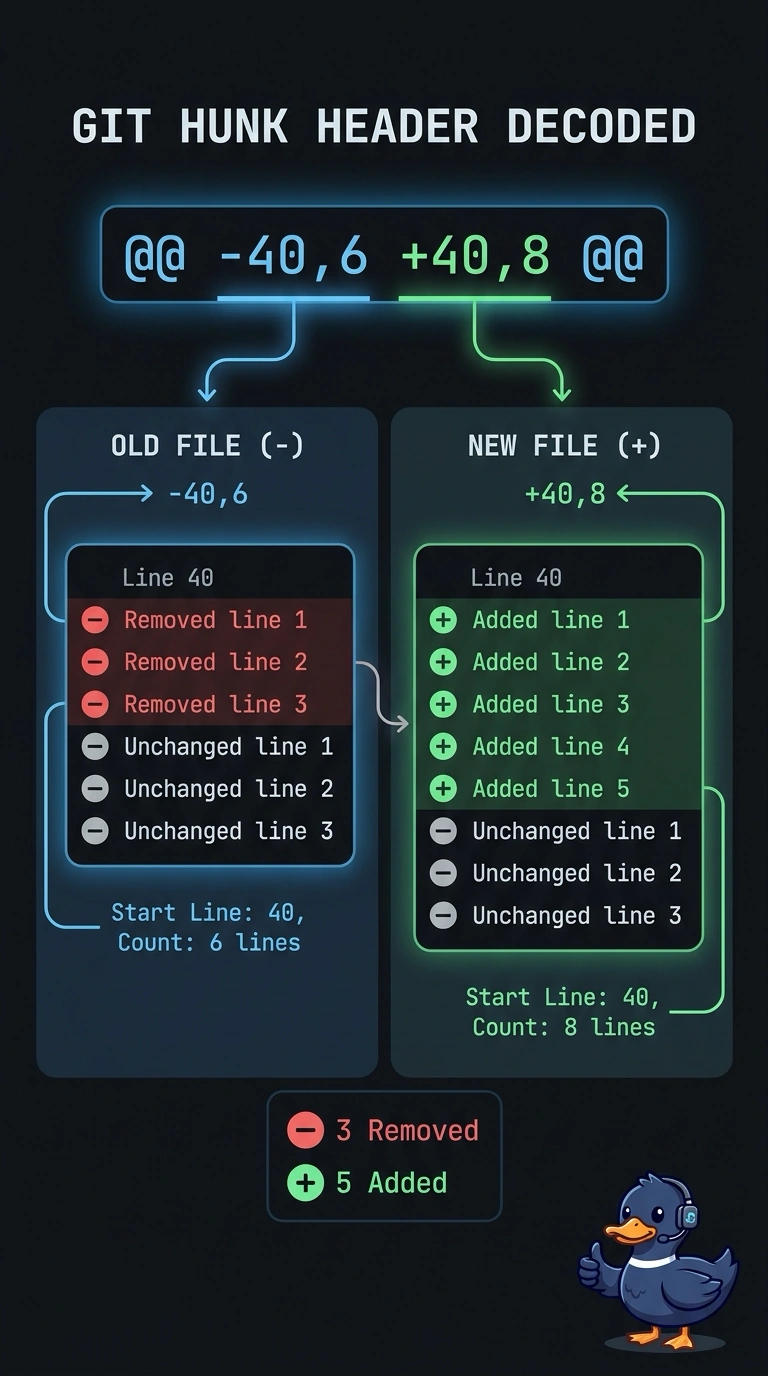
Short Explanation
Those two pairs of numbers are the whole trick: minus points at the old file, plus at the new one. Each pair is a start line and a count, so the hunk header reads like a tiny map of the change. You'll stop second-guessing 40 the moment you treat it as a position instead of a quantity.
Full Explanation
Unified diff prints a hunk header shaped like @@ -40,6 +40,8 @@, and each side gives a starting line plus a line count, with a missing count meaning a single line. The minus side describes the file as it stands in the commit you compared against, the plus side describes the result after the change, so both halves can legitimately begin at line 40. Your numbers also agree with the body: three removed lines plus three unchanged context lines fill the six-line old span, while five added lines plus those same three context lines fill the eight-line new span. Reading the pairs as totals of edited lines mistakes span length for change size, assuming the old region starts elsewhere ignores that the header shows both starts, and treating 40, 6 and 8 as a list of individual edit positions misreads what a range is. One caveat: these fields describe a line range, not how many hunks or files changed, and a one-line region is often printed as a single number. A practical check is to run git diff --numstat against the same path, which reports added and deleted counts per file so you can confirm your reading.