
An automation engineer must collect 'show version' and 'show interfaces status' from 60 Catalyst switches through Catalyst Center inside a Python job. The job should start the collection and carry on rather than sit idle while every switch answers. Which Command Runner flow returns the command output?
Select an answer to reveal the explanation.
Short Explanation
Nice — Command Runner is submit-now-collect-later, and the task ID is your claim ticket. It's like a deli counter: you place the order, keep working, and come back when your number is called.
Full Explanation
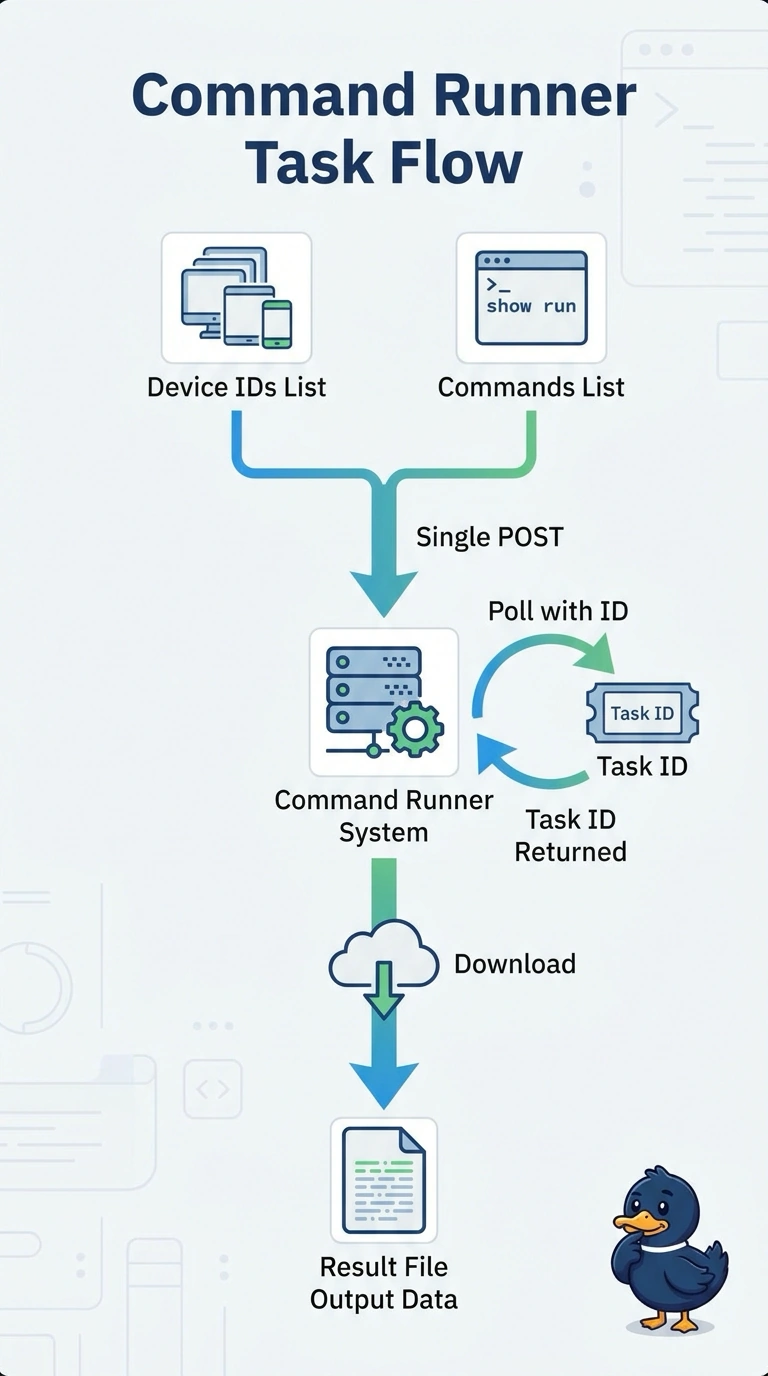
The correct flow uses Command Runner’s asynchronous task model: submit the commands with the target device IDs, retain the returned task ID, poll that task until it completes, and then download the result file containing the command output. This lets the Python job continue doing other work while the 60 switches respond, while still obtaining the results through the supported retrieval step. Waiting synchronously for completion may eventually produce the same file, but it makes the job sit idle during collection, contrary to the explicit requirement to carry on. Reading output from a task-details response confuses task tracking with result retrieval: the task resource is used to check status, while completed command output is provided through the result-file download flow. Waiting a fixed interval before downloading avoids blocking, but does not poll the task ID; response times vary, so the file may not yet be ready, or the job may wait longer than necessary. Exam caveat: distinguish a task’s completion/status response from the command-output artifact; an asynchronous submission response is not itself the output. Practical check: inspect the submission response for the task ID, verify that polling reaches a completed state, and confirm that downloading the associated result file returns output for both requested commands and the intended devices.