
For a network configured to use the legacy Meraki Scanning API, a retail chain wants raw WiFi and Bluetooth scan observations from its Meraki access points flowing into an in-house analytics service. The developer opens the API reference looking for a REST route that returns yesterday's observations for a network, expecting a paginated list of scan records. How does the Scanning API deliver those observations to the customer's service?
Select an answer to reveal the explanation.
Short Explanation
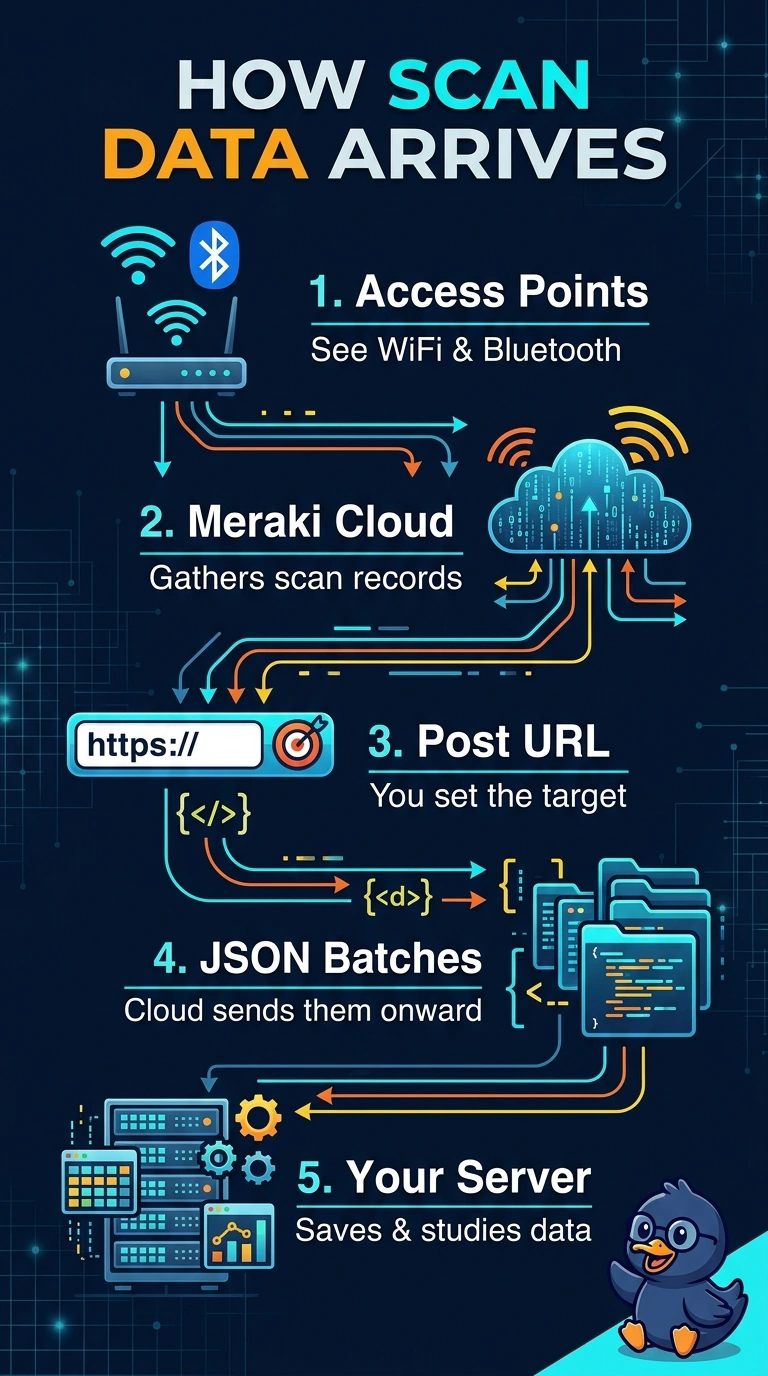
The Scanning API pushes rather than waits to be asked, which is why a read route never turns up for scan records. You register a receiving URL, and the cloud POSTs batches to it — it's like a newspaper delivery instead of a library visit.
Full Explanation
The legacy Scanning API is a push service rather than a queryable dataset: access points observe WiFi probe requests, associated clients and Bluetooth devices, the Meraki cloud aggregates and locates those observations, and you register an HTTPS post URL in the dashboard for the network, after which the cloud posts JSON batches about once a minute as they accumulate. Because delivery is outbound, no route exists for requesting a time window of past scans, so the customer's service has to accept the POST, check the validator and shared secret, store the batch and analyse from there. Polling the REST API with a time range assumes a pull model this API does not offer, so the pagination logic never has anything to page through. Streaming syslog from the access points to your own collector bypasses the cloud pipeline entirely and describes a different integration that would also need reachability from every access point. A scheduled CSV export is a dashboard reporting habit rather than this feed, since raw scans arrive as JSON records and nothing archives them for download. Caveat: a receiver with persistent delivery errors can be disabled automatically, so keep the endpoint healthy once it is live.