
A retailer wants foot-traffic and dwell data for its stores from the existing MR access points, covering Wi-Fi clients and Bluetooth beacon sightings. Its analytics service is an HTTPS receiver that Meraki's cloud must post to. Which Location Scanning API setup delivers the data correctly?
Select an answer to reveal the explanation.
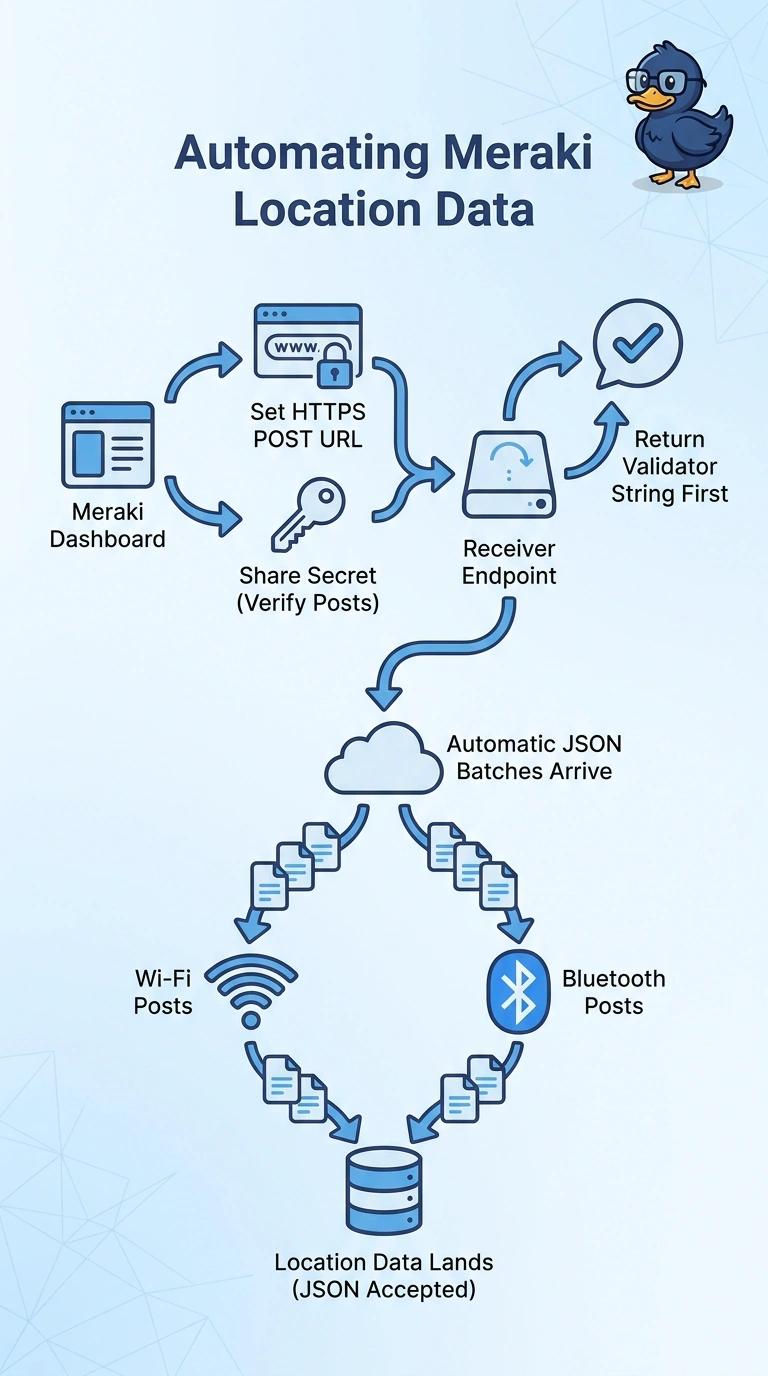
Short Explanation
You register the HTTPS URL and secret, pass Meraki’s validator check, and accept JSON observation posts to receive both Wi-Fi and Bluetooth sightings. Your receiver is ready when validation succeeds and it can accept those posts.
Full Explanation
The correct setup registers the HTTPS destination and shared secret, completes Meraki’s validator exchange, and configures the receiver to accept JSON observation posts. This lets Meraki’s cloud deliver the requested Wi-Fi client and Bluetooth beacon sightings to the analytics service. A receiver configured with the URL but no secret is missing a required registration credential, even if it answers the validator request and accepts posts. A receiver that accepts Wi-Fi sightings only would exclude the Bluetooth beacon data the retailer needs. Returning HTTP 200 to the validator without echoing its token is not enough: Meraki expects the validator response to include the token, so a generic success status does not complete validation. Exam caveat: distinguish accepting the validator request from returning the expected token; both matter for this setup. Practical check: run the dashboard’s validation test, confirm the expected token response, and inspect receiver logs for JSON posts containing both Wi-Fi and Bluetooth observations.