
An administrator is troubleshooting a pilot deployment and wants the most appropriate next step. What is the best way to handle data tiering while staying aligned with the certification objectives?
Select an answer to reveal the explanation.
Short Explanation and Infographic
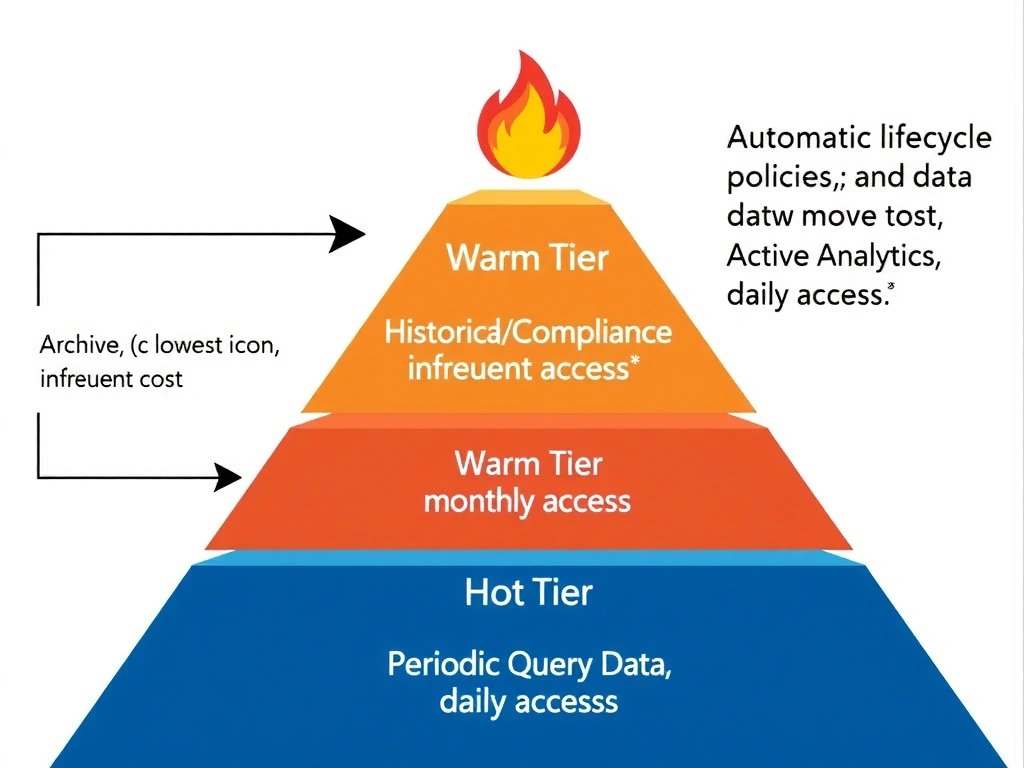
Here's the deal: not all data deserves a front-row seat. IBM watsonx.data uses tiered storage to match data temperature to storage cost — hot data on fast, expensive tiers for active queries, warm on mid-tier, and cold on cheap archival storage for compliance and infrequent access. Putting everything on the fastest tier is like driving a sports car to the grocery store every day — technically works, financially painful.
Full explanation below image
Full Explanation
IBM watsonx.data supports data tiering through integration with IBM Cloud Object Storage storage classes (Standard, Vault, Cold Vault, Smart Tier) and on-premises storage tiers. The correct answer — placing data on cost-appropriate storage tiers based on performance, retention, and access patterns — reflects the storage optimization model that makes lakehouse economics viable at enterprise scale. Keeping all historical data on the fastest tier (Option A) dramatically inflates storage costs for data that is rarely accessed; active query performance does not require historical archival data to live on premium storage. Archiving active query data to cold storage (Option B) does the opposite harm — moving frequently queried data to cold tiers increases query latency and may incur retrieval fees for every access. Choosing tiers only by file extension (Option D) is not a governance-based tiering strategy; extension alone conveys no information about access frequency, business value, or retention requirements. Proper data tiering requires lifecycle policies based on access patterns, data age, and SLAs rather than file-level heuristics.