You have trained a machine learning model and want to deploy it so that external mobile apps and third-party web services can query it to receive real-time predictions. Which technology is best suited for exposing this model as a service?
Select an answer to reveal the explanation.
Short Explanation and Infographic
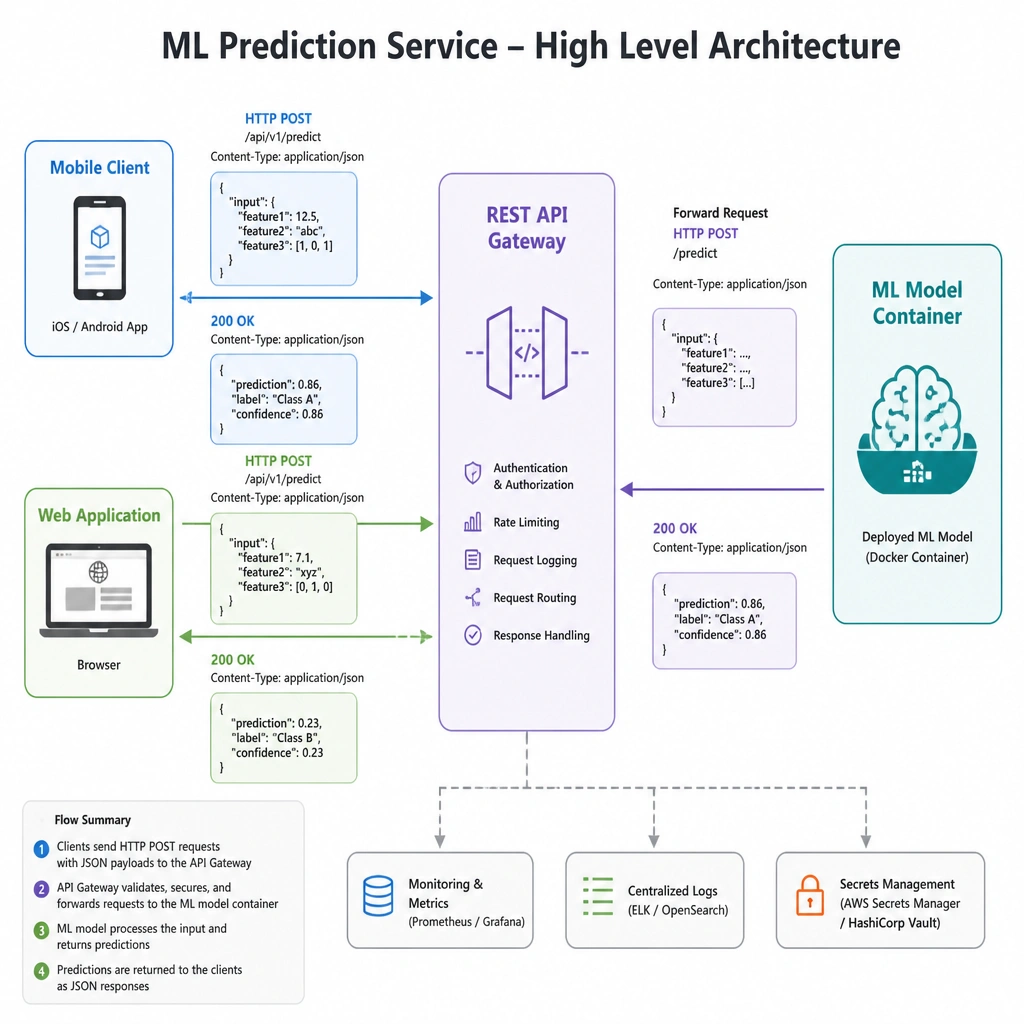
Imagine your boss walks in and says, "Hey, that machine learning model you built is awesome. Now, our mobile developers need to send customer data to it and get predictions back instantly." How do you connect them? You don't send them a Jupyter Notebook or a CSV file! You wrap your model in a web service using a RESTful API. This creates an endpoint—a URL—that the mobile app can send a JSON request to, and your model will run the prediction and shoot back a JSON response. It's clean, standard, and it's how the entire software world communicates in production. Trust me on this!
Full explanation below image
Full Explanation
To make a machine learning model accessible to external applications, it must be deployed as a web service. A RESTful API (Representational State Transfer Application Programming Interface) is the standard technology for this task. It allows client applications (such as mobile apps, front-end websites, or other microservices) to communicate with the model server over HTTP. Clients send requests containing input features (often formatted as JSON), and the API endpoint routes this data to the model, triggers inference, and returns the prediction back to the client. Frameworks like FastAPI, Flask, or cloud-based model hosting services (e.g., AWS SageMaker, Azure ML, Google Vertex AI) are commonly used to build and expose these REST APIs.
Let's look at why the other options are not suitable for web service deployment: - A Jupyter Notebook (Option A) is an interactive development environment used for prototyping, exploratory data analysis, and model training, not for serving high-performance, real-time production requests. - A CSV file (Option C) is a static data format. It cannot process live inputs or dynamically execute model code. - A standalone Python script (Option D) running locally lacks the web routing, concurrency management, and protocol handling required to accept and respond to external network requests.