
A Run Command update reached most of a factory fleet and skipped several EC2 instances. Those instances do not appear as managed nodes. What should the operator check?
Select an answer to reveal the explanation.
Short Explanation
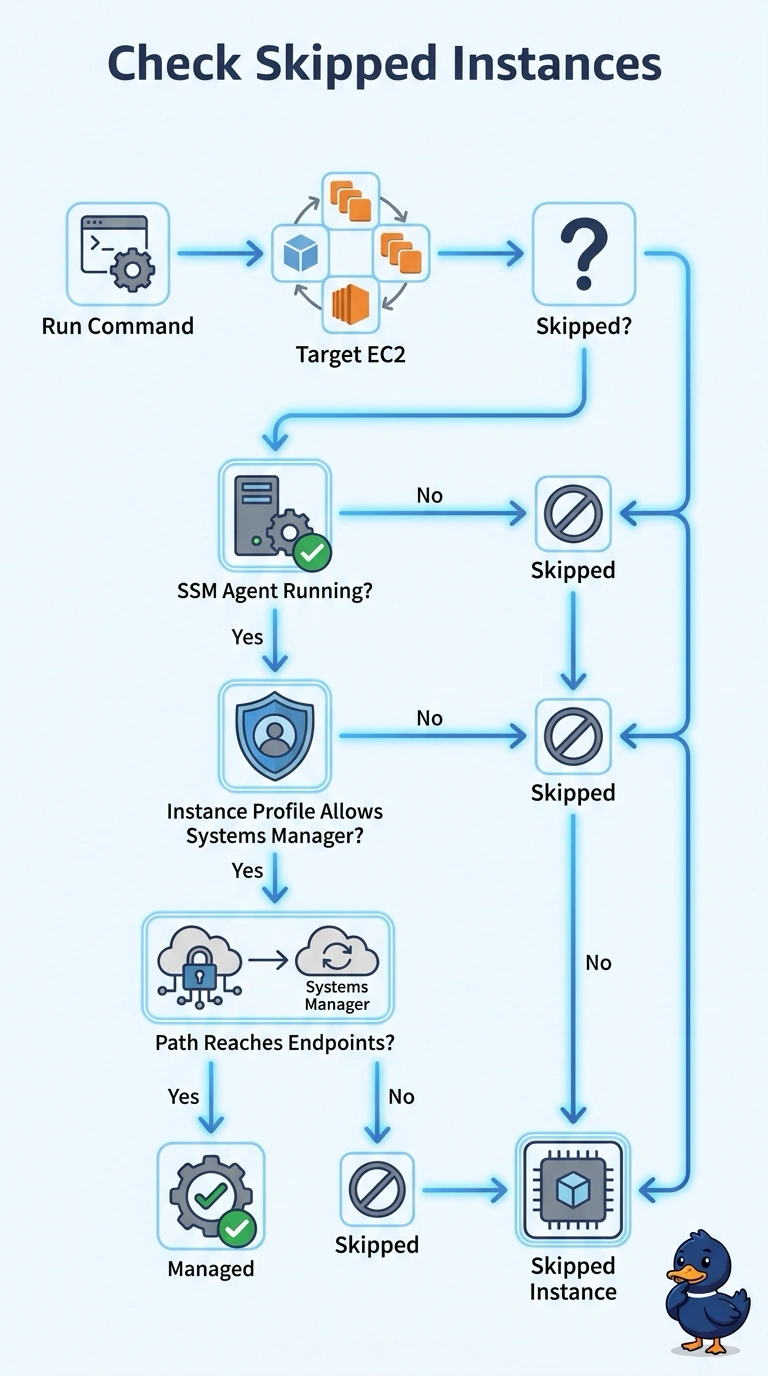
A work order left on the counter never reaches a shop that is not on the dispatch list. You check the SSM agent, the instance profile, and a path to Systems Manager, because those are what make a managed node. Volume type and the CloudWatch agent do not register the instance for Run Command.
Full Explanation
Run Command runs only on managed nodes. An EC2 instance becomes a managed node when the SSM agent is running, the instance profile lets that agent call Systems Manager, and the instance can reach the Systems Manager endpoints, through the internet path or through interface endpoints. Any one of those missing explains a skipped instance that does not appear in the managed-node list. Tenancy, the AMI product code, and the document's Region do not register the agent. Volume type, snapshots, and instance store are storage details and do not create a managed node. The CloudWatch agent publishes metrics. It is a different agent, and its namespace and alarms do not make the instance eligible for Run Command. A ping that stays offline after the agent is installed usually means the profile or the path is still wrong. Caveat: a private subnet with no route to the endpoints stays offline even when the agent and the profile are correct. Operational check: the skipped instances should show an online ping status in Systems Manager before the command is sent again.