
A virtualization engineer needs to configure NVIDIA virtual GPU (vGPU) profiles for design engineers who require workstation-class CAD application performance and support for up to four 4K displays. Which NVIDIA vGPU software license edition should be selected?
Select an answer to reveal the explanation.
Short Explanation and Infographic
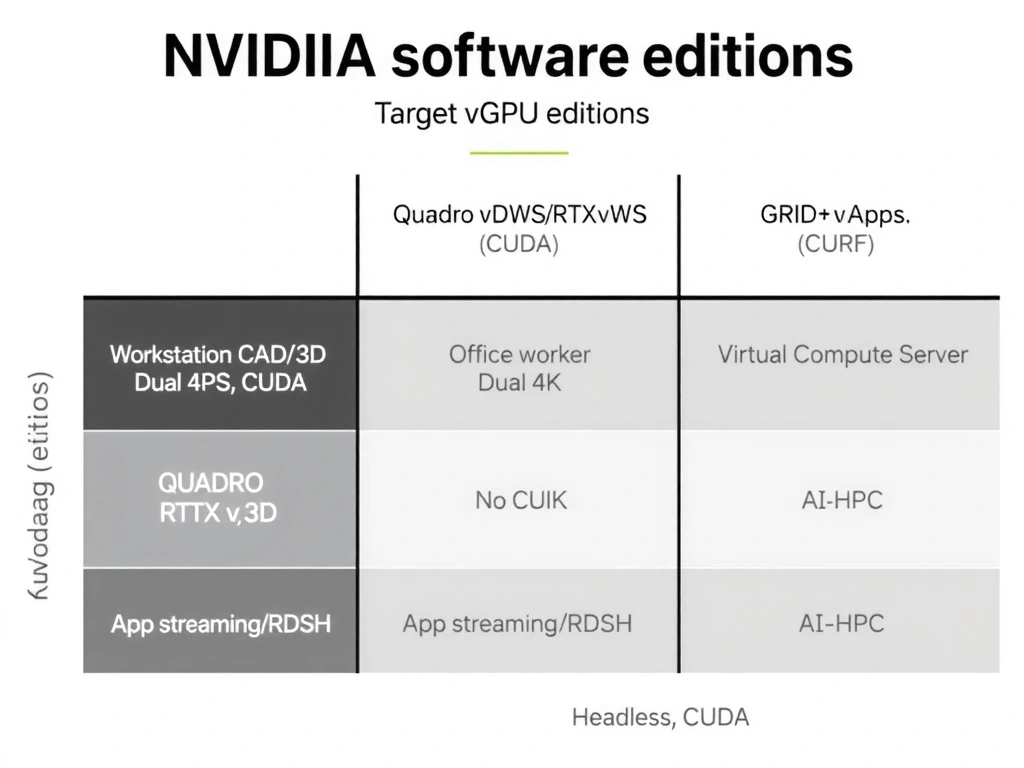
Okay, let's break down NVIDIA's vGPU lineup because they love to ask about this on the exam, and it's easy to get them mixed up. If you've got power users like CAD engineers, 3D animators, or architects who need serious workstation horsepower and want to run four 4K monitors, you need the big gun: Quadro Virtual DataCenter Workstation, or Quadro vDWS. Here is a quick cheat sheet for the exam: vCS is for heavy-duty compute—think AI, machine learning, and CUDA processing where you don't even need a display. vPC is for your standard office workers using Word and Excel (it maxes out at dual 4K). vApps is for hosted applications (RDSH) rather than full desktops. So, for professional graphics and quad 4K monitors, Quadro vDWS is your go-to. Got it? Sweet, let's keep rolling!
Full explanation below image
Full Explanation
NVIDIA virtual GPU (vGPU) technology allows multiple virtual machines to share a physical GPU's resources, or a single VM to harness multiple physical GPUs. NVIDIA packages this technology into different software editions tailored to specific workloads: 1. NVIDIA RTX Virtual Workstation (formerly Quadro vDWS): Designed for professional creators, engineers, and designers. It supports professional graphics APIs (OpenGL, DirectX), CUDA and OpenCL compute, and high-resolution display configurations, including up to four 4K (or two 8K) displays. It provides workstation-grade performance and software certifications for professional CAD, CAM, and GIS applications. 2. GRID Virtual PC (vPC): Intended for knowledge workers who require a virtual desktop with PC-like performance. It supports general business applications, web browsers, and high-definition video, but limits display support (typically up to dual 4K monitors) and does not support advanced professional graphics features or CUDA compute. 3. GRID Virtual Applications (vApps): Tailored for remote desktop session host (RDSH) environments, delivering virtualized applications rather than full virtual desktops. 4. NVIDIA Virtual Compute Server (vCS): Optimized for compute-intensive workloads such as artificial intelligence, deep learning, and high-performance computing (HPC) in virtualized environments. It does not prioritize display output, focusing instead on maximizing raw compute throughput and CUDA acceleration.