An image classification model deployed on a shared NVIDIA T4 GPU exhibits highly erratic latency, with response times spiking during periods of high general system activity. How can you stabilize the inference latency to ensure predictable execution times?
Select an answer to reveal the explanation.
Short Explanation and Infographic
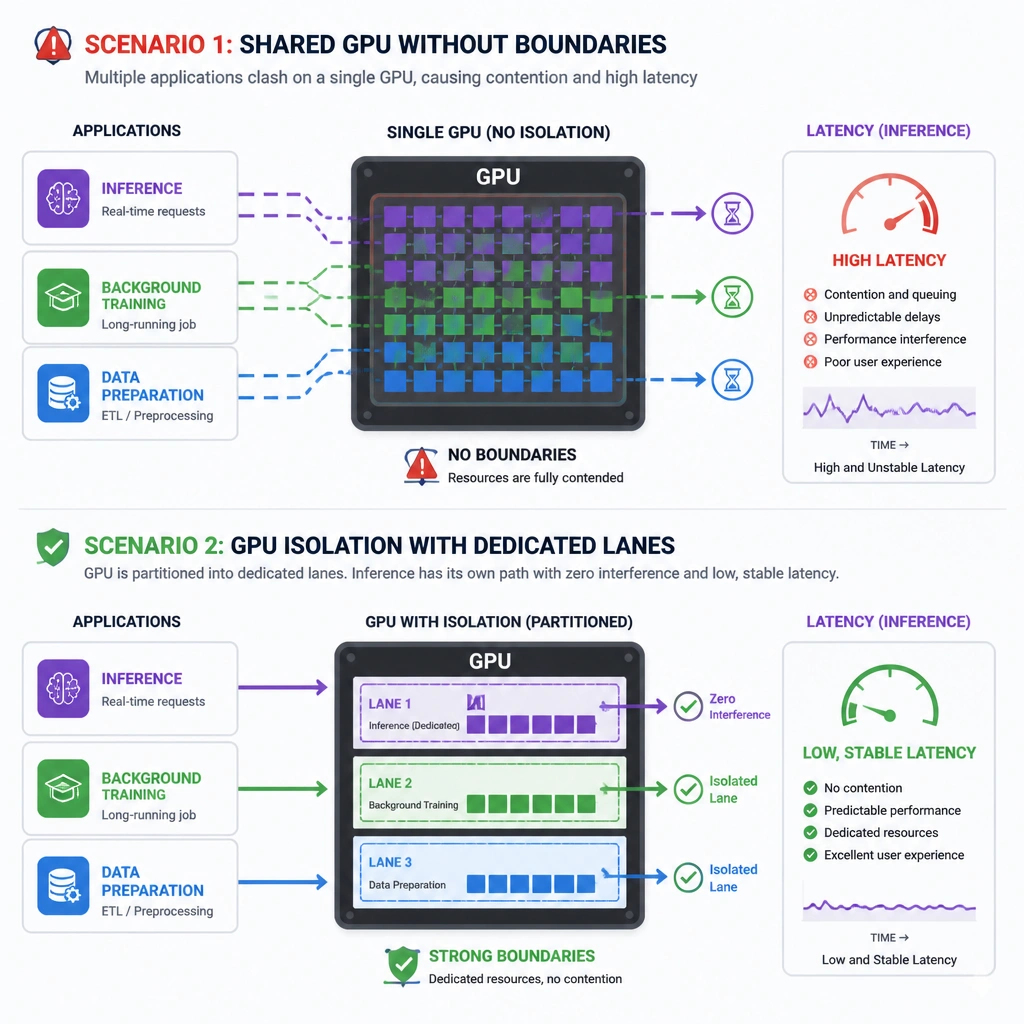
Check this out: if you share a GPU among different applications without setting boundaries, it's like sharing a single lane road with delivery trucks. When they decide to move, you're stuck in traffic. That's why your inference latency is bouncing all over the place! The NVIDIA T4 is a great workhorse, but if other processes are stepping on its toes, your response times will spike. To fix this, you have to isolate the GPU resources for your inference process. You can use container runtimes to dedicate specific GPU cores or memory to your app, or use Multi-Instance GPU (MIG) on supported hardware. This keeps other workloads out of your lane and ensures your latency stays flat and fast. Trust me on this, process isolation is production rule number one. Let's keep rolling!
Full explanation below image
Full Explanation
Erratic or inconsistent inference latency in a production environment is a classic symptom of resource contention. When multiple processes or containerized applications access the physical GPU simultaneously, they compete for compute cores (CUDA cores) and GPU memory bandwidth. This leads to context switching overhead and queueing delays. Implementing GPU isolation—by dedicating specific physical GPU resources, utilizing Docker container GPU mapping (--gpus device=X), or configuring Multi-Instance GPU (MIG) where supported—ensures that the inference process has exclusive access to a defined slice of the hardware. This prevents noisy neighbors from degrading latency.
Why the other options do not resolve the issue: - Increasing inference threads (Option A) can actually worsen latency. If the GPU is already bottlenecked by resource contention, adding more software threads increases scheduling overhead and contention for the same limited hardware resources. - Upgrading drivers (Option C) is a good maintenance practice, but it will not solve the underlying architectural issue of uncontrolled resource sharing and contention. - Deploying on a CPU (Option D) generally results in significantly higher baseline latency for deep learning models. While it might remove GPU contention, it violates the requirement for low-latency execution and represents an inefficient rollback of hardware acceleration.
For modern enterprise deployments, separating training and inference workloads onto distinct physical nodes or using partitionable architectures like MIG on NVIDIA Ampere/Hopper architectures is standard practice to guarantee SLA-compliant response times.