You are supervising an enterprise HPC data center environment running intensive AI training pipelines. During a heavy training run, you notice a massive drop in training throughput (FLOPs) accompanied by a sudden decline in GPU power usage and clock speeds. You suspect that the system is entering a thermal protection state. Which two methods should you implement to verify this condition and resolve the root physical cause? (Choose two)
Select all correct answers, then click Submit.
Short Explanation and Infographic
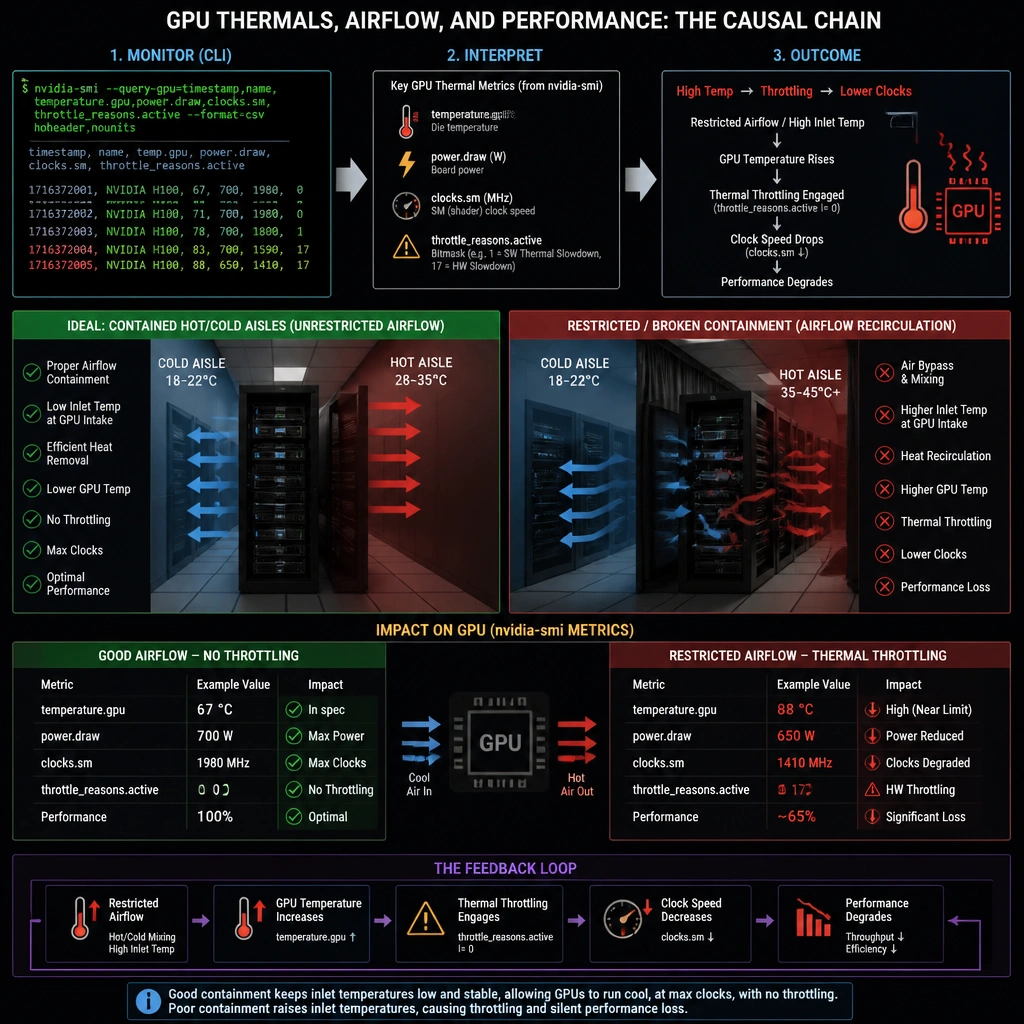
Here's the deal: if your GPUs are getting too hot, they are going to throttle themselves to save their own silicon from melting. Think of it like running a marathon in the desert—eventually, you've got to slow down or you'll collapse. When your boss walks in and asks why the training throughput just fell off a cliff, the very first thing you do is run nvidia-smi. That command is your window into the GPU's soul. It'll show you the exact temp and whether the card is actively throttling. Once you confirm they're running hot, you don't just change software settings or, heaven forbid, try to disable safety features (that's a quick way to start a fire!). Instead, you walk down to the server room and check the physical cooling—make sure the hot/cold aisles are sealed, the fans are spinning, and the filters aren't choked with dust. Trust me on this, keeping the air flowing is just as important as writing clean code. Got it? Sweet. Let's keep rolling.
Full explanation below image
Full Explanation
When NVIDIA GPUs reach their maximum safe operating temperature, they automatically invoke thermal throttling, reducing their core clock speeds to decrease power consumption and heat output. This safety mechanism protects the physical silicon from permanent damage but results in a significant drop in computational throughput (FLOPs). To diagnose and resolve this issue, administrators must perform two key steps. First, they need to query the current state of the hardware. The System Management Interface (nvidia-smi) is the standard tool for monitoring NVIDIA GPUs, providing real-time data on temperature, power draw, and performance state (P-State) throttling flags. Second, because thermal throttling is typically caused by environmental or cooling failures, the physical infrastructure must be examined. Checking data center airflow, hot/cold aisle isolation, and server fans addresses the root cause of the cooling failure. Overclocking (Option A) or disabling thermal protection (Option E) are dangerous and will either fail due to hardware-level safety locks or cause catastrophic hardware destruction. Reducing the batch size (Option D) reduces VRAM footprint but does not resolve the cooling system's failure to handle sustained computing loads.