You are optimizing a real-time video inference application running on NVIDIA GPUs. Despite having state-of-the-art GPU hardware, the system's frames-per-second (FPS) throughput remains low, and telemetry shows that GPU utilization spikes briefly and then drops to 0% repeatedly. What is the most critical first step to diagnose and resolve this performance issue?
Select an answer to reveal the explanation.
Short Explanation and Infographic
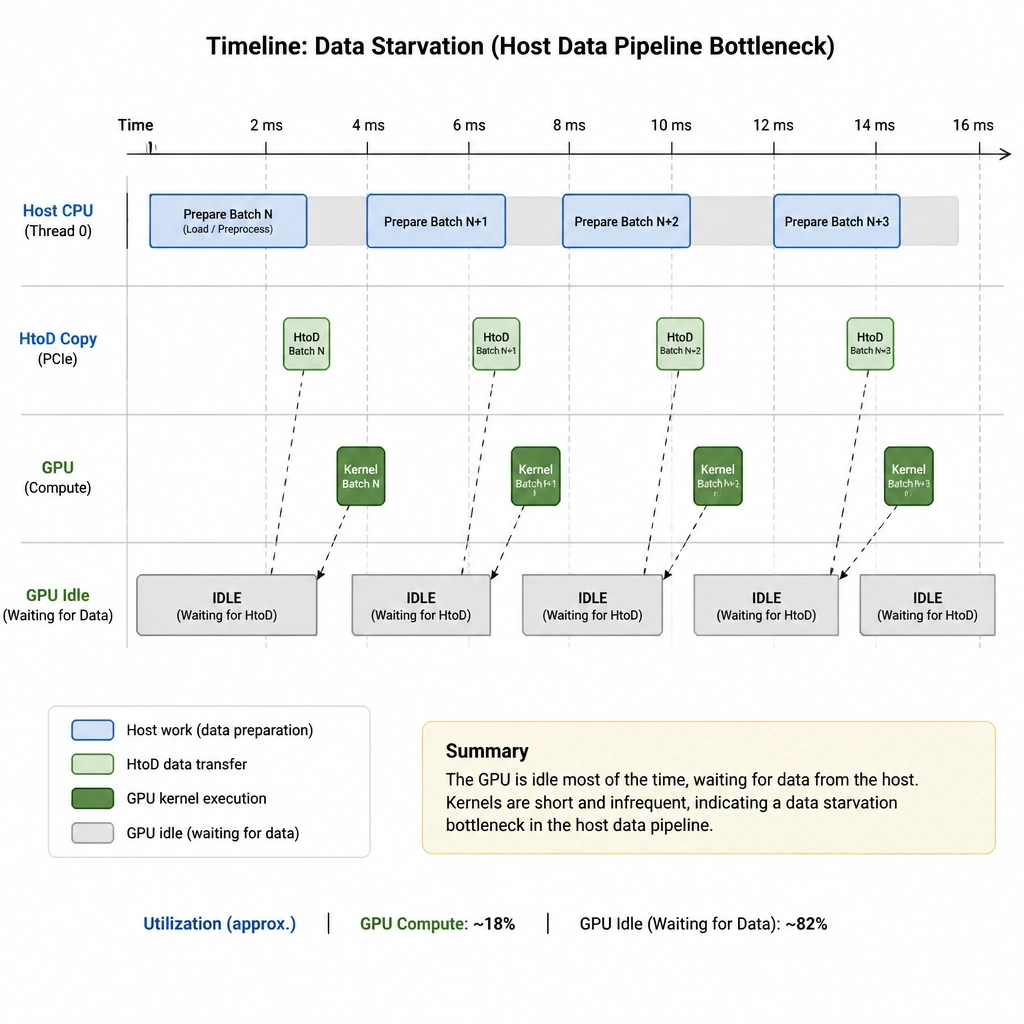
Pay close attention here, because this one bites people in production all the time. You buy the fastest, most expensive GPUs on the market, load up your real-time video model, and... it's running like molasses. When you look at the GPU utilization, it looks like a roller coaster: spiking to 99%, then dropping to zero. That's a classic sign of data starvation! The GPU is running so fast that it finishes processing and then has to sit around waiting for the CPU to load, decode, and copy the next frame over the PCIe bus. If you just increase the batch size, you might actually make the latency worse. What you need to do is profile your data loading pipeline. Fix the slow disk reads, optimize the CPU decoding, or pre-fetch data. Once the pipeline is clear, the GPU will stay fed and your inference speed will soar!
Full explanation below image
Full Explanation
In high-performance AI inference pipelines, performance bottlenecks often occur outside of the actual GPU execution window, particularly in the data ingestion and preprocessing stages. - The behavior described (GPU utilization spiking and dropping to zero) indicates "starvation," where the GPU execution cores are idle because they are waiting for the next batch of data to be loaded from storage, decoded (especially for video), preprocessed (resized, normalized), and transferred across the PCIe bus. Profiling the data loading pipeline allows engineers to identify these bottlenecks (e.g., synchronous single-threaded loading) and implement solutions like asynchronous data transfer, multi-threaded loading, or GPU-accelerated decoding (using NVIDIA DALI or NVDEC). - Increasing batch size is helpful for throughput in batch processing, but for real-time inference, it increases latency because the system must wait to accumulate enough frames to fill the batch. It does not resolve the underlying ingestion bottleneck. - CUDA Unified Memory simplifies memory management but can introduce page fault overhead during transfers, which may degrade real-time inference performance. - Disabling thermal throttling is hazardous to hardware health and does not address the data pipeline starvation issue.