An enterprise data center manager is tasked with lowering the utility bills and heat output of a cluster of NVIDIA-accelerated servers running mixed AI workloads. The goal is to minimize power draw during idle or low-utilization periods without bottlenecking performance during peak deep learning training runs. Which strategy achieves this balance?
Select an answer to reveal the explanation.
Short Explanation and Infographic
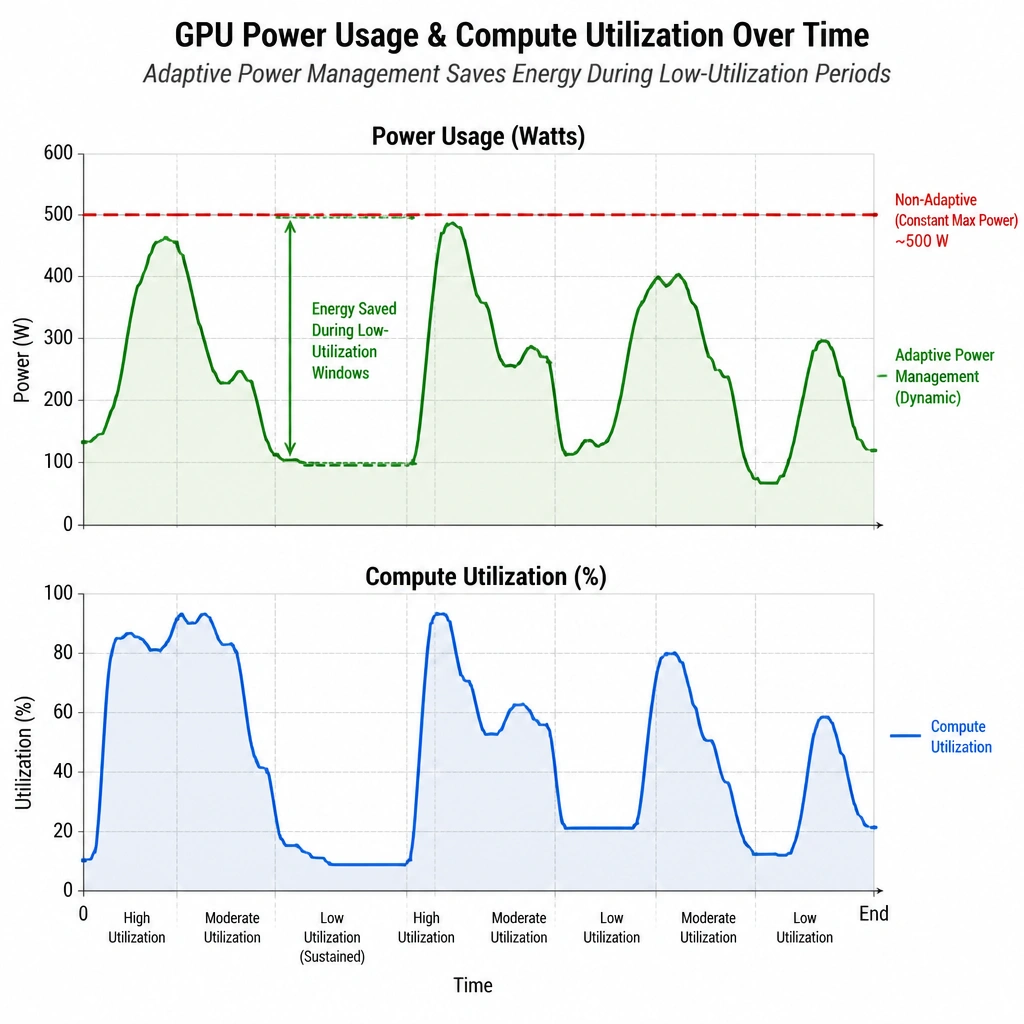
Imagine your boss walks in and says, 'Our electricity bill for the AI cluster is out of control, but if you drop our training speeds, you’re fired.' Talk about a high-pressure situation! The fix here is pretty cool: NVIDIA's adaptive power management features. Instead of running your GPUs at full throttle 24/7—which wastes energy like leaving your car idling at red lights—these features dynamically scale the clocks and power draw based on what the workload actually needs. When the GPU is waiting on storage or CPU data, it dials back. When it's crunching matrix math, it scales up. It's smart, efficient, and saves a ton of cash without hurting your performance.
Full explanation below image
Full Explanation
Managing the power envelope of a high-performance computing (HPC) or AI data center is critical for reducing operational expenditure (OpEx) and thermal output. NVIDIA GPUs support advanced power management technologies, such as dynamic power management and power capping, which optimize energy consumption based on active workloads.
By enabling adaptive power management features (such as NVML-based power management or dynamic power states like P-states), the system automatically scales down the GPU's clock speeds and operating voltages when it is under-utilized, idle, or waiting for I/O operations (like fetching data from storage). When intensive computational tasks are executed, the GPU scales up to its required operational frequency. This ensures that energy is not wasted during non-compute phases of training pipelines, without degrading the performance of active compute phases.
Let's look at why the other options fail: - Running GPUs at maximum clock speeds continuously (Option A) prevents the hardware from stepping down to lower power states, resulting in maximum power consumption and heat generation even when the system is idle. - Utilizing older GPUs (Option B) is counterproductive. Older GPU architectures are significantly less power-efficient per watt than modern architectures (which offer better performance-per-watt ratios). - Disabling power capping (Option D) permits unrestricted voltage and power consumption, which can lead to thermal throttling and excessively high energy consumption without necessarily improving execution speed.
Implementing adaptive power management ensures that the infrastructure adapts to real-time workload demands, yielding the best balance between computational throughput and energy efficiency.