You are managing an enterprise AI data center where several GPU nodes have experienced unexpected shutdowns and hardware degradation during prolonged 72-hour deep learning training runs. To implement a proactive alerting system and prevent hardware failure from thermal stress, which telemetry metric must you monitor and set critical thresholds for?
Select an answer to reveal the explanation.
Short Explanation and Infographic
Pay close attention here, because this one bites people in production all the time. When you run deep learning models, you are pushing these GPUs to their absolute limits for days or weeks on end. They are running hot, and I mean hot. If the temperature gets too high, the GPU will try to save itself by throttling its speed—which ruins your training time. But if it stays hot or spikes too fast, the hardware will just shut down or, worse, suffer permanent damage. That's why you must monitor GPU temperature like a hawk. Setting up alerts for when core temperatures cross, say, 80 degrees Celsius lets you ramp up the fans or gracefully migrate the workload before you end up with fried hardware. Sure, tracking VRAM utilization is important to avoid 'Out of Memory' crashes, and power draw matters, but thermal stress is the number one killer of silicon under heavy loads. Trust me, keep your cool! Let's keep rolling.
Full explanation below image
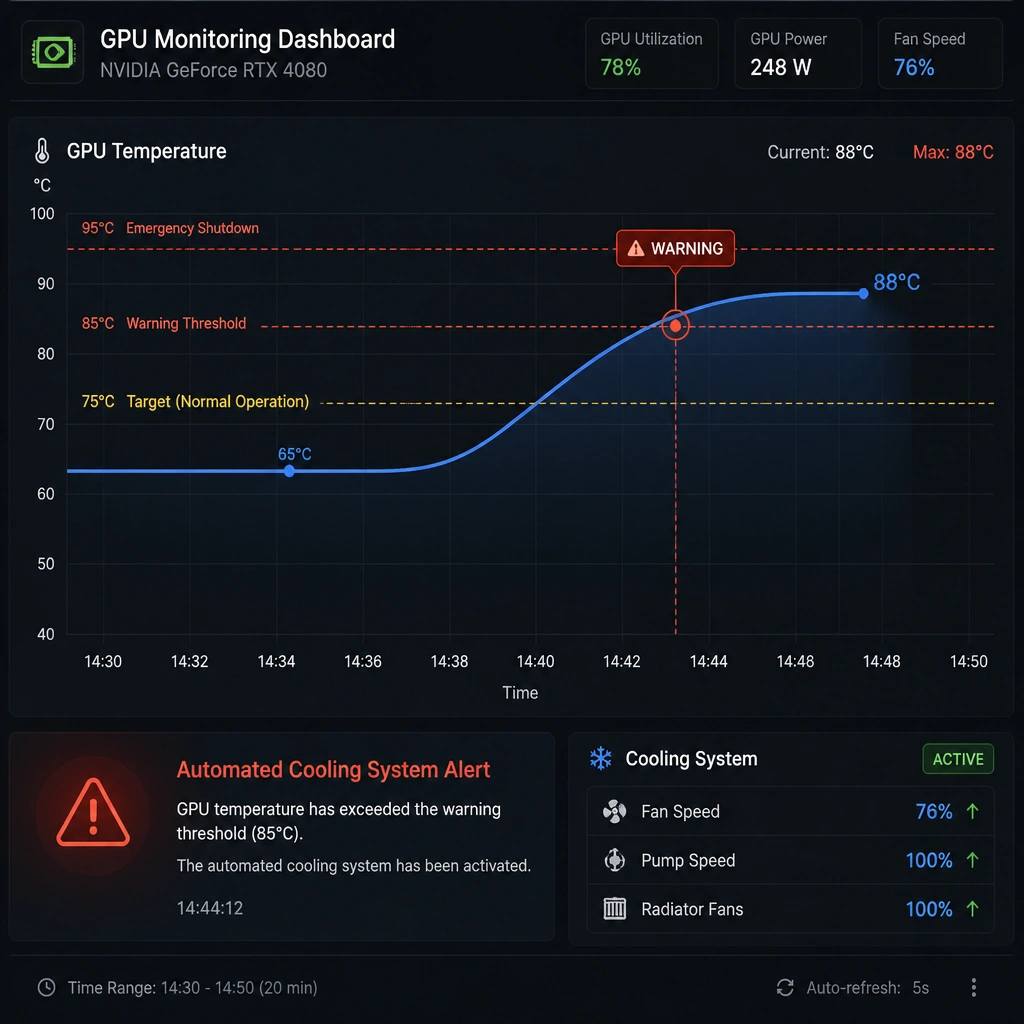
Full Explanation
During intensive deep learning training sessions, GPUs operate near their maximum thermal design power (TDP) for extended periods. This continuous power draw generates massive amounts of heat. If the cooling infrastructure (fans, liquid blocks, airflow) fails or is insufficient, the temperature of the GPU silicon will rise rapidly.
To prevent permanent physical damage, GPUs utilize internal thermal sensors to trigger protective mechanisms: 1. Thermal Throttling: The GPU decreases its clock speed and voltage to reduce heat output, leading to severe performance degradation. 2. Thermal Shutdown: If the temperature crosses a critical safety threshold (typically between 85°C and 95°C depending on the architecture), the GPU driver or hardware triggers an emergency shutdown to prevent catastrophic silicon failure.
Monitoring GPU core and junction temperatures allows system administrators to build proactive alerting and mitigation workflows. For example, if a node's temperature exceeds a warning threshold, the cluster orchestrator can stop scheduling new tasks to that node or increase fan speeds.
Let's look at the incorrect options: - Option A: PCIe link width and speed indicate the bandwidth of the data path between the CPU and GPU. While vital for data transfer speeds, it does not correlate with thermal stress or predict imminent hardware failures. - Option B: Frame buffer (VRAM) utilization tells you how much graphics memory is in use. Exceeding VRAM capacity triggers 'Out of Memory' (OOM) runtime software errors, but it does not cause hardware degradation or thermal shutdowns. - Option D: While monitoring PDU input voltage is a good data center practice, it tracks facility-level electrical delivery, whereas thermal degradation is localized to the silicon chips under heavy load.
Consequently, monitoring GPU temperature is the most direct and critical strategy for preventing heat-related hardware failures.