When designing a virtualized infrastructure to support multiple virtual machines (VMs) running AI inference and design workloads, which technology should you implement to dynamically allocate physical GPU resources to virtual machines?
Select an answer to reveal the explanation.
Short Explanation and Infographic
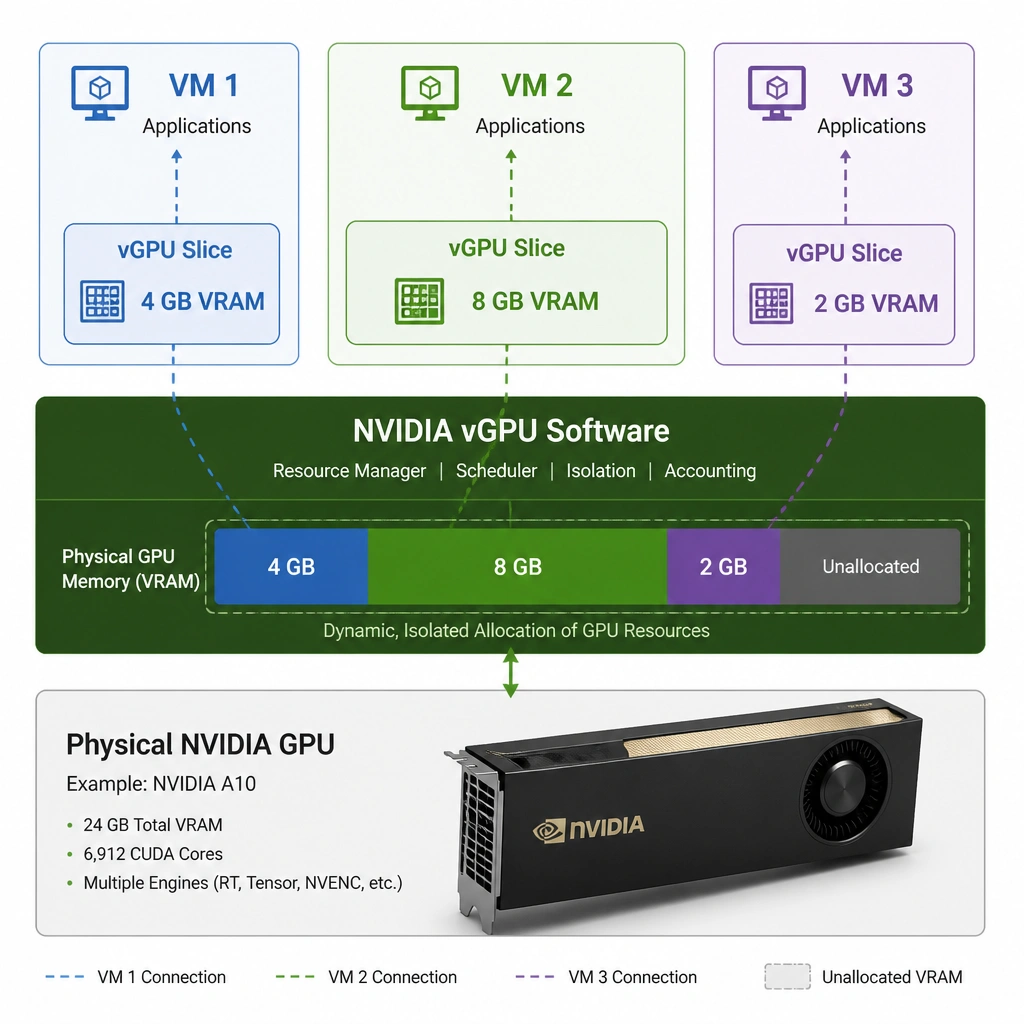
Alright, let's look at virtualization. In the old days, if a virtual machine needed a GPU, you had to pass the entire physical card directly to that VM. Great for that one VM, but terrible for everyone else who wanted to use it. It's like buying a whole highway for one car! Today, we use NVIDIA vGPU (formerly known as GRID). This software sits between your physical GPU and the hypervisor, allowing you to slice up the GPU and share it among multiple VMs. Each VM gets virtual GPU resources allocated dynamically based on its needs. This gives you the performance of a physical GPU with the flexibility and cost-effectiveness of virtualization. Pretty cool, right?
Full explanation below image
Full Explanation
Virtualizing GPU resources is essential for cloud providers and enterprise data centers to maximize hardware utilization and flexibility. When multiple Virtual Machines (VMs) require GPU acceleration for AI workloads, simply passing through an entire physical GPU to a single VM (Direct Device Assignment or Passthrough) is highly inefficient and does not scale.
NVIDIA vGPU (virtual GPU) technology solves this by allowing a physical GPU to be shared among multiple virtual machines. The vGPU software manager (integrated into hypervisors like VMware ESXi or Red Hat KVM) creates virtual GPU instances from the physical hardware. Each VM is assigned a vGPU profile, which defines the amount of frame buffer (VRAM) and GPU compute engines allocated to it. The physical GPU's Streaming Multiprocessors (SMs) are scheduled dynamically among the VMs, ensuring that workloads receive GPU acceleration when needed while maintaining isolation and security between VMs.
Let's check the incorrect options: Option B is incorrect because disabling hardware virtualization and pinning CPU threads does not provide GPU acceleration. CPU-only execution is highly inefficient for parallelizable AI workloads like deep learning inference. Option C is incorrect because DirectPath I/O (passthrough) for storage controllers does not solve the problem of sharing GPU compute resources. It only addresses storage I/O and does not provide GPU virtualization. Option D is incorrect because CPU-emulated graphics drivers run entirely on the host CPU. They lack the parallel processing units (CUDA cores, Tensor cores) of a physical GPU, resulting in extremely slow performance for AI workloads.