
Lucerne Publishing wants all documents uploaded to their 'Legal Contracts' SharePoint site to be automatically labeled with the 'Highly Confidential - Legal' sensitivity label — without requiring any action from users — when those documents contain words like 'CONFIDENTIAL' or 'ATTORNEY-CLIENT'. What should the compliance administrator configure to achieve this?
Select an answer to reveal the explanation.
Short Explanation and Infographic
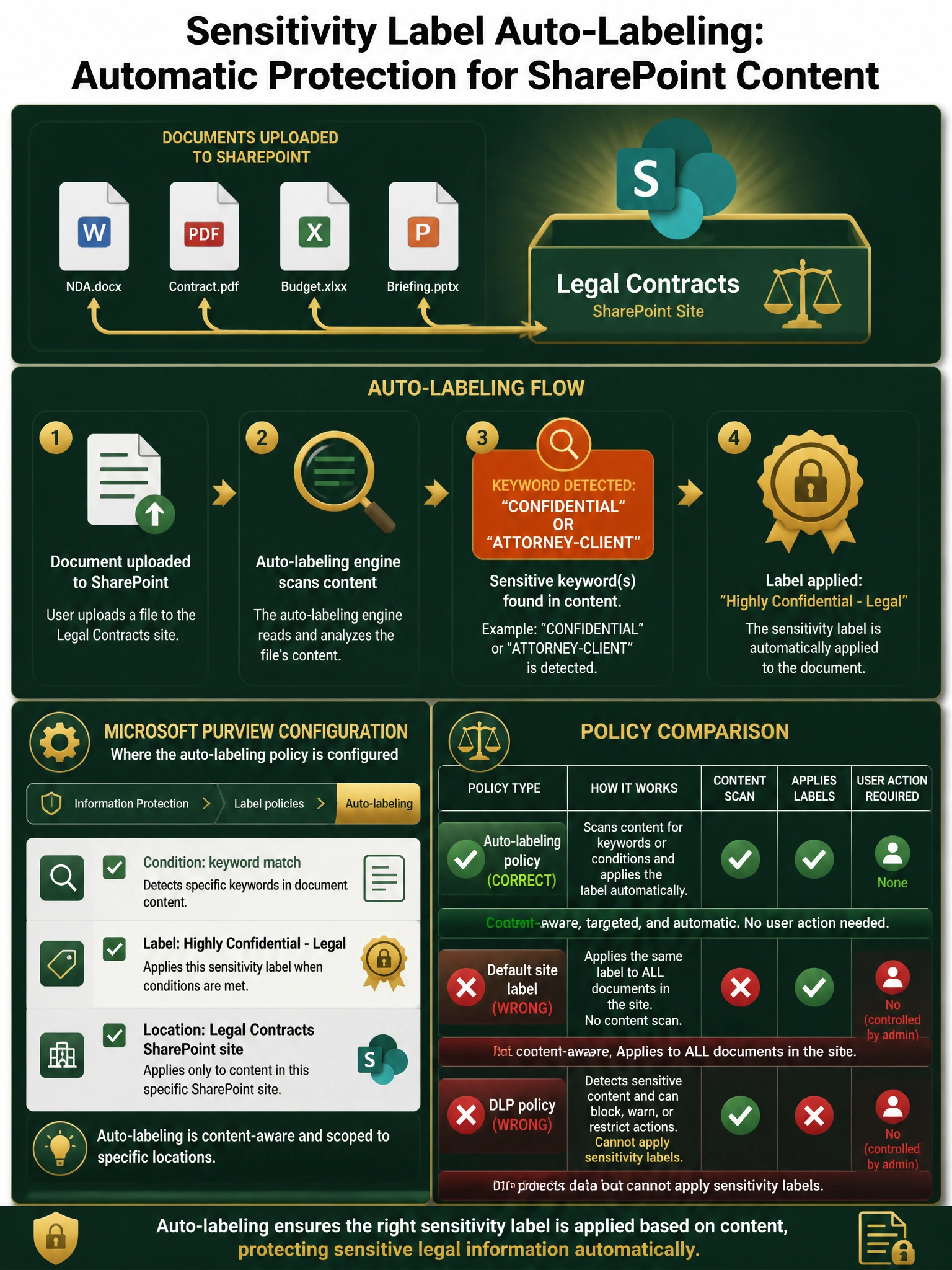
Auto-labeling for SharePoint is like having a stamp machine that reads every page coming off the printer — it scans document content and stamps the right label automatically. This lives inside the sensitivity label policy in Microsoft Purview, under the 'Auto-labeling' tab, not in DLP or retention policies.
Full explanation below image
Full Explanation
The correct answer is B. Auto-labeling sensitivity label policies in Microsoft Purview are specifically designed to scan content at rest in SharePoint (and OneDrive) and automatically apply a sensitivity label based on conditions — including keyword matching, sensitive information types, or trainable classifiers — without any user involvement. You configure this in Microsoft Purview > Information Protection > Label policies > Auto-labeling, set the conditions (keyword = 'CONFIDENTIAL' or 'ATTORNEY-CLIENT'), select 'Highly Confidential - Legal' as the label to apply, and scope it to the 'Legal Contracts' SharePoint site.
Option A is incorrect. DLP policies can detect sensitive content in SharePoint and take protective actions (like blocking external sharing or alerting), but applying a sensitivity label is NOT a supported DLP policy action. DLP and sensitivity labels work in complementary ways, but label application is controlled through label policies, not DLP policies.
Option C is incorrect. Retention labels are a completely different object from sensitivity labels. Retention labels control how long content is kept and whether it can be deleted — they have nothing to do with encryption, visual markings, or access permissions. The scenario requires a sensitivity label (which can apply encryption and visual markings), not a retention label.
Option D is incorrect. The 'Default label' setting on a SharePoint site does apply a sensitivity label to new documents, but it applies the same label to EVERY document regardless of content — it does not inspect document content. This fails the requirement because it would label all documents on the site, not just those containing the specific keywords. Additionally, default site labels apply labels when documents are created or uploaded without a label, not based on content scanning.
Exam tip: Know the difference between three types of label policies: (1) published label policies — make labels available for users to manually apply; (2) auto-labeling policies — scan content and apply labels automatically based on conditions; (3) default site labels — apply a fixed label to all content on a site. The AB-650 exam will test whether you can pick the right policy type for the scenario.