
Adventure Works' security team wants to use Microsoft Entra ID Protection's sign-in risk signals to automate their response to risky sign-ins. Their policy is: sign-ins flagged as 'High' risk should be completely blocked, while sign-ins flagged as 'Medium' risk should be allowed if the user completes MFA. What is the correct way to implement this in Microsoft Entra?
Select an answer to reveal the explanation.
Short Explanation and Infographic
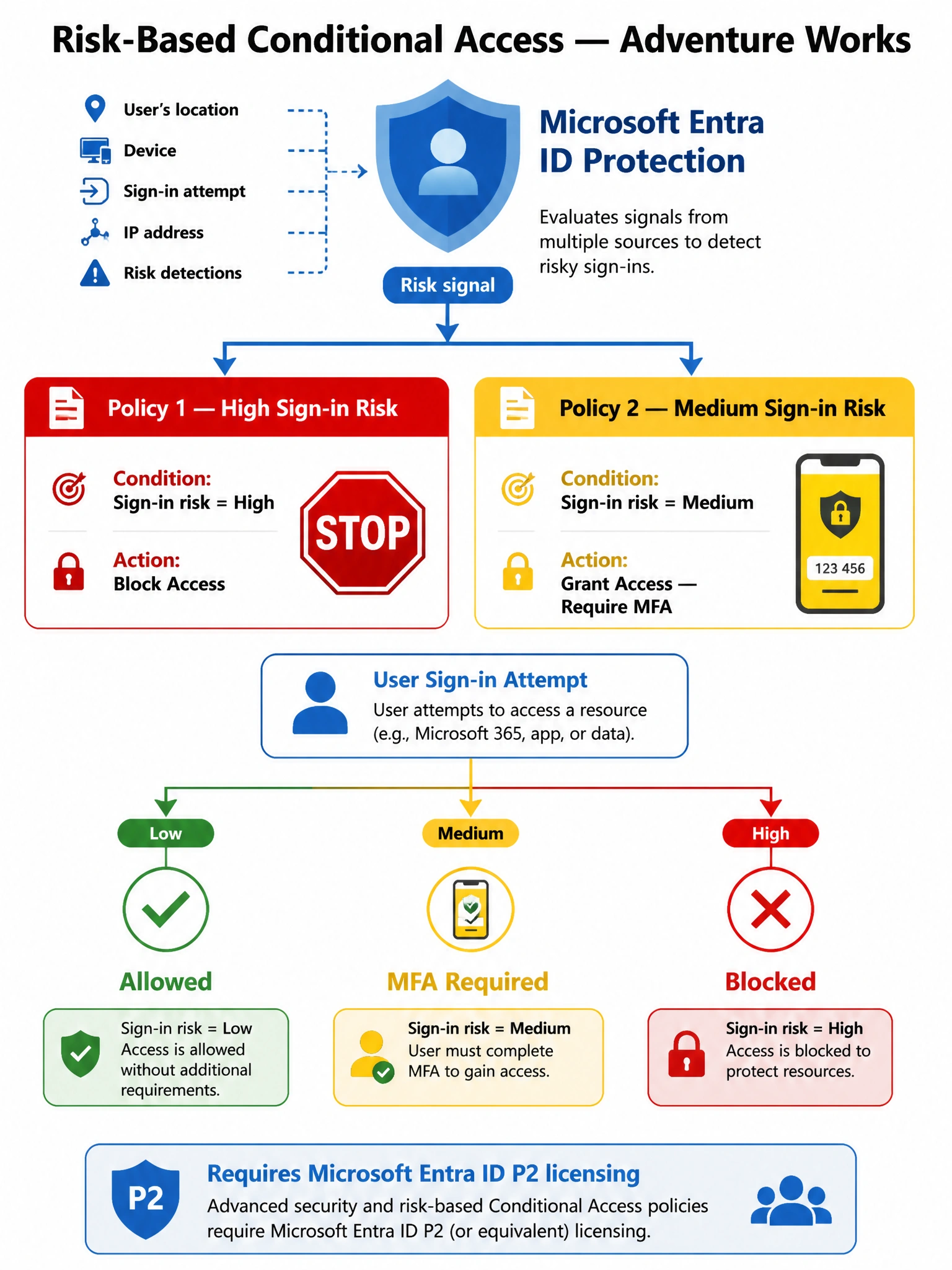
Think of sign-in risk like a traffic light: High risk gets a red light (block completely), Medium risk gets a yellow light (slow down — prove it's really you with MFA). One policy can't do both jobs because you can't simultaneously block and grant access, so you need two separate Conditional Access policies, each targeting a different risk level.
Full explanation below image
Full Explanation
Microsoft Entra Conditional Access supports sign-in risk as a condition (available when Entra ID Protection / Microsoft Entra ID P2 licensing is present). A single CA policy can target one or more specific risk levels. Because the desired outcome differs per risk level — Block for High, Grant+MFA for Medium — two separate policies are required. Policy 1: Conditions > Sign-in risk = High; Access controls > Block access. Policy 2: Conditions > Sign-in risk = Medium; Access controls > Grant access, Require multi-factor authentication. This is the Microsoft-recommended architecture for risk-based access control.
Option A is incorrect because a single policy targeting all risk levels with Block access would also block Medium-risk users, denying them the option to self-remediate with MFA. This is overly restrictive and doesn't match the requirement to allow MFA for medium-risk sign-ins.
Option C is incorrect because Microsoft Entra ID Protection does have its own built-in sign-in risk policy (legacy feature), but Microsoft now recommends managing risk responses through Conditional Access policies instead of the Identity Protection policy blade. More importantly, the legacy Identity Protection sign-in risk policy supports block or require MFA but cannot differentiate between High and Medium risk with different actions in the same policy. Using Conditional Access provides more control and is the current best practice.
Option D is incorrect because Microsoft Sentinel is a SIEM/SOAR platform used for broader threat detection, investigation, and response across the enterprise. While Sentinel can detect risky sign-ins and trigger playbooks, this approach is significantly more complex, introduces latency in the remediation loop, and is not the purpose-built solution for this scenario. Conditional Access provides real-time, inline enforcement at the authentication layer.
Exam tip: Conditional Access sign-in risk conditions require Microsoft Entra ID P2 (or Microsoft 365 E5). Know that High risk = Block and Medium risk = MFA is the standard Microsoft recommended posture. Two separate policies for two different outcomes is the correct implementation pattern.