
Woodgrove Bank has deployed Microsoft 365 Copilot to 1,000 users. The compliance team is concerned that users might be accessing sensitive customer financial data through Copilot prompts and that this exposure is not visible to administrators. The team needs a solution to monitor AI interactions involving sensitive data and receive recommendations for improving AI data security posture. What should the admin enable?
Select an answer to reveal the explanation.
Short Explanation and Infographic
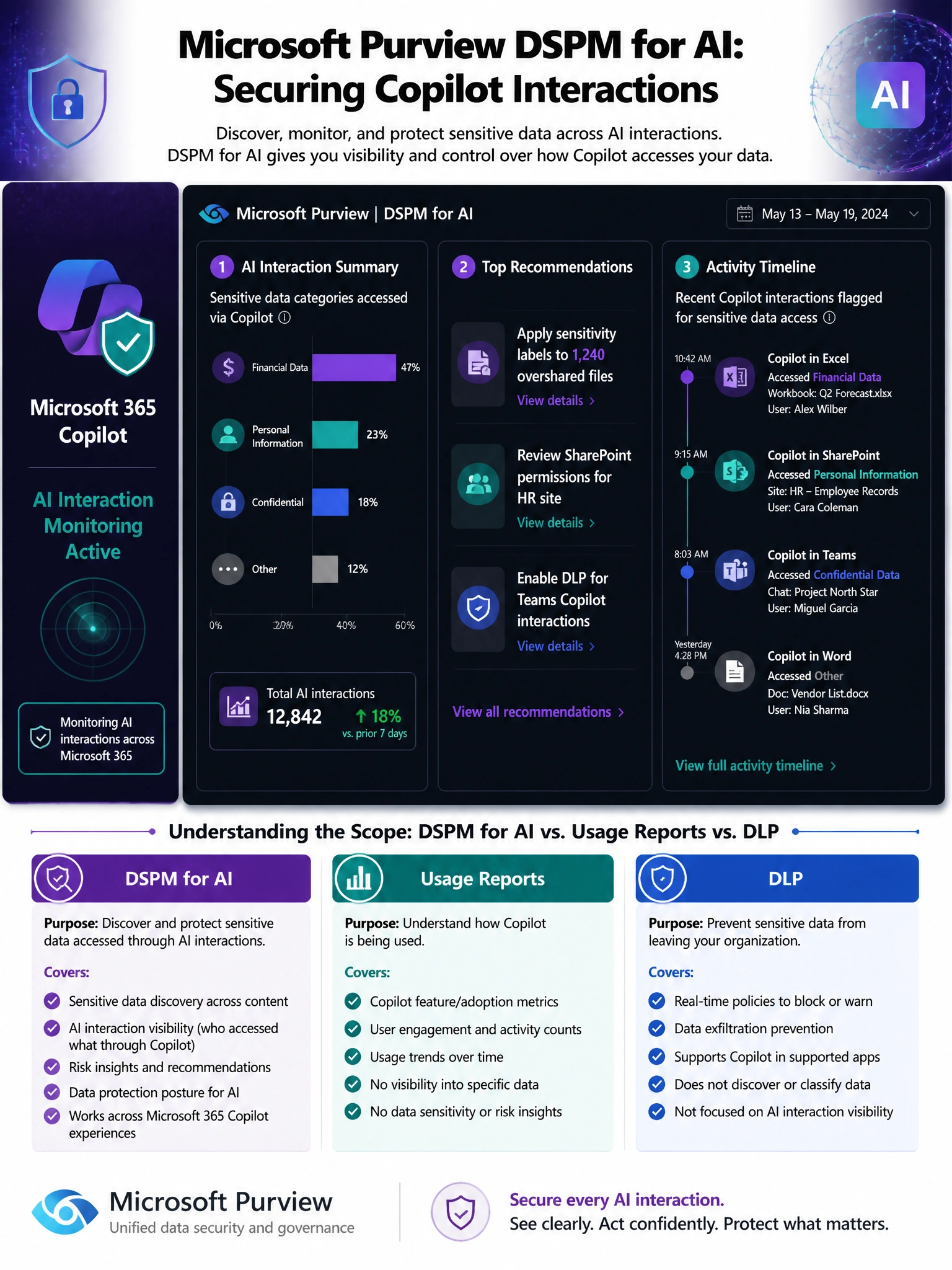
DSPM for AI is your Copilot compliance cockpit. It's built specifically for the problem of 'we deployed AI and now we're nervous about what it's touching.' It surfaces insights like which sensitive data categories Copilot is accessing, which users are asking risky questions, and — crucially — gives you actionable recommendations to tighten your data security posture before an actual incident happens. Usage reports just tell you adoption stats, not security exposure.
Full explanation below image
Full Explanation
Microsoft Purview Data Security Posture Management (DSPM) for AI is a capability specifically designed to address the unique data security and compliance challenges introduced by AI assistants like Microsoft 365 Copilot, Microsoft Copilot (web-grounded), and other AI services. DSPM for AI provides: (1) Visibility into AI interactions — which users are interacting with AI, what sensitive data categories are being accessed or referenced, and what types of requests are being made; (2) Security posture recommendations — actionable guidance on how to improve data governance, such as labeling overshared files that Copilot can access, applying sensitivity labels, or reviewing overly permissive SharePoint permissions; (3) Compliance insights — activity explorer events for AI interactions, enabling audit trail review; (4) DLP and sensitivity label integration — awareness of how existing policies apply to AI interactions. DSPM for AI is enabled in the Microsoft Purview compliance portal under Data Security Posture Management.
Option A (Defender for Cloud Apps session controls) is primarily used to apply real-time session monitoring and control to third-party cloud applications via the Cloud App Security proxy. While Defender for Cloud Apps has visibility into Microsoft 365 app usage, it is not purpose-built for the Copilot-specific insights and data security posture recommendations that DSPM for AI provides. DSPM for AI is the right tool for the specific Microsoft 365 Copilot governance scenario described.
Option B (Microsoft 365 admin center Copilot usage reports) provides adoption and usage telemetry — how many users are using Copilot, how often, across which apps, and satisfaction scores. Usage reports are valuable for measuring adoption and ROI but do not provide security or compliance visibility into what sensitive data Copilot is accessing or surfacing in its responses. They are operational metrics, not security posture tools.
Option D (DLP policy blocking Copilot prompts with sensitive data) is a reactive control that blocks specific sensitive data patterns from being included in Copilot prompts. While DLP for AI interactions is a valid protection layer, it does not provide posture management or visibility into what sensitive data Copilot is accessing from SharePoint and other repositories to generate its responses. DSPM for AI addresses the broader posture question of data accessibility and oversharing that enables Copilot to surface sensitive data in the first place.
Exam tip: Microsoft Purview DSPM for AI is a key AB-650 exam topic as it directly relates to the 'AI Services Administrator' aspect of the certification. Know that Copilot can only access data that the user already has permission to access — the risk is not that Copilot bypasses permissions, but that users can use Copilot to efficiently find and surface sensitive data that was overshared. DSPM for AI helps identify those oversharing risks before they become incidents.