
Contoso is running a confidential merger and acquisition project. Project documents stored in a dedicated SharePoint site must be encrypted so only designated M&A team members can open them — even if a document is accidentally shared externally or downloaded to a personal device. The protection must travel with the document. What should the admin configure?
Select an answer to reveal the explanation.
Short Explanation and Infographic
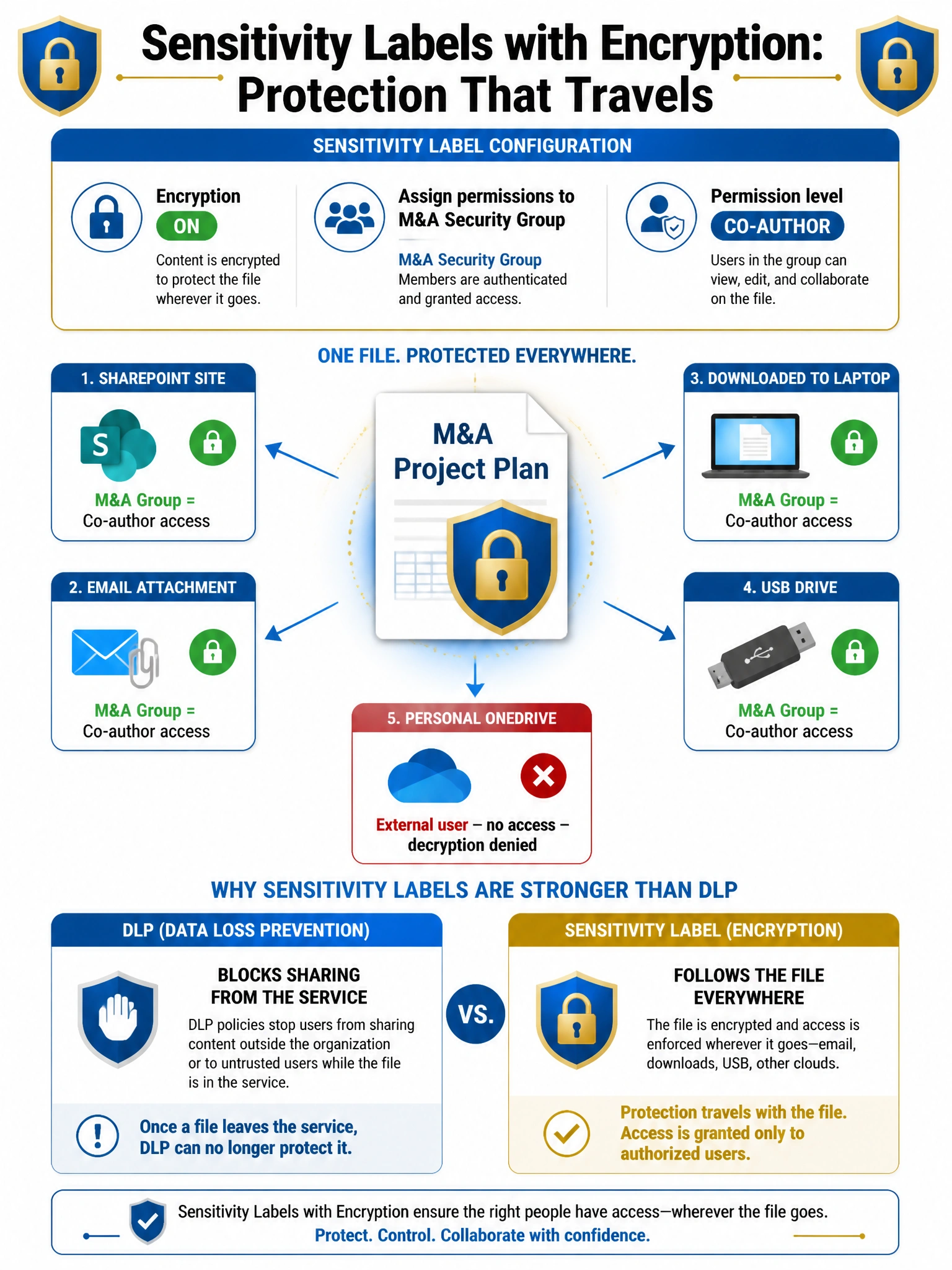
Sensitivity labels with encryption are the only protection that actually travels with the document. Think of it like wrapping the file in an encrypted bubble that goes wherever the file goes — the cloud, an email attachment, a USB drive, a personal laptop. Without the right Azure AD credentials and group membership, the file is just scrambled bits. DLP can block sharing, but once a file escapes, DLP can't follow it — encryption can.
Full explanation below image
Full Explanation
Microsoft Purview sensitivity labels with encryption use Azure Rights Management (Azure RMS) under the hood to embed cryptographic protection directly in the document file itself. When a sensitivity label with encryption is applied to a document, the file is encrypted and the decryption key is controlled by Microsoft Entra ID. The admin specifies in the label's encryption settings which users or groups can access the content and what permissions they have (View, Edit/Co-author, Full Control, etc.). Assigning co-author permissions to the M&A security group means only group members can open and edit the files, regardless of where the files travel. When the label is published as the default label for the M&A SharePoint site, all new documents in the site automatically receive the label and encryption.
Option A (DLP policy blocking external sharing) provides a network-layer control that prevents sharing from within Microsoft 365, but it does not encrypt the document. If the file is downloaded by a legitimate M&A team member and then emailed or copied to another location, the DLP policy no longer applies — the file is unprotected. DLP and sensitivity labels are complementary: DLP prevents oversharing within the service, sensitivity label encryption protects the file everywhere.
Option B (retention label preventing deletion) is a data lifecycle control, not an information protection control. Retention labels manage when content can be deleted or must be preserved — they have no encryption or access control capability. A retention label cannot restrict who can open or edit a document.
Option C (Conditional Access blocking external SharePoint access) is a valid access control for the SharePoint site itself, but it does not protect the files that are already downloaded or that travel outside the SharePoint service. Conditional Access operates at the authentication level — it cannot follow a file after it has been downloaded to a device.
Exam tip: Sensitivity labels have two protection components that can be applied independently: Encryption (Azure RMS, controls who can open the file) and Content marking (visual markings like watermarks, headers, footers). Auto-labeling can apply labels to content at rest in SharePoint/OneDrive or in transit through Exchange based on sensitive information types or trainable classifiers. Know that sensitivity labels require Microsoft Purview Information Protection licensing (Microsoft 365 E3/E5 or equivalent).