
Bellows College wants to configure Microsoft 365 access so that students signing in from on-campus (a set of known IP ranges) are not prompted for MFA, but students accessing from off-campus must complete MFA. The IT admin needs to implement this without disrupting the growing population of remote learners. What is the correct approach?
Select an answer to reveal the explanation.
Short Explanation
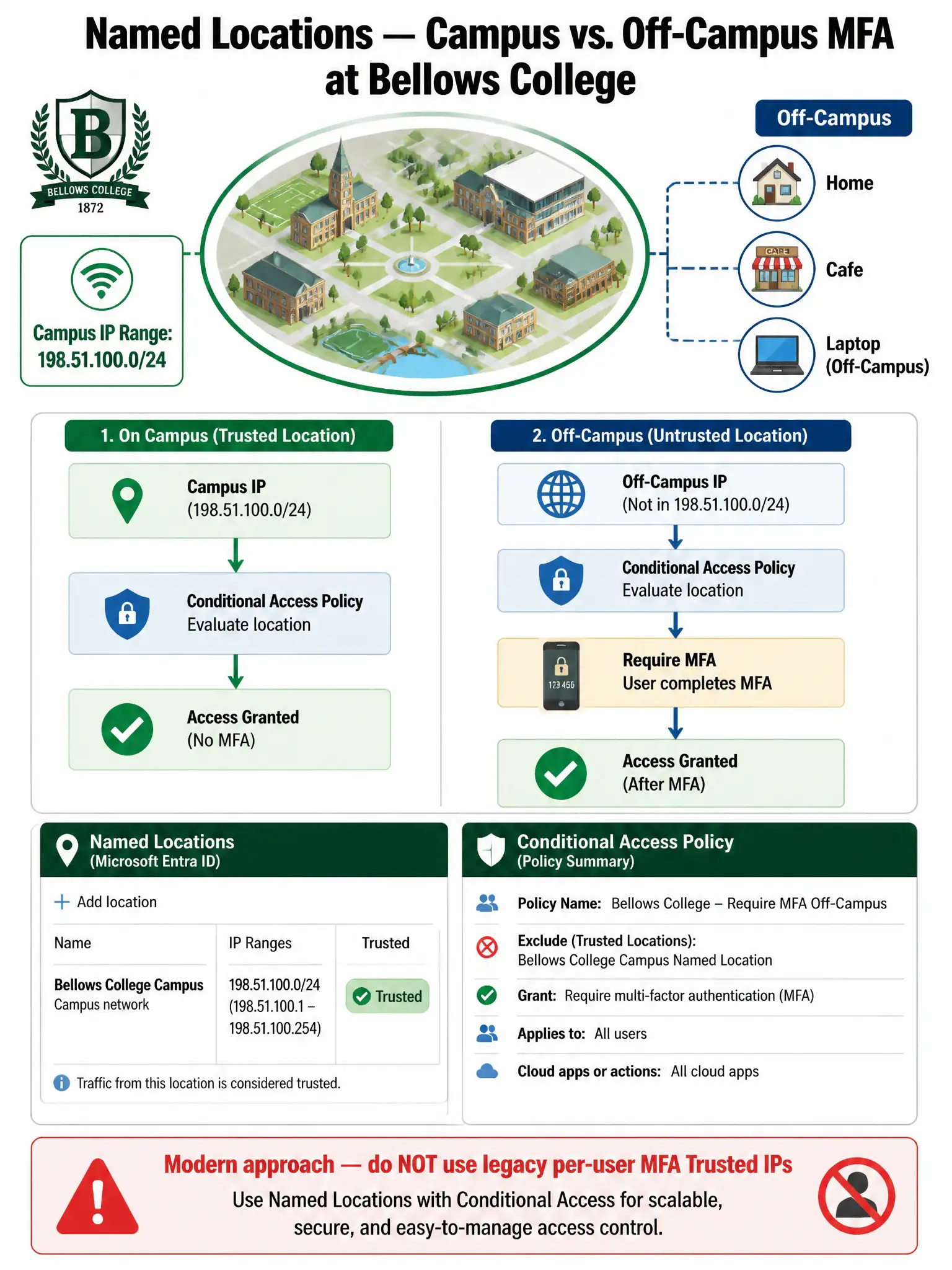
Named Locations are like a VIP door at a club — if you walk in through the campus IP door, you skip the extra check. If you come in from any other IP, you show your ID twice. You define the campus ranges once in Named Locations, then write a Conditional Access policy that requires MFA for everyone except that location.
Full Explanation
Microsoft Entra Conditional Access Named Locations allow admins to define trusted IP ranges (or geographic regions) that can be referenced as conditions in CA policies. The correct workflow is: (1) Create a Named Location (Security > Conditional Access > Named locations) and enter the campus IP ranges, marking it as 'trusted'. (2) Create a Conditional Access policy with: Users = All users; Cloud apps = Office 365 (or All cloud apps); Conditions > Locations = 'Any location'; Exclude = the campus Named Location; Grant = Require multi-factor authentication. This results in all users being required to complete MFA unless they are connecting from the campus IP ranges.
The legacy per-user MFA Trusted IPs approach is incorrect because it is a deprecated, per-user MFA feature that predates Conditional Access. Microsoft recommends migrating away from per-user MFA settings and managing MFA through Conditional Access policies instead. Legacy per-user MFA settings also conflict with Conditional Access-managed MFA policies and can cause unpredictable behavior. Conditional Access Named Locations is the modern, supported approach.
The block-all-non-campus approach is incorrect because blocking all non-campus IPs would prevent remote students from accessing Microsoft 365 entirely — the opposite of what Bellows College wants. The requirement is to allow off-campus access but require MFA, not block it. Block access is the wrong grant control here.
The password-protection approach is incorrect because Microsoft Entra Password Protection governs password creation policies (banned passwords, lockout thresholds) and has nothing to do with MFA enforcement or location-based access control. It cannot be configured with IP exclusions for MFA bypass purposes.
Exam tip: Named Locations can be defined as IP ranges or countries/regions. When marking an IP-range Named Location as 'Trusted,' it also affects sign-in risk scoring — Entra ID Protection treats sign-ins from trusted locations as lower risk. Know the difference between Named Locations (modern Conditional Access) and legacy Trusted IPs (per-user MFA settings). The exam tests whether you use the modern Conditional Access approach.