
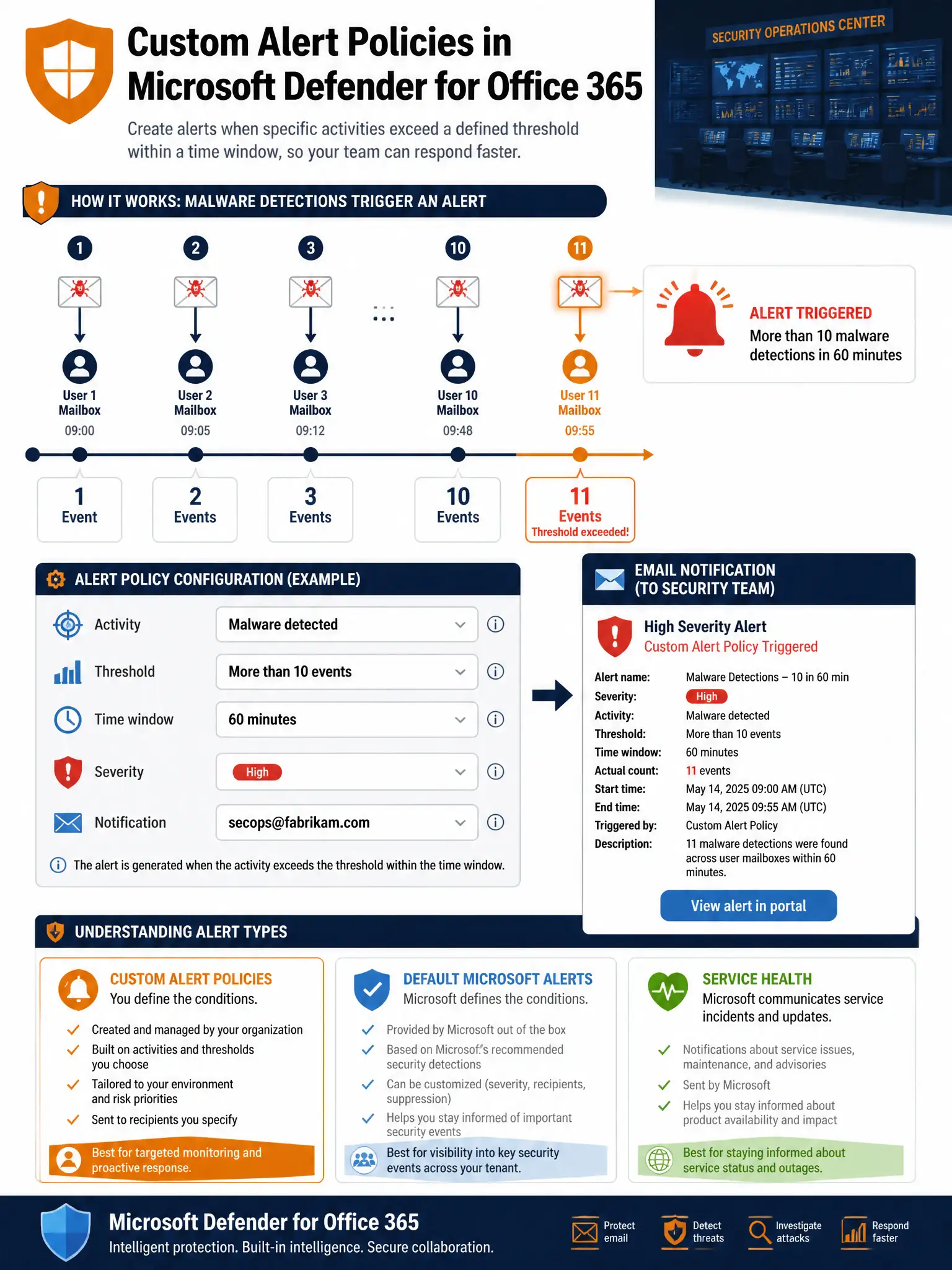
The security operations team at Fabrikam wants to receive an email notification when Microsoft Defender for Office 365 detects that more than 10 users in the organization have received malware-containing emails within a one-hour window, indicating a potential malware campaign. What should the admin configure?
Select an answer to reveal the explanation.
Short Explanation
Alert policies in Defender for Office 365 are your tripwire. You define the malware event, the one-hour threshold for more than 10 users, and the security team's email address. When the threshold is hit, the alert fires automatically.
Full Explanation
Microsoft Defender for Office 365 alert policies (accessed via Microsoft 365 Defender > Alerts > Alert policies, or the Microsoft Purview compliance portal > Policies > Alert policy) allow administrators to define custom alerting rules with precise thresholds and notification targets. For a malware campaign scenario, the admin creates an alert policy with: Activity = 'Detected malware in email messages', Threshold = 'Activity count is greater than 10 events in 1 hour' to catch more than 10 users in one hour, Severity = High, and Notification = email addresses of the security operations team. This gives the team timely, actionable notification when the volume of malware detections suggests a coordinated campaign rather than isolated incidents.
The Purview retention policy is a data lifecycle management tool, not a security alerting tool. Retention policies determine how long content is kept or deleted — they have no ability to detect security events or send alert notifications based on malware detection activity.
The Conditional Access policy that blocks email access is disproportionate and impractical. You cannot configure Conditional Access to dynamically monitor malware event counts and then block email access — Conditional Access policies evaluate conditions at sign-in time, not continuously against threat intelligence event thresholds. This would also block legitimate users from accessing email during an incident, compounding the problem.
The Microsoft 365 service health alerts notify administrators about Microsoft 365 service degradation or outages — incidents where Microsoft's infrastructure is experiencing issues. Service health does not report on tenant-specific threat detections. When malware is found in Fabrikam's emails, that is a tenant-level security event, not a Microsoft service health event.
Exam tip: Alert policies support several activity types beyond malware: phishing detections, user-reported phishing, data-loss-prevention policy matches, and more. Custom alert policies are also available in the Microsoft Purview compliance portal for compliance-specific events. Know the difference between alert policies (custom threshold-based alerting) and default alerts (pre-built alerts from Microsoft that are always on, such as 'Malware campaign detected').