
Northwind Traders finished building a Copilot Studio agent for field technicians and wants employees to use it inside Microsoft Teams. What must the team do to make the agent available as a Teams bot for the organization?
Select an answer to reveal the explanation.
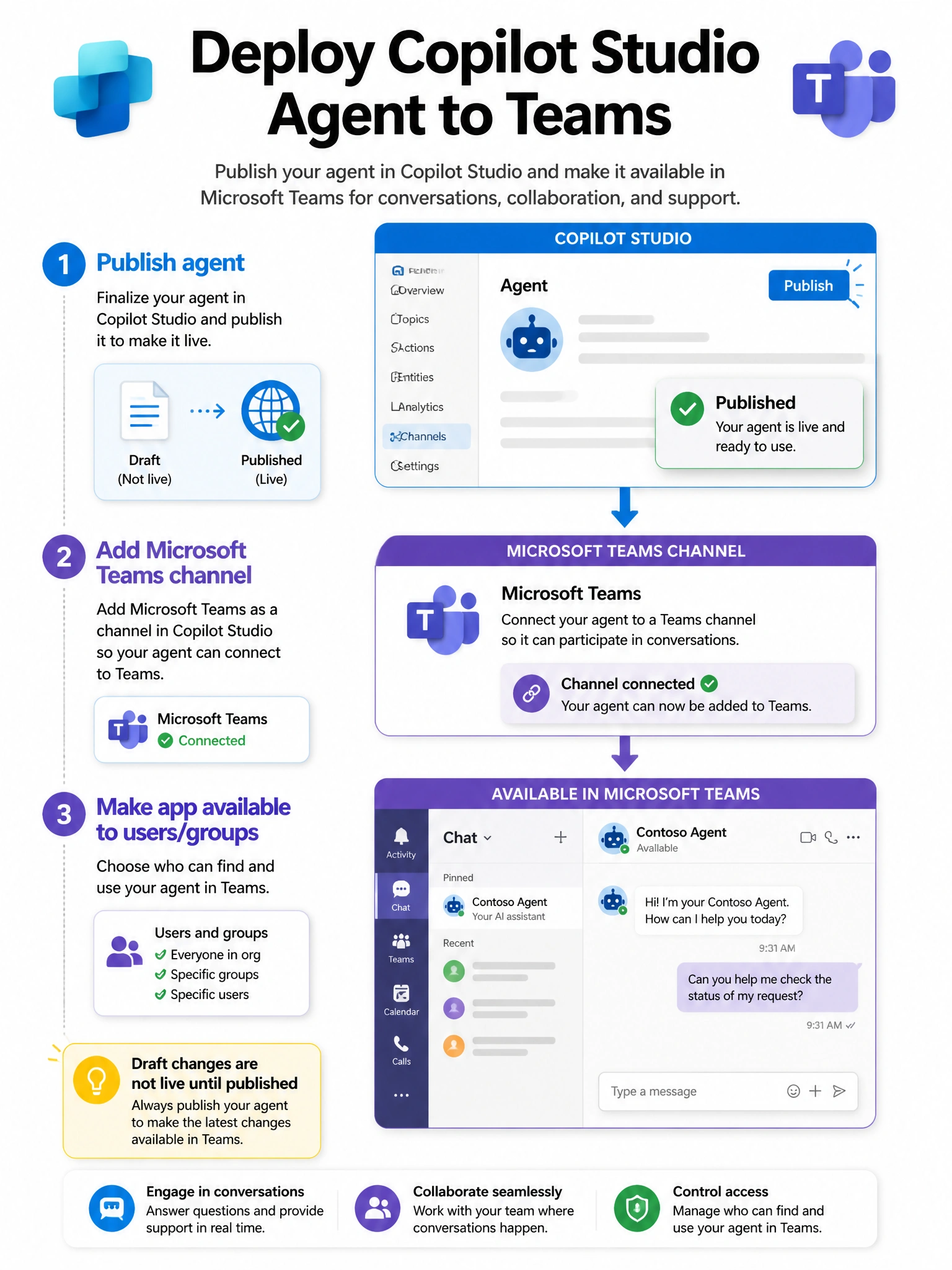
Short Explanation and Infographic
Publishing is baking the cake; adding the Teams channel is putting it on the serving tray. Users cannot chat with an unpublished draft, and dumping topic files into a Files tab is not a bot deployment.
Full explanation below image
Full Explanation
Copilot Studio agents must be published before channel endpoints serve the latest content. The Microsoft Teams channel connects the published agent to Teams as a bot/app, after which admins/makers complete availability (org-wide, specific users/groups, or submission policies depending on tenant setup).
Option A is correct. Publish + Teams channel configuration + Teams distribution/availability is the standard path.
Option B is wrong because topic source files in a Files tab are documents, not a bot registration.
Option C is wrong because Power BI visualizes metrics; it does not host the conversational channel.
Option D is wrong because end users do not import solution zips into Teams as a personal app install path for Copilot Studio bots; solution import is an ALM operation in Power Platform environments.
Exam tip: Remember the sequence Publish → Channel (Teams) → Availability/permissions.