
You are configuring a Copilot Studio agent to answer employee questions using your company's SharePoint intranet. After adding the SharePoint site as a knowledge source, employees report that the agent sometimes returns information from pages they should not have access to. What is the correct approach to resolve this security issue?
Select an answer to reveal the explanation.
Short Explanation and Infographic
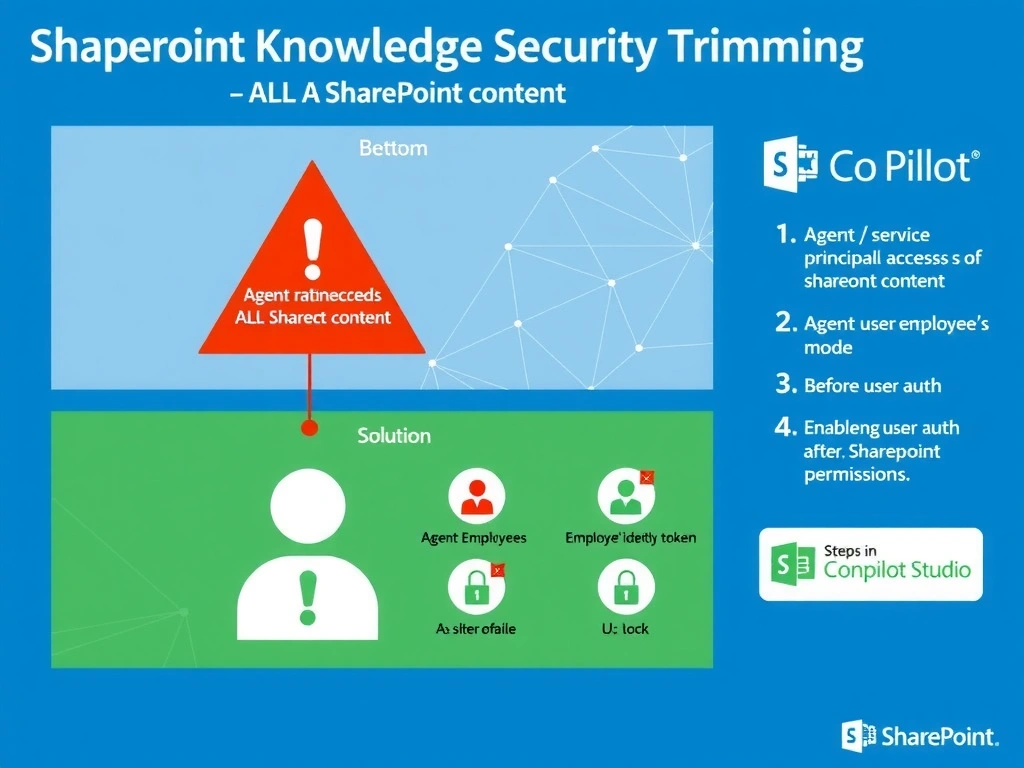
When the agent uses its own system identity to fetch SharePoint content, it sees everything — like a manager's badge that unlocks every door. Switch to user authentication mode and the agent borrows the employee's own badge, so SharePoint's existing permissions automatically limit what the agent can retrieve.
Full explanation below image
Full Explanation
Copilot Studio knowledge sources that connect to SharePoint can operate in two authentication modes: service principal (the agent's own identity) or user authentication (the end user's identity via OAuth). When the knowledge source uses the agent's service principal, it may have broad read access to the entire SharePoint site, bypassing the user-level permissions that are already configured in SharePoint.
The correct fix is to enable user authentication on the agent channel and configure the SharePoint knowledge source to use user delegation. This means when a user asks a question, Copilot Studio retrieves SharePoint content on behalf of that user using their token — so SharePoint's own permission inheritance and item-level permissions apply naturally.
Option A (removing SharePoint and using static FAQ) is a workaround that eliminates the problem by eliminating the feature — not an acceptable governance solution.
Option C (manually listing approved URLs) is impractical at scale, doesn't address the permission leakage problem, and becomes a maintenance burden as content moves.
Option D (sensitivity label on the SharePoint site) adds classification metadata but does not restrict which identity the agent uses to retrieve content — the agent's service principal would still have broad access.
Critical exam point: SharePoint knowledge source + user auth mode = content trimmed to the user's actual SharePoint permissions. This is called security trimming and it's the enterprise-correct answer for this scenario.