
Ingrid is a Power Platform administrator at Nexum Energy. The security team has enacted a data loss prevention (DLP) policy that places the SharePoint connector in the 'Business' data group and places the Twitter (X) connector in the 'Non-Business' data group. A developer is trying to build a Copilot Studio action that uses both connectors in the same cloud flow — the flow should read internal documents from SharePoint and post a public update to the company's Twitter account. Ingrid is reviewing whether this is possible under the current DLP policy. What will happen?
Select an answer to reveal the explanation.
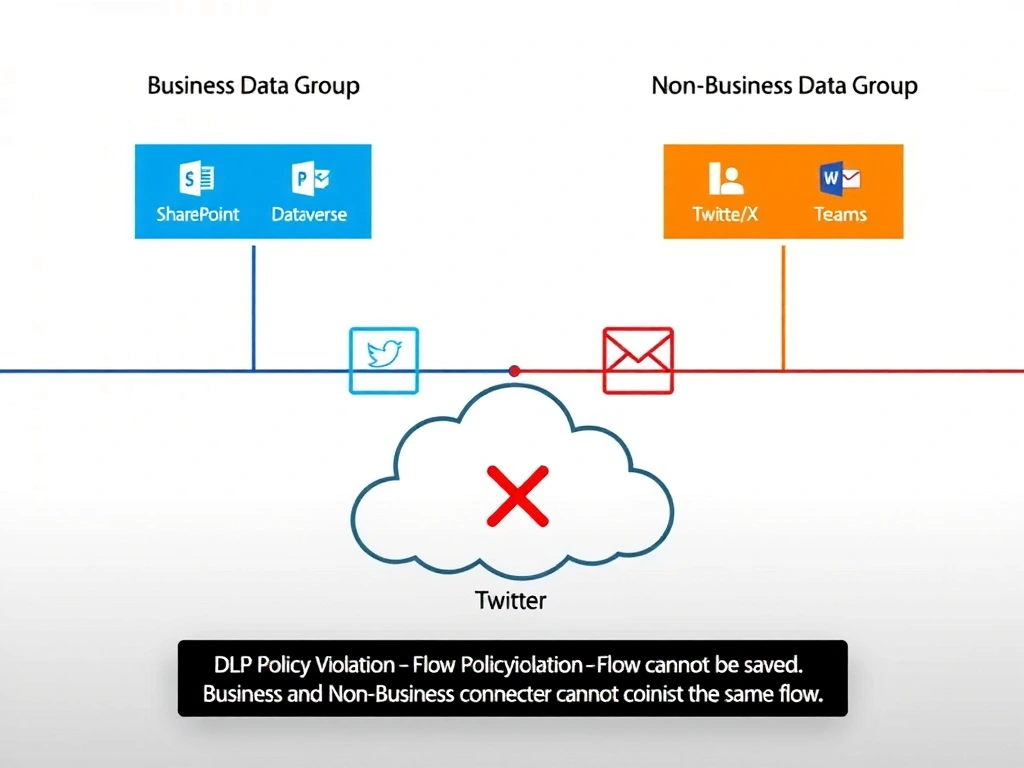
Short Explanation and Infographic
DLP policies act like a wall between Business and Non-Business data. SharePoint (Business) and Twitter (Non-Business) cannot coexist in the same flow — it's blocked at save time, not just at runtime. Splitting into child flows doesn't help because the DLP check spans the entire flow graph. Answer: C.
Full explanation below image
Full Explanation
Power Platform Data Loss Prevention (DLP) policies enforce data group boundaries at the connector level across cloud flows and Copilot Studio actions. When connectors from the 'Business' and 'Non-Business' data groups appear in the same flow, Power Platform blocks the flow from being saved or run — the enforcement is hard and non-circumventable at the flow composition level.
Option C is correct. The DLP policy's purpose is to prevent business data (from connectors like SharePoint, Dynamics 365, Dataverse) from flowing into non-business or consumer-grade connectors (like Twitter/X, Facebook, or personal Gmail). When the developer tries to save a flow that includes both SharePoint (Business) and Twitter (Non-Business) connectors, Power Platform rejects the composition with a DLP policy violation error. This applies to all cloud flows associated with Copilot Studio actions in the same environment.
Option A is incorrect. DLP policies do not distinguish between 'copying' data and 'posting' data. Any flow that contains both Business and Non-Business connectors is blocked regardless of what actions those connectors perform. The policy is structural — it examines connector membership in data groups, not the nature of data operations.
Option B is incorrect. Parent and child flow relationships do not circumvent DLP boundaries. Power Platform evaluates the entire flow graph, including child flows, as part of the policy check. If a child flow uses a Non-Business connector and the parent uses a Business connector, the violation is still detected.
Option D is incorrect. Power Platform does not perform automatic encryption or data masking to 'allow' cross-group connector data flows. DLP enforcement is a hard block with no automatic mitigation path — the policy must be changed or the flow design must be modified.
Exam tip: DLP policy enforcement key facts: (1) Business + Non-Business connectors in the same flow = blocked at save. (2) The 'Blocked' data group = connector cannot be used in any flow. (3) Child flows do not bypass DLP checks. (4) Resolution options: move the connector to the same group, or create a DLP exception through policy configuration.