
Meridian Logistics needs a Copilot Studio agent that can query SAP ERP to retrieve real-time shipment status and update delivery records. The SAP system is hosted on-premises behind the corporate firewall. The development team wants to avoid writing custom code and prefers a supported, low-code connector approach. Which connector type should the team configure in Copilot Studio to integrate with SAP?
Select an answer to reveal the explanation.
Short Explanation and Infographic
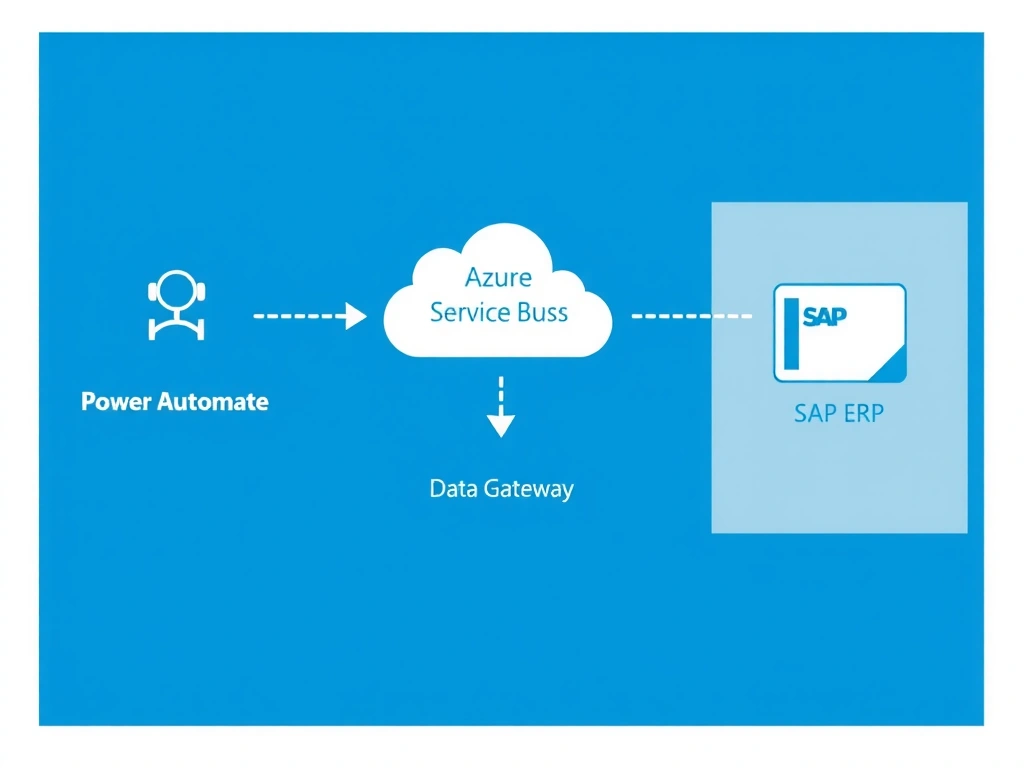
Think of the on-premises data gateway like a secure tunnel through the firewall — Power Automate uses it as a bridge so your SAP connector can talk to the on-premises system without exposing SAP to the public internet. Option B is correct because the SAP ERP Power Platform connector paired with an on-premises data gateway is the supported, low-code path for on-premises SAP integration from Copilot Studio.
Full explanation below image
Full Explanation
When SAP is hosted on-premises, the biggest integration challenge is network reachability. Copilot Studio topics execute in the Microsoft cloud, so they cannot directly reach systems protected by a corporate firewall. The on-premises data gateway acts as a relay: it is installed inside the corporate network, establishes an outbound connection to Azure Service Bus, and forwards requests from cloud services (including Power Automate) to on-premises systems like SAP.
Option B is correct. The Power Platform SAP ERP connector is a supported, certified connector that understands SAP's BAPI and OData interfaces. It is used inside a Power Automate cloud flow, which Copilot Studio invokes as an action. The cloud flow passes through the on-premises data gateway to reach SAP. This is the Microsoft-recommended, low-code architecture for on-premises SAP integration.
Option A is wrong because calling SAP OData over the public internet would require opening firewall ports and exposing SAP to external traffic — a serious security risk that most enterprises prohibit, and it bypasses the established gateway pattern entirely.
Option C is wrong because there is no built-in SAP plugin native to Copilot Studio. SAP integration always goes through Power Automate or a custom connector; Copilot Studio itself does not ship with direct SAP connectors.
Option D is wrong because Copilot Studio topic HTTP action nodes send requests from the cloud and would still be blocked by the corporate firewall. The on-premises data gateway is the required bridge, and it only works with Power Automate flows — not with raw HTTP actions in topics.
Exam tip: When you see 'on-premises' in an SAP or SQL Server scenario, the on-premises data gateway is almost always part of the correct answer. Pair it with a Power Automate cloud flow action in the topic, not a direct HTTP call.